Video Streaming Problems During Peak Traffic and How to Fix Them


Peak traffic does not create new weaknesses. It exposes the weaknesses already sitting inside the streaming platform.
For many streaming businesses, everything looks stable during normal usage. Videos load, apps respond, and live streams feel smooth. The real test begins when thousands of viewers arrive at the same time.
During peak traffic, small technical gaps become visible fast. A weak CDN setup, poor encoding strategy, slow APIs, or overloaded origin server can turn a major viewing moment into buffering, crashes, and user complaints.
Overview
What Peak Traffic Means in Video Streaming
Peak traffic means a sudden rise in viewers, requests, bandwidth demand, and playback sessions within a short time window.
In video streaming, traffic is not just page visits. Every viewer pulls video segments, player data, authentication checks, subtitles, thumbnails, and sometimes payment or access rules.
A normal app may handle steady growth over weeks. A streaming app must often handle demand within minutes, especially during live events, premieres, sports, news, creator launches, and weekend OTT peak hours.
When Peak Traffic Usually Happens
Most streaming failures happen when audience attention is concentrated, not when the platform is empty.
Peak traffic usually appears during live sports, concerts, religious events, online classes, product launches, breaking news, and exclusive content drops. OTT platforms also see high traffic during evenings, weekends, and festival periods.
The challenge is timing. Viewers do not arrive evenly. They often open the app within the same 5 to 10 minutes, which creates pressure on login systems, APIs, CDNs, players, and payment-based access.
Why Sudden Traffic Spikes Are Different From Normal Growth
Normal growth gives your platform time to adjust. Sudden spikes do not.
If a streaming platform grows from 10,000 to 20,000 users over months, teams can optimize gradually. But if 20,000 viewers join during one live event, the system must respond instantly.
This is why peak traffic planning is different from general scaling. The platform must be ready before demand arrives, not after users start complaining.
User Impact
Common Video Streaming Problems Users Notice During Peak Traffic
Users do not care whether the issue is CDN, server, player, or bitrate. They only know the video is not working.
During peak hours, users usually notice buffering, slow video start, quality drops, app crashes, player errors, and stream disconnections. These issues feel small technically, but they damage trust quickly.
| User Problem | What Users Feel | Business Impact |
|---|---|---|
| Buffering | “The video keeps stopping” | Drop-offs and complaints |
| Slow start | “The app is taking too long” | Poor first impression |
| Quality drops | “The stream looks blurry” | Lower perceived value |
| App crash | “The platform is unreliable” | Support load increases |
| Stream disconnect | “I missed the event” | Refund and churn risk |
Buffering, Slow Start Time, and Video Freezing
A 3-second delay can feel longer during a live event because the viewer expects instant playback.
Buffering happens when the player does not receive video data fast enough to continue smoothly. During peak traffic, this can come from network congestion, overloaded edge servers, poor cache performance, or heavy origin requests.
Slow start time is another warning sign. If the player takes too long to show the first frame, users may refresh, retry, or leave, which creates even more pressure on the platform.
Playback Quality
Poor Video Quality and Automatic Quality Drops
Quality drops are not always failures. Sometimes, they are the player trying to survive.
Adaptive bitrate streaming helps the player shift between different video qualities based on the viewer’s network and device. When traffic is high, the player may move to a lower bitrate to avoid buffering.
The problem starts when the quality drops too often or becomes too aggressive. A blurry stream during a paid event can feel like a broken promise, even if playback technically continues.
App Crashes, Player Errors, and Stream Disconnections
When traffic rises, the video player is only one part of the pressure chain.
App crashes can happen because of memory issues, weak device optimization, failed API responses, poor session handling, or overloaded backend services. In streaming, the app, player, CDN, and backend must work as one system.
Player errors and disconnections are more damaging during live streaming because the moment cannot be replayed in real time. A viewer who misses a key moment may not forgive the platform easily.
Root Causes
Why Streaming Platforms Struggle During Peak Traffic
Most OTT platforms are built for launch week. Fewer are designed for month 12.
Streaming platforms struggle during peak traffic because performance depends on multiple layers working together. Infrastructure, CDN, origin, encoding, APIs, database, player logic, and device experience all affect playback.
The mistake is treating streaming like a normal app problem. Video traffic is heavier, more sensitive, and less forgiving than regular web traffic.
Too Many Concurrent Viewers Create Server and Network Pressure
10,000 concurrent viewers are not the same as 10,000 monthly users.
Concurrent viewers create simultaneous demand. Each viewer may request video chunks, metadata, subtitles, recommendations, login validation, and access permissions at nearly the same time.
If the platform depends too heavily on one server, one region, or one delivery path, performance can degrade fast. This is why capacity planning and load balancing matter before the event starts.
CDN Cache Misses Can Push Traffic Back to Origin
A CDN protects the platform only when the right content is available at the right edge location.
When content is cached properly, viewers can receive video from servers closer to them. This reduces pressure on the origin server and improves playback stability.
But when cache misses happen, requests may go back to the origin. During traffic spikes, too many origin requests can overload the system and cause buffering, slow starts, or failed playback.
Encoding, Bitrate, and Player Limits Affect Playback
Good infrastructure cannot fully fix a poor bitrate ladder.
A streaming video should be prepared in multiple versions so the player can choose the right quality for each viewer. If the bitrate ladder is too heavy, users on weaker networks may buffer.
If the ladder is too limited, users with strong connections may still see poor quality. The goal is balance: fast start, stable playback, and quality that improves when conditions allow.
Live Events
Live Streaming Problems During High-Traffic Events
Live streaming is harder because there is no second chance for the first moment.
In VOD, users can pause, retry, or resume. In live streaming, delay, freezing, and disconnects are felt immediately because the content is happening now.
High-traffic live events create pressure across ingest, encoding, packaging, CDN delivery, player sync, and app performance. One weak layer can affect the full viewer experience.
Latency and Stream Delay
Live delay is not one issue. It is the result of many small delays added together.
Latency can come from camera capture, encoding, packaging, CDN delivery, player buffer, device performance, and viewer network conditions. This is why two users watching the same event may see different timings.
Low latency should be planned carefully. Reducing delay too aggressively can increase buffering if the platform is not ready to support it.
Stream Drops, Sync Issues, and Broadcast Failure
A live stream can fail even when the app is still open.
Stream drops may happen when the ingest connection breaks, encoder settings are unstable, or the delivery path cannot keep up. Viewers may see a black screen, a loading spinner, or a sudden exit from the stream.
Audio-video sync issues are also common during stressed live workflows. Even a small mismatch can make a professional event feel poorly managed.
Solutions
How to Fix Video Streaming Problems During Peak Traffic
The right fix is not one tool. It is a complete streaming readiness system.
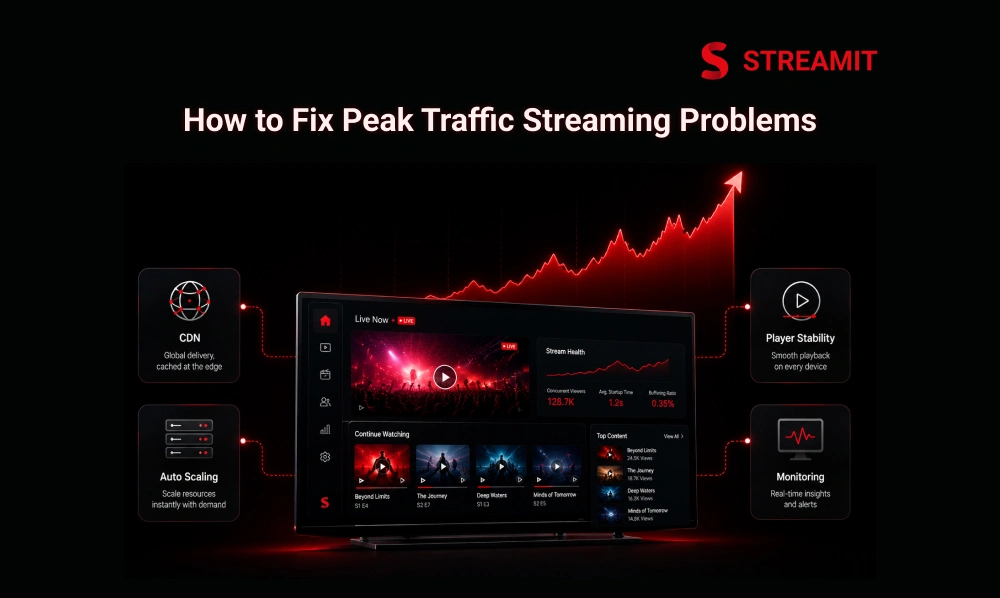
Peak-traffic problems are solved through planning, infrastructure design, CDN strategy, encoding optimization, player improvements, monitoring, and event testing.
The best streaming teams do not wait for failure reports. They test traffic assumptions before the real audience arrives.
Plan Capacity, Auto Scaling, and Load Balancing
Capacity planning should be based on expected concurrent viewers, not total registered users.
Before a major event, estimate peak concurrency, regional demand, device mix, bitrate demand, and login activity. This helps teams prepare the right server and delivery capacity.
Auto scaling and load balancing help distribute traffic across healthy resources. But they must be tested under a realistic load, not only enabled as a checkbox.
Improve CDN Setup and Multi-CDN Delivery
A single CDN can work well until one region, route, or edge layer becomes the bottleneck.
A strong CDN setup keeps video closer to viewers and reduces origin pressure. Cache rules, pre-warming, regional coverage, and failover paths should be reviewed before traffic spikes.
Multi-CDN delivery can improve resilience by giving the platform more than one delivery route. This is especially useful for global OTT platforms, live events, and premium content launches.
Optimize Encoding, Bitrate Ladders, and Player Behavior
The player should not be forced to choose between buffering and bad quality.
Encoding should create practical renditions for different devices and network conditions. The bitrate ladder should support smooth switching without forcing users into unnecessary stalls.
Player behavior also matters. Startup logic, retry rules, buffer size, error handling, and quality switching can decide whether a viewer stays or leaves.
Monitor Streaming Performance in Real Time
You cannot fix what you only discover after the event ends.
Real-time monitoring helps teams track startup time, buffering ratio, error rates, CDN performance, bitrate switches, stream health, and regional issues.
For serious OTT platforms, monitoring should connect technical performance with business impact. A spike in playback errors during a paid event is not just a tech issue. It is a revenue issue.
Peak-Traffic Readiness Checklist for Streaming Platforms
The best time to check streaming readiness is before the audience opens the app.
A checklist helps teams avoid last-minute panic. It also gives founders, product teams, and technical teams a shared view of what must be ready before peak traffic.
| Area | What to Check | Why It Matters |
|---|---|---|
| Infrastructure | Scaling, load balancing, and failover | Prevents backend overload |
| CDN | Cache, origin protection, routing | Reduces buffering risk |
| Encoding | Bitrate ladder, renditions, format | Improves playback stability |
| Player | Startup, retry, error handling | Protects user experience |
| Monitoring | Alerts, logs, stream health | Enables faster response |
Infrastructure Checklist
Infrastructure should be tested for the worst 15 minutes, not the average day.
Check server capacity, database performance, authentication flow, session handling, payment access, API response times, and failover behavior. These areas often face pressure before the video itself fails.
Also, test what happens when traffic arrives suddenly. Gradual load testing is useful, but spike testing is closer to real streaming behavior.
CDN, Origin, and Network Checklist
Origin protection is one of the most important parts of peak-traffic planning.
Review cache hit ratio, CDN rules, segment delivery, regional routing, and origin request volume. If too many viewers hit the origin directly, the platform becomes fragile.
For live events, also check ingest stability, stream packaging, backup paths, and network redundancy. The goal is simple: one weak path should not take down the full experience.
Player and App Checklist
The app experience must stay calm even when the backend is under pressure.
Test video startup, quality switching, player retries, error messages, app memory, smart TV behavior, mobile performance, and reconnect logic. Different devices fail in different ways.
Good error handling matters. A clear retry or resume experience is better than a blank screen that makes users feel abandoned.
Platform Solution
How Streamit Helps Streaming Platforms Handle Peak Traffic
Streamit is built for teams that want streaming performance and platform control, not just video playback.
Peak traffic is not only a delivery problem. It affects the full OTT business, including apps, content access, monetization, analytics, and viewer experience.
Streamit helps businesses plan streaming platforms with scalability, ownership, and long-term control in mind. The goal is not to launch fast and break later. The goal is to build for real usage.
Build a Scalable OTT Platform for Live and On-Demand Streaming
A serious OTT platform should support both planned growth and sudden demand.
Streamit supports live streaming, VOD, and multi-device OTT experiences across web, mobile, and TV. This gives streaming businesses a stronger foundation for audience growth.
For founders and media teams, this matters because the platform should not become a limitation after the first successful launch, event, or campaign.
Improve Playback, Delivery, and User Experience Across Devices
Playback quality is part of the brand experience.
Streamit helps teams improve video delivery, app performance, content access, and viewer journeys across devices. This creates a more consistent experience for users during normal days and peak moments.
A stable platform also gives teams more control over monetization, analytics, and user retention. That is where streaming becomes a business system, not just a video app.
Summary
Key Takeaways
Peak Traffic Reveals Platform Readiness
High demand exposes weaknesses through buffering, crashes, quality drops, and stream failures. Platforms that are not ready will show it during their biggest moments.
Concurrent Viewers Matter More Than Total Users
Streaming platforms must plan for how many people watch simultaneously, especially during live events. Concurrency creates immediate, simultaneous pressure across every system layer.
CDN Setup Can Make or Break Playback
Poor caching, cache misses, and origin overload cause serious performance issues during spikes. Cache rules, pre-warming, and multi-CDN paths must be reviewed before any major event.
Encoding and Player Behavior Are Business-Critical
Bitrate ladders, startup logic, retry rules, and device performance directly affect whether a viewer stays or leaves during a high-stakes streaming moment.
Monitoring Should Happen in Real Time
Teams need live visibility into buffering, errors, latency, CDN health, and stream performance. Discovering problems after the event ends is too late.
Peak Readiness Should Be Planned Before Growth
The best platforms are built for 12 months of scale, not only the first launch week. Planning capacity, testing spikes, and preparing failover paths protects the business long-term.
Final Thoughts
Conclusion
Peak traffic is not the enemy. Poor preparation is.
For streaming businesses, high traffic is a good problem only when the platform is ready for it. If the system is not prepared, the same attention that should create growth can create user frustration.
The fix is not to add more servers at the last minute. The fix is to design the platform with capacity planning, CDN readiness, encoding strategy, player stability, real-time monitoring, and long-term control from the beginning.
Streamit helps streaming businesses build that kind of foundation. Not just to stream content, but to operate a reliable OTT platform that can handle serious audience demand.
FAQs
Frequently Asked Questions
-
What are the most common video streaming problems during peak traffic?
The most common problems are buffering, slow video start, quality drops, app crashes, player errors, stream delay, and disconnections. These issues usually happen when infrastructure, CDN, player, or network systems cannot keep up with sudden demand.
-
How do traffic spikes affect video streaming performance?
Traffic spikes increase concurrent viewer load, bandwidth usage, API requests, CDN demand, and origin pressure. If the platform is not prepared, users may experience buffering, failed playback, lower video quality, or app instability.
-
What are the main reasons for live stream delay and latency?
Live stream delay can come from encoding, packaging, CDN delivery, player buffer, device performance, and viewer network conditions. Low latency requires careful balance because reducing delay too much can increase buffering risk.
-
What is the best way to handle sudden traffic spikes in streaming apps?
The best approach is capacity planning, auto scaling, load balancing, CDN optimization, bitrate optimization, player testing, and real-time monitoring. These systems should be tested before the traffic spike happens.
-
What is multi-CDN, and how does it help during peak traffic?
Multi-CDN uses more than one content delivery network to serve video traffic. It helps improve reliability by giving the platform alternate delivery routes if one CDN, region, or network path becomes overloaded.
-
How can users fix buffering and streaming problems on their side?
Users can check their internet connection, switch networks, restart the app, update the app, reduce video quality, or restart the device. However, if many users face the same issue, the problem is likely on the platform side.