Streaming Issues: 7 Reasons Why Your OTT App Is Failing

Nearly 40% of users reduce their watch time after just one buffering incident, according to research from Mux. In OTT, performance is not a backend metric. It’s a trust signal.
Most founders assume growth slows because content is weak. In reality, many platforms stall because infrastructure and user experience quietly break under pressure. Viewers don’t complain. They exit.
If your OTT app feels unstable, inconsistent, or unreliable at scale, the issue isn’t visibility. It’s architecture.
This is a direct breakdown of the seven streaming issues that silently damage OTT growth, and how serious platforms prevent them.
What Are Streaming Issues in OTT Apps?
Streaming issues are not bugs. They are visible performance failures. Buffering, crashes, resolution drops, login errors, sync issues, each one interrupts momentum.
Unlike traditional software errors, OTT issues are emotional. The viewer is mid-experience. When playback stops, trust stops.
For businesses, that translates into:
- Higher churn in the first 30 days
- Lower subscription renewals
- Reduced ad completion rates
- Poor app store ratings
Streaming reliability is not a technical layer. It is a revenue layer.
Meaning of Streaming Issues
Streaming issues are any technical, performance, or experience-related failures that interrupt smooth video playback. In OTT apps, this ranges from buffering and crashes to DRM failures, poor UI flows, and backend slowdowns. Unlike traditional software bugs, streaming issues are visible, emotional, and immediate. Users don’t file tickets,they uninstall.
Why Streaming Issues Matter for Users and Business?
Every second of delay reduces viewer engagement by nearly 7%. For users, streaming issues translate into frustration and distrust. For businesses, they show up as churn, bad reviews, lower lifetime value, and stalled growth. OTT app performance is no longer a “tech concern.” It’s a core revenue lever.
How Streaming Issues Affect OTT App Growth?
A one-second startup delay can reduce engagement by up to 7%. That impact compounds over millions of sessions.
Here’s how instability affects scale:
- Early churn increases acquisition costs
- Negative reviews reduce discoverability
- Ad fill rates drop with playback instability
- Live events damage brand credibility if delayed
Growth doesn’t collapse overnight. It erodes.
Loss of Users and High Churn Rate
Most OTT churn happens silently in the first 30 days. Buffering, lag, or crashes during onboarding or early viewing sessions cause users to drop before they ever convert. Once trust is broken, reacquisition costs skyrocket.
Poor Ratings and Bad Reviews
One-star reviews compound faster than five-star ones. App store algorithms punish unstable apps quickly, making discoverability harder and paid acquisition more expensive.
Revenue Loss from Subscriptions and Ads
A 1% increase in buffering can reduce ad completion rates by up to 5%. Subscription cancellations, ad skips, and reduced fill rates all trace back to unreliable streaming.
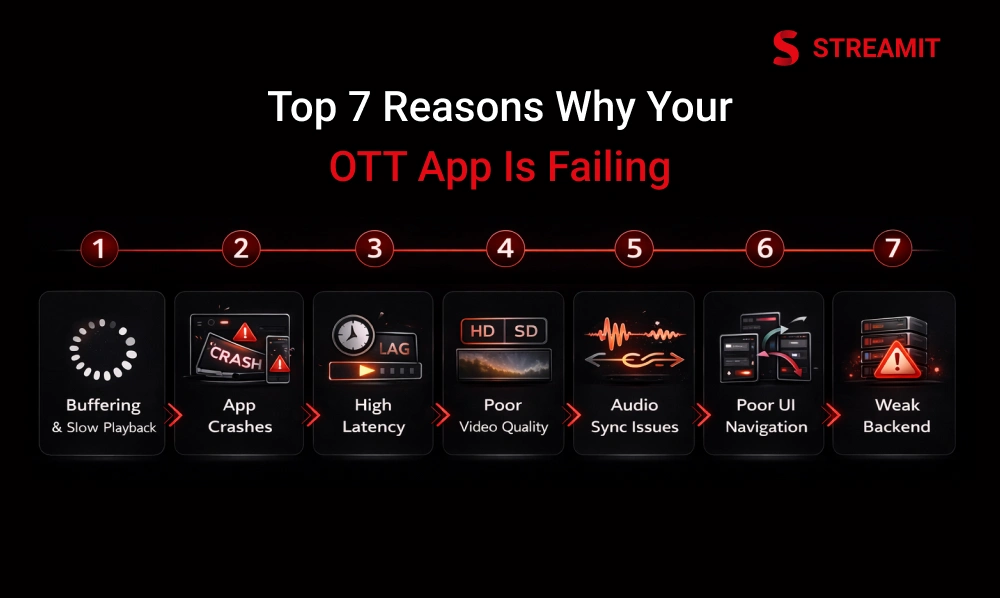
Streaming Issues: 7 Reasons Why Your OTT App Is Failing
Each issue below is common. What separates stable platforms from unstable ones is how early they design against these risks.
Reason 1 – Buffering and Slow Video Playback
Users rarely blame their internet. They blame your app.
Buffering signals poor delivery architecture. Even occasional pauses create a perception of unreliability.
Why Does It Happen?
- Weak CDN distribution
- No adaptive bitrate optimization
- Server overload during traffic spikes
- Poor caching strategy
What Serious Platforms Do?
- Multi-region CDN strategy
- Optimized ABR ladders
- Traffic simulation before scale
- Proactive load balancing
Buffering is rarely about bandwidth alone. It’s about preparation.
Causes of Buffering
- Insufficient bandwidth handling
- Poor CDN configuration
- Server overload during peak hours
Impact on User Experience
Buffering leads to drop-offs, session abandonment, and negative perception,even if content quality is high.
Reason 2 – App Crashes on Smart TVs and Mobile Devices
A single crash can trigger uninstall behavior.
Smart TVs and Android device ecosystems are fragmented. An app that runs smoothly on one device can still face issues on another.
Root Causes:
- Memory leaks
- Outdated SDKs
- Insufficient device testing
- Poor background task management
Strategic Fix:
- Real device QA testing (not emulator-only testing)
- Structured release cycles
- Performance profiling before updates
Stability across devices is not optional in OTT. It is baseline credibility.
Common Crash Reasons
- Memory leaks
- Outdated SDKs
- Device fragmentation issues
Frequent crashes result in uninstall behavior that’s nearly impossible to reverse.
Reason 3 – High Latency and Video Lag
In live sports, a 5–10 second delay can destroy engagement.
If social media announces the outcome before your stream shows it, users won’t tolerate it twice.
Common Latency Triggers:
- Encoder delay
- Inefficient CDN routing
- Server distance from user clusters
- Poor live protocol optimization
Long-Term Approach:
- Low-latency streaming protocols
- Edge server optimization
- Real-time monitoring dashboards
Live streaming exposes weak infrastructure instantly.
Causes of High Latency
- Encoder delays
- Poor CDN routing
- Long server distances
Impact on Live Streaming and Sports Apps
Even a 5–10 second delay can make live sports unwatchable when social media spoils outcomes in real time.
Reason 4 – Poor Video Quality and Resolution Drops
Viewers tolerate smaller libraries. They don’t tolerate pixelated video.
Quality drops reduce perceived brand value. Even premium content feels cheap if delivery is unstable.
Technical Causes:
- Incorrect bitrate ladder
- Codec misconfiguration
- Inconsistent bandwidth detection
- Poor compression strategy
Strategic Fix:
- Data-driven ABR tuning
- Proper encoding presets
- Continuous playback analytics review
Video quality is not just visual. It’s psychological positioning.
Causes of Poor Video Quality
- Broken adaptive bitrate logic
- Codec misconfiguration
- Inconsistent bandwidth detection
User Impact
Blurry video and pixelation reduce watch time and perceived platform credibility.
Reason 5 – Audio and Video Sync Problems
Users notice sync issues within seconds, even if they can’t explain why. Lip mismatch or delayed reactions break immersion immediately.
Why Does It Happen?
- Encoding mismatches
- Player rendering delays
- Network jitter
- Improper segment alignment
How to Prevent It?
- Encoding validation
- Player-level optimization
- Real-time playback monitoring
Sync issues reduce watch time more than most founders realize.
Main Causes
- Encoding mismatches
- Player bugs
- Network jitter
Effect on Watch Time
Users exit faster when audio feels unnatural,even if they can’t articulate why.
Reason 6 – Poor App UI and Confusing Navigation
A fast backend cannot compensate for a confusing interface. If users struggle to find content, performance improvements won’t matter.
UX Failures That Hurt Retention:
- Overloaded home screens
- Slow transitions
- Inconsistent menu logic
- Too many decision points
Strategic Fix:
- Shorter time-to-content
- Clear content hierarchy
- Behavior-driven UI design
Discovery is performance. Navigation is retention.
Common UX Mistakes
- Overloaded home screens
- Slow UI transitions
- Inconsistent navigation patterns
How UX Affects Retention?
Good UX shortens time-to-content. Bad UX sends users elsewhere.
Reason 7 – Weak Backend and Server Performance
Most OTT apps don’t fail at launch. They fail during growth. Traffic increases expose hidden weaknesses.
Infrastructure Bottlenecks:
- Database overload
- API timeouts
- No auto-scaling
- Single-region deployment
What Growth-Ready Platforms Build?
- Auto-scaling architecture
- Distributed databases
- Redundancy planning
- Peak-load stress testing
Scaling is not adding servers. It’s designed for elasticity from day one.
Business Impact
Downtime during peak traffic doesn’t just cost revenue,it damages reputation.
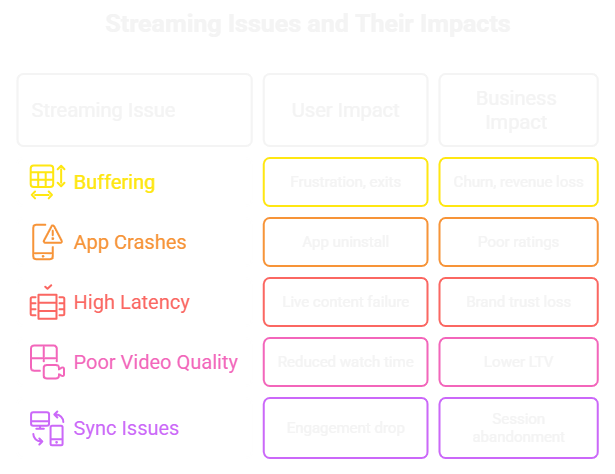
Common Streaming Issues vs Business Impact
Common streaming platform issues frustrate users and harm business. Buffering, crashes, and poor quality increase churn, reduce watch time, and lower revenue if not addressed.
Most Common OTT Streaming Errors
Common OTT errors like videos not playing, login failures, or crashes frustrate users and often lead to app exits or uninstalls.
Black Screen and Video Not Playing
These problems usually come from small setup mistakes rather than big system failures. When protection settings, video playback, or content delivery aren’t configured properly, the viewer feels it right away, videos don’t start, stop midway, or behave inconsistently across devices. Small missteps behind the scenes can quickly turn into a frustrating viewing experience.
Login and DRM Playback Issues
When users can’t log in or are suddenly denied access, frustration sets in immediately. From their point of view, nothing else matters if they can’t get past the first screen. Even a short login failure makes the platform feel unreliable and raises doubts about whether it will work the next time they open the app.
App Freezing and Screen Stuck
These issues often come from the app trying to do too much at once. When screens become heavy or tasks aren’t handled smoothly, the app starts to slow down, freeze, or close unexpectedly. From the user’s side, it just feels unstable and frustrating, even if the problem is happening deep inside the app.
How to Fix Streaming Issues in Your OTT App?
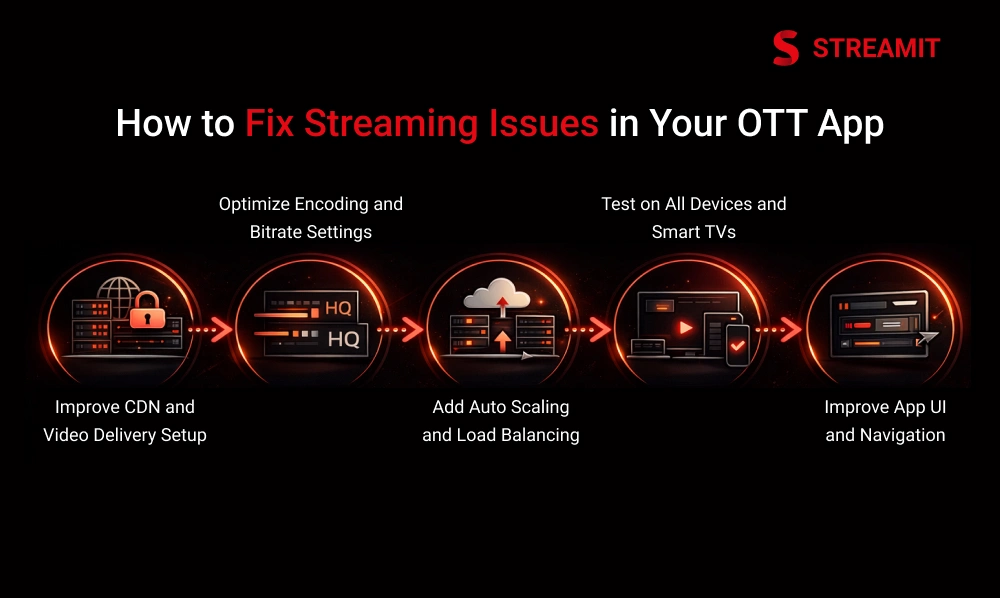
Fixing streaming issues means improving delivery, performance, and usability. Testing, monitoring, and stabilizing the app keeps viewers engaged and prevents problems before they notice.
Improve CDN and Video Delivery Setup
Most buffering issues come from how videos are delivered, not the user’s internet. Serving content from reliable, nearby servers and spreading traffic evenly helps videos load faster and stay stable, even during high traffic.
Optimize Encoding and Bitrate Settings
Encoding plays a major role in how good your video looks. When it’s set up correctly, viewers get the best quality their network can handle, with smooth transitions and fewer interruptions. Poor encoding, on the other hand, leads to quality drops, buffering, and wasted data.
Add Auto Scaling and Load Balancing
Traffic spikes can happen without warning, especially during launches or live events. Auto-scaling and load balancing help your system adjust instantly, spread traffic evenly, and stay stable under pressure, so users don’t feel the strain when demand rises.
Test on All Devices and Smart TVs
OTT apps behave differently across devices, and something that works on one screen can fail on another. Testing on real phones, TVs, and operating systems helps catch crashes, performance issues, and navigation problems before users run into them.
Improve App UI and Navigation
When an interface feels confusing or slow, users leave instead of figuring it out. A clear, fast, and consistent UI helps people find content quickly, stay longer, and enjoy the app without frustration.
Streaming Issue → Recommended Fix
Each streaming issue has a clear fix. Optimizing delivery, testing devices, tuning video quality, and scaling infrastructure helps prevent problems and keeps users satisfied.
Tools to Detect and Monitor Streaming Issues
Monitoring tools track video quality, crashes, and network issues, helping you spot and fix problems quickly to keep streaming smooth.
Video Quality Monitoring Tools
Watching how fast videos start and how smoothly they play helps you see what viewers really experience. This makes it easier to fix issues early, before users get frustrated or leave.
Crash and Error Tracking Tools
Issues often appear on one device before others. Spotting these early helps you fix problems before they affect more users.
Network and CDN Monitoring
Delays and slow delivery quickly frustrate viewers. Clear visibility helps you spot problems early and keep playback smooth as traffic grows.
Checklist to Prevent Streaming Issues Before Launch
A pre-launch checklist ensures your OTT app runs smoothly. Testing performance, devices, and UX helps catch issues early and provides a reliable experience from day one.
Performance Checklist
Before launching or scaling your OTT app, performance validation should never be optional. A structured checklist helps you identify weak points early and prevent streaming issues before users ever experience them.
- Load testing
- Stress testing
- Peak traffic simulation
UX and Device Checklist
A high-performing OTT app can still fail if users struggle to navigate it or if it behaves inconsistently across devices. UX and device validation ensure your platform feels smooth, intuitive, and reliable everywhere.
- Smart TV coverage
- UI responsiveness
- Navigation clarity
How Streaming Issues Affect Viewer Retention and Revenue?
Streaming issues don’t just interrupt playback, they interrupt growth. Every buffering screen, crash, or delay chips away at user trust. And in the OTT space, trust directly drives retention, subscription renewals, and ad revenue.
Impact on Subscription Business
When an app feels slow, freezes, or crashes, users lose trust quickly. Even if the content is great, they’re more likely to cancel subscriptions or stop using the service. Poor performance doesn’t just annoy viewers, it directly drives them away.
Impact on Ad Revenue
When ads fail to play correctly, it’s more than just a small glitch. Each failed ad means lost revenue and missed opportunities to connect with viewers. Even a few errors can lower overall earnings and make your advertising less effective.
When to Upgrade Your OTT Infrastructure?
Upgrade your OTT infrastructure when performance issues affect users. A scalable system keeps streaming smooth, viewers happy, and growth steady.
- Support tickets increase
- Crash reports rise
- Startup time worsens
- Live events strain servers
Signs Your Platform Needs an Upgrade
When an app keeps crashing, takes too long to load, or triggers more support requests than usual, it’s a clear sign the platform is struggling. These issues frustrate users, hurt trust, and signal that it’s time to improve or upgrade your infrastructure before bigger problems arise.
Choosing the Right Streaming Technology Partner
When you want the best, you stop looking. This is where the search ends. If quality matters, this is your last stop. You don’t need more options. You need the right one.
Conclusion
Most OTT platforms don’t fail because the content strategy was wrong. They fail because the foundation wasn’t engineered for scale. Early traction can hide structural weaknesses, but once traffic grows, instability becomes visible, through buffering, crashes, latency, and rising churn.
Performance is not a feature you add later. It’s the infrastructure that protects retention, revenue, and brand credibility. Every delay, every failed playback, every unstable live session quietly reduces long-term value.
If your platform struggles under pressure, the solution isn’t patchwork fixes. It’s architectural clarity, better delivery logic, scalable backend systems, disciplined testing, and consistent monitoring.
Growth-ready OTT businesses don’t optimize for launch day. They design for sustained performance, predictable scale, and long-term control.
FAQs
1. How do streaming issues affect user experience?
Streaming problems frustrate users and reduce their trust in the app. Even minor interruptions can quickly lower engagement and make users less likely to return.
2. What causes video buffering in streaming apps?
Buffering usually happens due to bandwidth limitations, server overload, or CDN misconfigurations. These issues slow down playback and disrupt the viewing experience.
3. How to fix audio and video sync issues in streaming apps?
Audio and video sync problems can be resolved by correcting encoding errors and optimizing the player. Managing network jitter also helps keep audio and video aligned properly.
4. How to reduce buffering in OTT streaming apps?
Buffering can be minimized by using optimized CDNs and adaptive bitrate streaming. Scaling infrastructure to handle traffic spikes ensures smooth playback even during peak usage.
5. What checklist should I follow before launching an OTT app?
Before launch, test performance across devices and network conditions to catch potential issues. Validate the user experience to ensure navigation is intuitive and the app runs smoothly.
6. How do streaming issues affect viewer retention?
Streaming issues increase churn by frustrating users and pushing them away. Over time, this lowers lifetime value and reduces overall revenue.
Read Also
1. 7 Steps to Integrate Payment Gateways in OTT Platforms
2. Why Binge-Watching Isn’t Enough to Keep Your OTT Subscribers Engaged
3. Why Most Streaming Platforms Fail at Retention (and How to Fix It Like Netflix)
4. Personalization vs. Content Quantity: What Drives Streaming Retention in 2025
5. 7 Reasons Why OTT Platforms Will Fail in 2026 Without Retention