How to Build a Video Streaming Platform in Laravel


Most streaming platforms do not fail because Laravel is weak. They fail because Laravel is asked to do the wrong job.
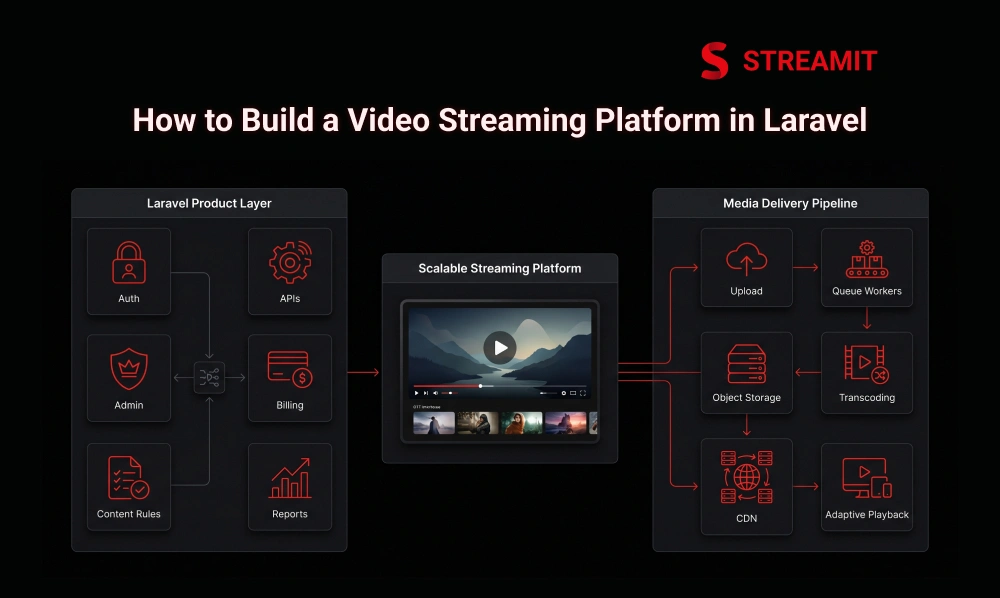
A serious video streaming platform needs two systems working together: the product system and the media delivery system. Laravel can handle the business logic beautifully, but video files, playback, encoding, and delivery need a different layer.
Foundation
What Laravel Should and Should Not Do in a Video Streaming Platform
Laravel should control the platform, not carry the entire video load. It is excellent for users, subscriptions, admin workflows, APIs, content rules, payments, and reporting.
But the actual media pipeline should not depend on normal Laravel requests. Uploading, transcoding, packaging, and delivery need workers, storage, CDN, and player-level planning.
| Layer | Laravel Should Handle | Laravel Should Not Handle Directly |
|---|---|---|
| Product logic | Users, plans, access rules | Raw video playback |
| Admin | Content management, reports | Heavy media processing inside requests |
| Delivery | Signed access, metadata | Serving large video files from app server |
| Growth | Analytics, recommendations | CDN-level delivery decisions |
Laravel Should Handle Auth, APIs, Admin, Billing, and Content Logic
Laravel is strongest where business rules matter. User registration, login, profiles, watchlists, subscriptions, and admin permissions all fit naturally inside Laravel.
It should also power your APIs for web, mobile, and TV apps. That gives your platform one controlled backend instead of scattered logic across devices.
The Video Pipeline Should Sit Outside Normal Laravel Requests
A 2 GB upload should never behave like a contact form submission. Large media actions need queues, background workers, object storage, and retry-safe processing.
Laravel can trigger these jobs, track their status, and show progress. But the heavy work should happen outside the main user request.
A Good Streaming Product Needs Both App Logic and Media Delivery
A streaming business is not just an app with videos attached. It needs catalog logic, access control, search, monetization, analytics, and reliable playback.
The product layer decides who can watch what. The delivery layer makes sure the video starts fast, adapts well, and keeps playing.
Planning
What to Plan Before You Start Building
The first 30 days decide the next 12 months of flexibility. Before writing code, decide your audience, content type, devices, monetization, and launch depth.
Bad planning creates expensive rebuilds later. Good planning keeps the platform simple at launch but ready for growth.
Define Your Niche, Audience, and Content Model
A fitness platform, film library, and education platform should not share the same product logic. Each one has different viewing behavior, pricing, content structure, and retention needs.
Define whether users come for entertainment, learning, community, live events, or premium access. That decision shapes everything after it.
Decide If You Need VOD, Live Streaming, or a Hybrid Product
VOD is usually the cleaner first build. It gives you control over uploads, metadata, subscriptions, and playback quality before adding live complexity.
Live streaming adds pressure around latency, concurrency, moderation, recordings, and event operations. Add it only when the product truly needs it.
Choose Monetization Before You Lock the Product Structure
Monetization is architecture, not just a pricing page. SVOD, AVOD, TVOD, rentals, bundles, coupons, and trials all need different access rules.
If you add monetization late, your backend becomes messy. Decide early how users pay, what they unlock, and when access expires.
Decide If You Are Building Web Only or a Full Multi-Device Platform
Web-only is faster, but multi-device changes the backend standard. Mobile and TV apps need cleaner APIs, better session handling, and stricter playback testing.
If TV apps are part of the 12-month plan, build APIs with that future in mind from day one.
Architecture
Core Architecture of a Laravel Video Streaming Platform
A strong Laravel streaming platform has 5 core layers: backend, storage, processing, delivery, and playback. Each layer should have a clear job.
When these layers are mixed together, scaling becomes painful. When they are separated, the platform becomes easier to improve.
| Architecture Layer | Main Purpose |
|---|---|
| Laravel backend | Users, catalog, payments, admin |
| Object storage | Store original and processed media |
| Queue workers | Process uploads, thumbnails, metadata |
| CDN | Deliver video closer to viewers |
| Player layer | Handle playback, quality, subtitles |
Laravel Backend for Users, Catalog, Billing, and Admin
Laravel should be the control center. It manages users, roles, videos, categories, plans, payments, coupons, access rules, and admin actions.
It should also expose clean APIs. Your frontend, mobile apps, and TV apps should consume the same structured backend logic.
Object Storage, CDN, and Player Layer for Delivery and Playback
Do not serve serious video traffic from the Laravel server. Store media in object storage and deliver it through CDN-backed infrastructure.
The player should receive stream URLs, subtitles, thumbnails, and playback rules. Laravel should authorize access, not push the video bytes itself.
Queue Workers for Uploads, Transcoding, Thumbnails, and Background Jobs
Queues protect the user experience. Upload processing, transcoding, thumbnails, subtitle generation, and email notifications should run in the background.
This keeps the platform responsive. It also makes failures easier to retry without breaking the viewer or admin workflow.
Build Process
Step-by-Step Process to Build the Platform
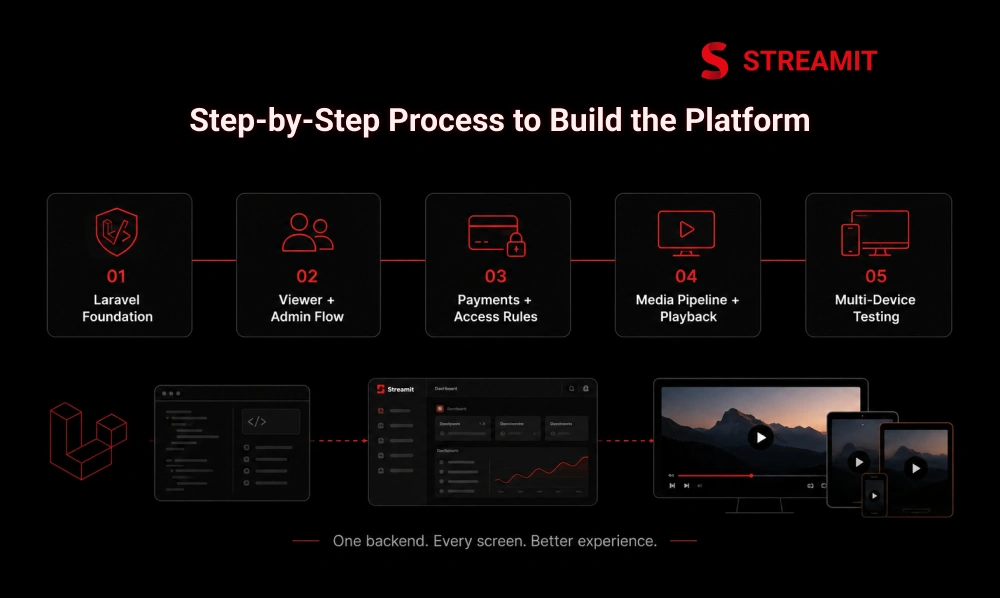
The safest build path is backend first, media second, devices third. Trying to build every screen before the core logic is stable creates rework.
Start with a clean Laravel foundation, then add admin, content, playback, payments, and device testing in stages.
Set Up the Laravel Project, Auth, and API Structure
Your first milestone is not video playback. It is clean access control. Set up auth, roles, user profiles, API structure, and base permissions.
Then define models for videos, seasons, episodes, categories, plans, transactions, and watch history. Clean data structure saves months later.
Build the Viewer Flow and Admin Side Together
Viewer experience and admin workflow must grow together. If admins cannot upload, tag, publish, and manage content easily, the viewer side will suffer.
Build catalog browsing, detail pages, playback access, and admin content controls in parallel. This keeps the product realistic.
Add Payments, Access Rules, and Subscription Logic
Payment is only half the work. Entitlement is the real system. The platform must know what each user can watch, for how long, and under which plan.
Handle free trials, renewals, failed payments, cancellations, coupons, and plan upgrades carefully. These small details protect revenue.
Test Across Devices Before You Think About Launch
A platform that works on one laptop is not launch-ready. Test mobile browsers, tablets, smart TVs, low bandwidth, expired sessions, subtitles, and payment flows.
Playback bugs feel bigger than normal website bugs. Users do not report them politely; they leave.
Media Delivery
Media Processing and Streaming Delivery
Video delivery is where many Laravel builds become expensive. The backend may be solid, but poor encoding or weak delivery can still ruin the platform.
Plan storage, transcoding, packaging, CDN, thumbnails, subtitles, and monitoring as one media system.
Upload Originals and Store Them Safely
Original video files are business assets. Store them securely, organize them clearly, and avoid exposing raw file locations.
Use structured folders, private storage, backup rules, and metadata tracking. The admin should always know the processing status of each video.
Encode, Transcode, and Package Streams for Playback
One video file is not enough for modern streaming. A platform usually needs multiple resolutions so playback can adjust to different networks.
Transcoding prepares those versions. Packaging turns them into stream-friendly formats that a player can understand.
Use Adaptive Streaming and CDN Delivery for Better Playback
Adaptive streaming is what makes playback feel stable. It allows the player to shift quality based on the viewer’s network instead of stopping completely.
A CDN helps deliver segments closer to viewers. This reduces pressure on your origin and improves playback consistency.
Features
Core Features Every Laravel Streaming Platform Needs
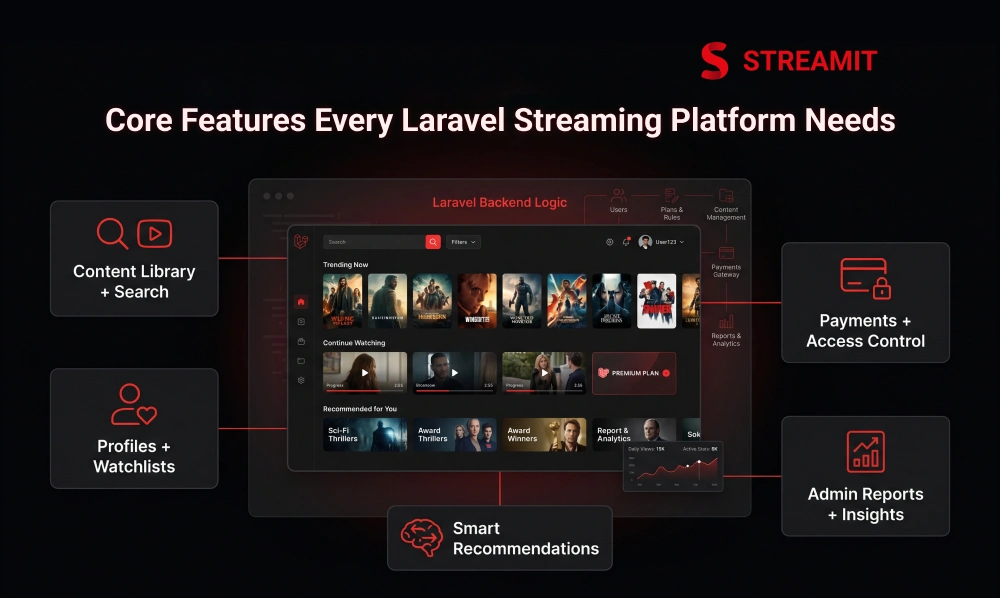
Features only matter when they support viewing behavior. A long feature list means nothing if users cannot find, play, pay, and return.
Start with the features that improve discovery, access, retention, and admin control. Everything else can be phased.
Content Library, Search, Filters, and Category Browsing
Metadata is the quiet growth engine. Titles, genres, cast, tags, language, duration, age rating, and release type improve discovery.
Search and filters should feel natural. If users cannot find content quickly, the platform will look full but feel empty.
User Accounts, Profiles, Watchlists, and Continue Watching
Retention starts with memory. Profiles, watchlists, continue watching, and device history make the platform feel personal.
These features also generate useful behavior data. That data helps improve recommendations, content planning, and engagement.
Smart Recommendations and Personalized Discovery
Recommendations should solve choice fatigue, not show random content. Start with simple rules like category, watch history, popularity, and completion rate.
You can improve personalization over time. The first goal is relevance, not complexity.
Subscription Plans, Payments, and Access Control
Access control must be strict but invisible. Users should smoothly watch what they paid for and clearly understand what requires an upgrade.
Plans, rentals, coupons, and renewals should connect directly with entitlement logic. This prevents revenue leakage.
Admin Reports, User Insights, and Content Performance Tracking
You cannot improve what you cannot see. Track watch time, drop-off, popular content, failed payments, buffering complaints, and user retention.
Reports should help operators make decisions. A dashboard is only useful if it changes what the team does next.
Security & Performance
Security, Performance, and Reliability in Laravel
Security and performance should be designed before traffic arrives. Adding them after launch usually costs more.
Laravel can support secure access, caching, queues, logging, and API discipline. But streaming security also needs media-layer protection.
Secure Authentication, Signed Access, and Viewer Entitlements
A login system is not enough for paid streaming. The backend must verify user access before issuing playable stream links.
Use signed URLs, expiry rules, plan checks, and device/session policies. This protects both content and revenue.
DRM Matters More as Content Value and Licensing Risk Increase
DRM is not always needed on day one, but it becomes important as content value rises. Licensed, premium, or exclusive libraries need stronger protection.
For smaller internal libraries, lighter controls may be enough initially. The decision should follow content risk, not trend pressure.
Use Queues, Caching, and Lean Queries to Keep the Product Fast
Laravel performance is usually won in boring places. Cache repeated catalog queries, avoid heavy dashboard loads, and push slow tasks into queues.
Keep APIs lean for mobile and TV apps. Every unnecessary query becomes more expensive at scale.
Watch Buffering, Playback Errors, and Slow API Paths Early
The first signs of scale are small complaints. Buffering, slow pages, failed playback, and delayed thumbnails show where the system is weak.
Monitor these issues early. Waiting until launch traffic grows makes diagnosis harder.
Post-Launch
What Usually Breaks First After Launch
Most platforms do not break everywhere. They break at the seams. Search, metadata, payments, playback, device behavior, and admin workflows usually reveal the first cracks.
The goal is not to build everything perfectly. The goal is to know where pressure will come from.
Weak Metadata Hurts Search, Recommendations, and Watch Time
Poor metadata makes good content invisible. If videos are not tagged, categorized, and described properly, discovery becomes weak.
That affects recommendations, search results, user engagement, and content performance. Metadata is not admin work; it is product work.
Device Support Gets Harder Once You Move Beyond Web
TV apps change the quality bar. Remote navigation, slower processors, app store rules, and playback differences all add complexity.
Build backend APIs that can support devices cleanly. Do not let every device become a separate product.
Delivery Problems Show Up as Buffering and Playback Complaints
Users experience infrastructure as emotion. If playback buffers, they do not care whether the issue is CDN, encoding, or bitrate logic.
Test different regions, networks, and devices. Delivery quality is part of brand trust.
Product Changes Slow Down When the Backend Is Too Rigid
Rigid backends punish growth. New plans, bundles, content types, devices, and promotions become slow when the structure is too fixed.
Design for controlled flexibility. You do not need unlimited customization, but you need room to evolve.
Cost & Timeline
Cost, Timeline, and Team Model for a Laravel Build
Cost depends less on Laravel and more on product depth. A web-only VOD MVP is very different from a multi-device platform with live streaming, DRM, and analytics.
The honest question is not “How cheap can this be?” It is “What must be stable 12 months from now?”
| Scope | Typical Complexity | Why It Changes Cost |
|---|---|---|
| Web VOD MVP | Medium | Core backend, admin, payment, playback |
| Multi-device OTT | High | APIs, mobile apps, TV apps, testing |
| Live streaming | High | Latency, concurrency, event operations |
| Premium security | High | DRM, signed access, monitoring |
What Changes the Timeline: Features, Devices, Live Support, and Security
Timeline expands with every device and every monetization rule. Web is faster than mobile and TV, and VOD is simpler than live.
Security requirements also change the build. DRM, account sharing rules, and licensed content workflows need planning.
What Changes the Cost: Infrastructure, Encoding, and Product Depth
Infrastructure is not a one-time development cost. Storage, encoding, CDN usage, monitoring, and scaling all affect ongoing spend.
Product depth matters too. Recommendations, analytics, complex billing, and admin automation require more careful engineering.
In-House Build vs Agency vs Hybrid Team
In-house gives control, agency gives speed, hybrid gives balance. The right model depends on your existing technical strength.
For serious builds, hybrid often works well. Internal teams keep ownership while experienced builders reduce mistakes.
Decision Guide
When Laravel Is the Right Choice for a Streaming Platform
Laravel is right when the platform needs business logic, ownership, and long-term control. It is not just about launching pages around videos.
Choose Laravel when subscriptions, admin workflows, APIs, customization, and roadmap flexibility matter.
Use Laravel When Product Logic, Billing, APIs, and Admin Matter Most
Laravel fits platforms where operations matter. If your team needs custom plans, content rules, reports, roles, and workflows, Laravel is a strong base.
It gives structure without locking the business into a fixed product model. That matters after launch.
Avoid a Full Custom Laravel Build if Speed to Launch Matters More Than Flexibility
Custom is not always the smartest first move. If you only need a simple launch quickly, a ready-made route may be enough.
A full custom Laravel build makes sense when flexibility, ownership, and future product control justify the investment.
Decide Based on the Product You Want 12 Months Later, Not Just Launch Day
Launch day is the easiest version of your platform. The real test comes when content grows, users increase, and monetization becomes more layered.
Plan for the business you are building, not only the demo you want to show.
Build Path
A Practical Build Path for Teams Starting With Laravel
The best path is phased, not bloated. Build the foundation first, then add intelligence, devices, analytics, and live features.
This keeps risk controlled. It also lets the business learn from real users before overbuilding.
Start With VOD, Clean Admin Workflows, and Paid Access
A strong VOD foundation teaches you the business. Start with content upload, catalog, search, playback, subscriptions, and access control.
Make the admin side clean. If publishing content is painful, the platform will slow down internally.
Add Recommendations, Device Expansion, and Better Analytics Next
Growth features should follow real behavior. Once users are watching, add recommendations, deeper analytics, retention tools, and mobile or TV expansion.
This avoids guessing. You improve based on actual platform usage.
Add Live Streaming Only When the Product and Ops Team Are Ready
Live streaming is an operational commitment. It needs event planning, monitoring, failover thinking, and support readiness.
Add it when it strengthens the business model. Do not add it just because it sounds advanced.
Summary
Key Takeaways
Laravel Controls Logic, Not Video
Use Laravel for auth, APIs, billing, catalog, user roles, admin workflows, and access rules – not raw video delivery or media processing.
Separate the Media Pipeline
Uploads, transcoding, thumbnails, stream packaging, and CDN delivery should run outside normal Laravel requests through queues and background workers.
VOD First, Live Streaming Later
VOD lets teams launch with cleaner workflows, paid access, search, and playback tracking before tackling the complexity and operational demands of live events.
Plan Monetization Before Writing Code
Subscriptions, rentals, ads, bundles, trials, and coupons all need different access control logic – decisions that must be made before development starts.
Metadata Drives Discovery and Retention
If videos are not tagged, categorized, and structured properly, users will struggle to find content, watch time will drop, and recommendations will fail.
Choose Laravel for Long-Term Control
Laravel works best for teams that need custom workflows, flexible monetization, scalable APIs, admin ownership, and room to grow beyond launch day.
Conclusion
Conclusion
Building a video streaming platform in Laravel is not about copying a streaming interface. It is about designing a platform that can handle content, payments, users, devices, and delivery without collapsing under growth.
If you are serious about ownership, flexibility, and long-term control, Laravel can be a strong foundation. Just make sure it is used for the right job.
FAQs
Frequently Asked Questions
-
Should Laravel handle video streaming directly or only app logic?
Laravel should handle app logic, access rules, users, billing, admin, and APIs. The actual video delivery should sit on storage, streaming formats, CDN, and player infrastructure.
-
What usually breaks first in a Laravel streaming build?
Metadata, playback delivery, payment access rules, and device support usually show issues first. These areas create user-facing problems faster than backend code quality alone.
-
Do I need queues from day one in Laravel streaming apps?
Yes, if your platform handles uploads, thumbnails, processing, emails, or reports. Queues keep slow work outside normal user requests and make the product feel faster.
-
When should I add CDN in a Laravel video platform?
Add CDN before real users start watching at scale. It helps deliver video closer to viewers and reduces pressure on your main storage or origin system.
-
Do I need HLS or DASH in a Laravel streaming build?
For serious playback, yes. HLS or DASH allows adaptive streaming, which helps the player adjust quality based on the viewer’s network.
-
How do I keep Laravel fast when streaming traffic grows?
Keep Laravel focused on APIs, access control, and product logic. Use queues, caching, lean database queries, CDN delivery, and background processing for heavy work.
-
When should I choose Laravel over a white-label OTT solution?
Choose Laravel when ownership, custom workflows, monetization flexibility, and long-term roadmap control matter. Choose white-label when speed matters more than custom product depth.