11 Ways to Improve Streaming Performance & Reduce Buffering


One buffering event can reduce video watch time by 39%. That is the real business problem. Buffering is not just a playback irritation. It shortens sessions, weakens trust, and makes retention more expensive than it needs to be. Mux’s analysis of hundreds of millions of sessions found that even a single interruption materially reduced viewing time.
Most OTT streaming teams do not lose viewers because they launched too slowly. They lose them because the platform no longer feels reliable under real conditions. That is why serious OTT businesses think beyond surface fixes. Streamit’s positioning is built around performance, scale, multi-CDN delivery, analytics, personalization, and secure streaming infrastructure rather than launch-only features.
Foundation
What Causes Video Buffering and Poor Streaming Performance in OTT Platforms
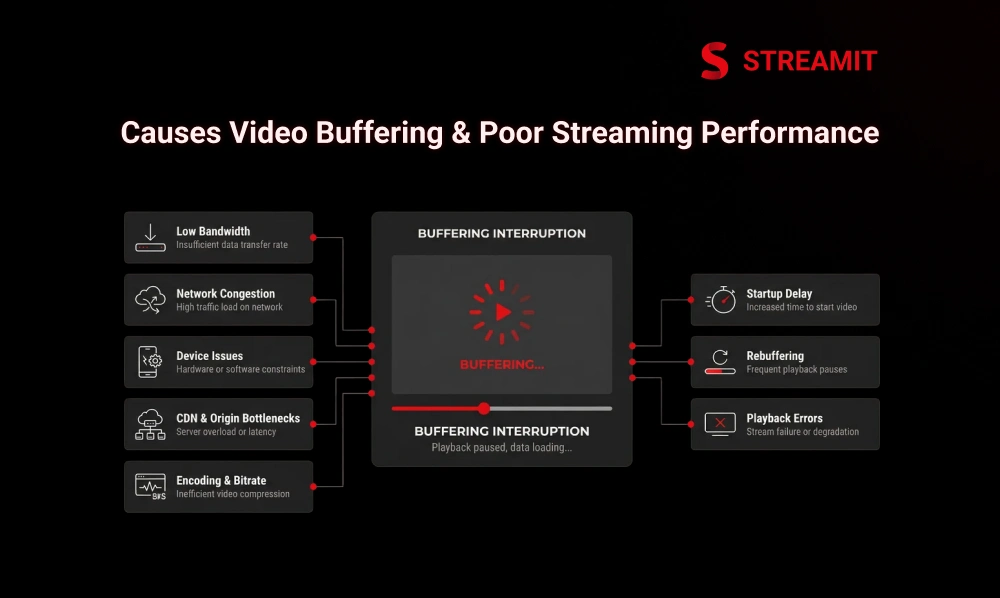
Buffering usually comes from a chain failure, not a single failure. A weak home network can cause it. So can bad bitrate ladders, overloaded origins, poor CDN routing, outdated devices, or live packaging choices that add delay before playback even starts. In other words, “the internet is slow” is often an incomplete diagnosis.
The important distinction for OTT operators is this: QoE is what viewers feel, while QoS is what your systems report. Your dashboards may show traffic is flowing, yet viewers may still face startup delay, rebuffering, and playback errors. That gap is where churn begins.
What Is Video Buffering in OTT Video Delivery
Buffering is the delay that happens when enough video data has not arrived for playback to start or continue. The player pauses because it runs out of content to play.
In OTT platforms, buffering is not just a player issue. It also reflects upstream delivery decisions such as encoding, bitrate renditions, caching, CDN routing, and how well the player adapts to changing network conditions.
Common Streaming Issues That Hurt QoE and QoS
A buffering issue may look simple to the viewer, but the root cause can come from the network, device, player, CDN, origin, or encoding stack. That is why OTT teams need to treat buffering as a system-wide issue, not just a playback problem.
Slow internet speed and bandwidth limits
Bandwidth still plays a major role in streaming quality. If the connection cannot support the selected video bitrate, playback either drops in quality or starts buffering. For live streaming, stable headroom matters even more than minimum speed.
Network congestion and a weak WiFi signal
A fast internet plan does not always mean smooth streaming. Congested networks, poor router placement, interference, and too many connected devices can still cause buffering. For more stable playback, wired connections often perform better than WiFi.
Device, browser, and streaming app performance issues
Old devices, outdated browsers, low memory, and weak OTT apps can also cause buffering. In OTT, playback depends on device support, app health, and software stability, not just internet speed.
Video CDN, origin, and video delivery bottlenecks
If the origin is overloaded, edge caching is weak, or CDN delivery is inefficient, buffering and startup delays rise quickly. Strong CDN routing and failover help keep video delivery more stable.
Business Impact
Why Video Buffering Hurts OTT User Engagement, OTT Retention, and Revenue
Poor playback breaks the viewing habit before the content gets a chance to work. Viewers may forgive one weak title. They do not forgive a platform that feels unstable.
That is why buffering is a retention problem disguised as a delivery problem. Teams often try to solve churn with more acquisition or more content volume, when the first fix should be playback reliability.
How buffering increases viewer drop-off and makes retention harder
Buffering makes viewers leave faster and reduces watch time. When the first session feels slow or unstable, trust drops, and it becomes harder to keep viewers engaged over time.
Why poor playback hurts watch time, trust, and smarter monetization
Poor playback reduces watch time, weakens viewer trust, and lowers interaction with subscriptions, ads, or other monetization opportunities. Stronger monetization depends on stable streaming, better analytics, and a smoother viewing experience.
The Fixes
11 Ways to Improve Streaming Performance and Reduce Video Buffering
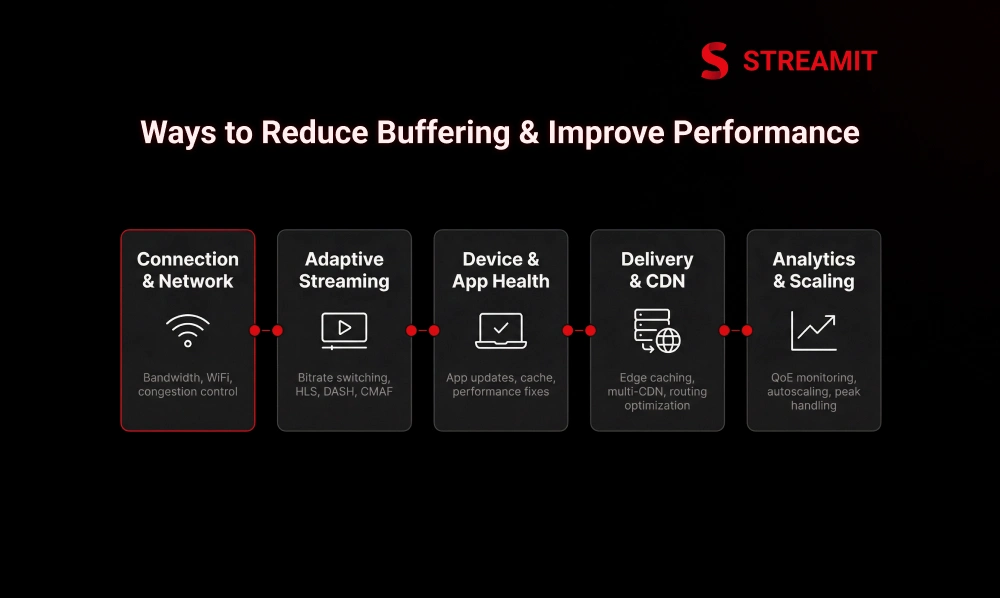
The fastest way to reduce buffering is to fix the layers in order. Start with connection reality, then the player and device, then delivery architecture, then encoding, then live latency tuning, and finally performance analytics.
1. Check internet speed and bandwidth for better streaming performance
Before you change infrastructure, confirm whether the selected stream is realistic for the available connection. Too many support teams skip this and jump straight to app troubleshooting.
A platform should match stream weight to connection reality. That means validating viewer bandwidth and using the right bitrate ladder rather than pushing maximum quality everywhere.
Recommended Mbps for HD, 4K, and low latency live streaming solution
Use baseline speed guidance as a floor, not a promise. The table below combines Netflix’s playback recommendations with AWS guidance to keep live upload headroom above the minimum requirement.
| Stream Type | Starting Bandwidth Target | Practical Note |
|---|---|---|
| 720p HD | 3 Mbps+ | Minimum starting point for stable HD playback |
| 1080p FHD | 5 Mbps+ | Better fit for mainstream OTT viewing |
| 4K UHD | 15 Mbps+ | Needs stronger stability, not just burst speed |
| Low-latency live upload | ~1.5x target stream bitrate | Keep overhead to avoid stalls and lag |
2. Optimize WiFi and use Ethernet for smoother video delivery
WiFi convenience often hides performance inconsistency. Walls, interference, poor router placement, and crowded 2.4 GHz networks can make a good broadband plan feel unreliable.
For serious playback or contribution, wired still beats convenient. Ethernet removes a lot of jitter and interference from the equation and gives the player a steadier path to segments. AWS recommends wired connections whenever possible for stream stability.
Router placement, 5GHz WiFi, and wired connection best practices
Small network changes can deliver outsized QoE gains. Put the router in an open central location, favor 5 GHz where range allows, reduce interference, and move fixed streaming devices to Ethernet.
This is not glamorous work, but it is leverage. A better local network often improves startup time and rebuffering faster than another round of front-end polishing.
3. Reduce network congestion across home, office, and OTT infrastructure
Streaming competes with everything else on the network. Cloud backups, large downloads, conferencing, and multiple connected devices can quietly consume the bandwidth your player expected to use.
OTT operators face the same principle at the infrastructure level. Shared networks, noisy internal traffic, and poor prioritization can hurt ingest and delivery before the viewer ever presses play.
Limit background traffic and connected devices during peak streaming hours
Peak-hour discipline matters. AWS recommends keeping encoding machines on a dedicated network or VLAN to reduce traffic pollution and bottlenecks. The same logic applies to viewers at home: less competing traffic means more stable streaming.
4. Use Adaptive Streaming and smarter video quality settings
Adaptive streaming is still one of the most practical anti-buffering tools in OTT. Instead of forcing one heavy file on every viewer, the player switches between renditions as bandwidth changes.
That makes the experience more resilient, especially on mobile and mixed-quality networks. Cloudflare notes that adaptive bitrate streaming reduces buffering by letting the player move up or down the bitrate ladder as conditions change.
How Adaptive Streaming, HLS vs DASH, and CMAF help reduce buffering
HLS and DASH both exist to make changing conditions survivable. Apple describes HLS as designed for reliability and for adapting playback to available wired and wireless speeds, while Cloudflare notes that both HLS and DASH support adaptive bitrate delivery.
CMAF matters because it reduces packaging complexity and helps low-latency delivery. Apple describes CMAF as a standard for segmented media, and Apple’s low-latency HLS guidance notes that public-network latency below two seconds is achievable at scale.
5. Update your streaming app, OTT TV app, browser, and device software
Playback issues often survive because the software layer is stale. Old app builds, outdated browser engines, broken caches, and lagging firmware can create errors that look like network failure.
This is why mature OTT teams treat app maintenance as performance work. Updating the player, OS, browser, and device software is not housekeeping. It is part of delivery reliability.
Clear cache, update firmware, and fix playback errors faster
Cache corruption and old firmware cause more playback complaints than many teams expect. Clearing temporary data, reinstalling unstable app versions, and keeping device software current can restore smooth playback without changing the stream itself.
6. Use video CDN, Edge Caching, and Multi CDN for OTT streaming solutions
Buffering gets expensive when content travels too far for every request. CDNs reduce that distance by caching content closer to viewers, which improves delivery speed and lowers origin stress.
For larger OTT businesses, the better question is not “Do I have a CDN?” but “Is my CDN strategy resilient enough for regional failure and traffic spikes?” That is where edge caching and multi-CDN start to matter. Streamit positions multi-CDN, adaptive delivery, and intelligent routing as part of a stronger performance layer.
When Multi CDN improves QoE, failover, and regional OTT streaming performance
Multi-CDN becomes valuable when the uptime risk is more expensive than operational complexity. Cloudflare’s reliability guidance explains how failover reroutes traffic when a server or path fails, reducing disruption.
| Delivery Setup | Best Fit | Main Tradeoff |
|---|---|---|
| Single CDN | Early-stage or region-limited platforms | Simpler, but weaker regional redundancy |
| Multi-CDN | Large-scale, global, or live-event OTT | Better failover and route flexibility, but more orchestration |
7. Optimize video encoding, video transcoding, and bitrate ladder settings
A bad bitrate ladder creates avoidable buffering even on good networks. If renditions are spaced poorly or the encoded files are too heavy, the player has fewer safe options when bandwidth drops.
Encoding discipline matters as much as transport. AWS recommends CBR over VBR for live streaming because bitrate spikes from VBR can create frame drops and buffering in client players.
Use H.265, AV1 codec, and bitrate ladders to reduce video size without losing quality
Modern codecs help when used with device support in mind. H.265 and AV1 can reduce delivery weight compared with older approaches, but the smarter move is not blindly choosing the newest codec. It is building ladders that match content type, audience devices, and playback environments.
8. Improve low latency live streaming with better packaging and segment size
Low latency is not just about “faster”. It is about reducing delay without making playback fragile. Many live streams lower latency badly, then reintroduce instability through poor segment tuning or packaging choices.
A balanced live setup protects both immediacy and continuity. That is the real target for sports, auctions, betting, events, and interactive streaming.
How low-latency HLS, low-latency DASH, and chunk tuning improve live playback
Segment and chunk choices decide whether low latency feels premium or stressful. Apple’s low-latency HLS documentation says sub-two-second latency is achievable over public networks at scale, and CMAF helps support chunked segmented delivery more efficiently.
9. Monitor QoE, QoS, buffering rate, and Platform Analytics in real time
You cannot fix what you do not observe at the session level. Mux’s live metrics guidance focuses on startup time, rebuffering, playback failures, and engagement because vanity metrics alone do not explain whether people are actually watching comfortably.
This is why platform analytics should sit next to playback engineering, not far from it. Streamit makes the same point by positioning real-time analytics as part of the performance and retention stack.
Track startup time, playback errors, rebuffering, and video latency
The most useful streaming metrics are the ones closest to viewer pain. Watch these first.
| Metric | Why It Matters |
|---|---|
| Startup time | First impression of the stream |
| Rebuffering rate | Direct indicator of playback friction |
| Playback errors | Reveals failed sessions and broken flows |
| Live latency | Critical for live-event experience |
| Bitrate shifts | Shows how often the player is compensating |
10. Scale streaming infrastructure for peak traffic and live OTT events
Most streaming platforms do not fail on an average Tuesday. They fail at the moment that matters. Live events, launches, regional spikes, and promotional traffic expose whether the architecture was built for growth or for demos.
This is where enterprise OTT thinking separates from starter-platform thinking. Streamit repeatedly positions its architecture around high concurrency, real traffic, and long-term growth rather than surface-level launch readiness.
Auto scaling, cloud delivery, and resilient OTT platform solutions for high concurrency
Resilience means more than adding servers. It means autoscaling, origin protection, CDN intelligence, efficient packaging, and recovery paths that stay calm under load.
11. Improve content personalization and retention loops to reduce silent abandonment
Not every viewer leaves with an error. Many leave quietly because the platform feels generic. That is silent abandonment, and it matters because strong playback alone does not guarantee return behavior.
A smoother experience should end in a better next choice. Streamit connects personalized journeys, smart thumbnails, recommendations, and proactive retention flows because better discovery helps turn stable playback into longer engagement.
Use personalized discovery tools to increase OTT User Engagement
Discovery is part of performance once the stream actually works. Smart Thumbnail Personalization, recommendation systems, and Smart Seek Previews reduce friction after the click and improve the odds of the next one. Streamit explicitly states that personalized journeys increase watch time and engagement, and that smart thumbnail personalization improves play starts.
Platform Architecture
Which OTT Platform Features Matter Most for Zero Buffer Streaming
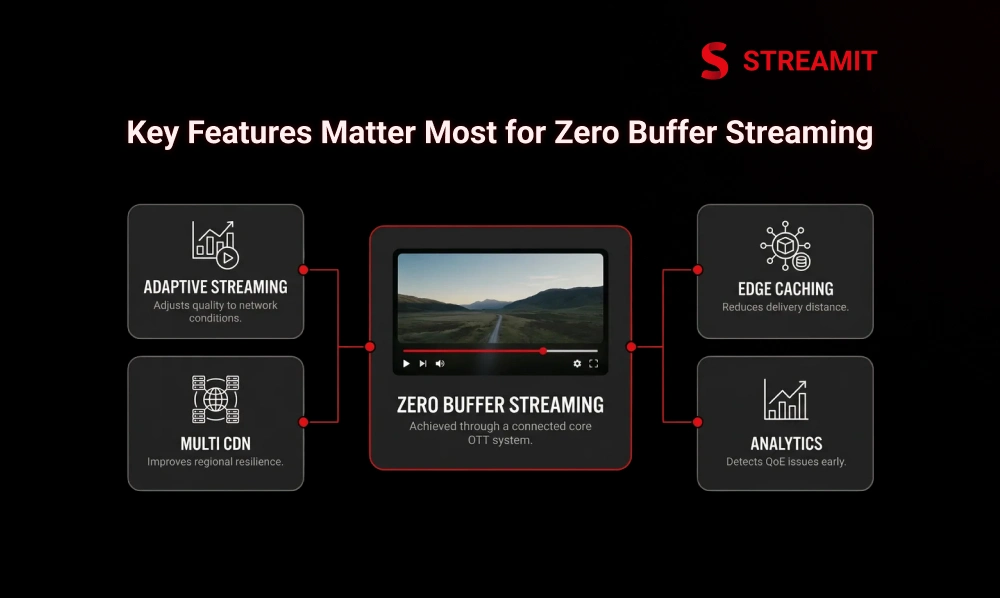
Zero-buffer streaming is never one feature. It is a stack. Teams that treat buffering as a single-tool problem usually end up patching symptoms.
Adaptive Streaming, Edge Caching, Multi CDN, and Platform Analytics as core OTT platform features
These are the core operating layers, not optional extras. Adaptive streaming protects playback under changing bandwidth. Edge caching reduces delivery distance. Multi-CDN improves regional resilience. Analytics helps teams see where QoE breaks first. Streamit’s features and recent blog positioning place these exact systems at the center of scalable OTT performance.
OTT Security Solutions like Widevine DRM, FairPlay DRM, PlayReady DRM, and video encryption without hurting playback
Security should protect premium content without breaking the session. Widevine is Google’s DRM system for premium media, FairPlay secures HLS playback on Apple platforms, and PlayReady protects digital content with enforceable usage rules. These systems matter because premium OTT needs both playback and control.
Next Steps
When to Choose a Professional OTT Solution Provider for Better Streaming Performance
There is a point where internal fixes stop being efficient. If buffering persists across devices, regions, or live traffic windows, the issue is usually architectural enough to justify specialist help.
Signs your OTT platform solution needs technical upgrades
If your team is firefighting every live event, you already have the answer. Repeated playback complaints, fragile scaling, unclear QoE visibility, CDN uncertainty, and ad hoc security are signs the stack needs redesign, not another quick patch.
How end-to-end OTT solutions improve video delivery, mobile optimisation, and subscriber retention
End-to-end OTT solutions matter when performance, monetization, and retention are starting to interact. Streamit positions its work around production-ready infrastructure, high-concurrency delivery, adaptive playback, analytics, personalization, and long-term control because serious OTT businesses eventually need those systems to work together, not in isolation.
Summary
Key Takeaways
Buffering Is a Multi-Layer Problem
Poor streaming performance usually comes from a mix of bandwidth limits, weak WiFi, device issues, poor bitrate settings, and CDN or origin bottlenecks – never just one cause.
Playback Stability Directly Drives Retention
Buffering hurts viewer drop-off, watch time, trust, and long-term retention, making playback reliability a core business priority, not just a technical one.
Adaptive Streaming Reduces Disruptions
Adaptive streaming improves playback by adjusting video quality in real time based on changing network conditions, making every session more resilient.
CDN Strategy Shapes Playback Quality
Edge caching, stronger regional delivery, and multi-CDN failover reduce buffering and improve playback stability – especially critical during live events and traffic spikes.
QoE Monitoring Should Be Continuous
Tracking startup time, rebuffering rates, playback errors, and live latency helps OTT teams identify and fix streaming issues before they compound into churn.
Personalization Extends What Playback Starts
Smooth playback combined with smart discovery, recommendations, and personalized journeys converts reliable sessions into longer engagement and stronger retention loops.
Conclusion
Conclusion
Most buffering problems do not begin with one obvious breakdown. They build slowly through weak bitrate decisions, unstable network conditions, poor CDN strategy, outdated playback environments, and limited performance visibility. That is what makes streaming performance harder to fix and more important to get right.
The bigger lesson from this blog is that reducing buffering is not about applying one quick solution. It is about strengthening the full OTT delivery path, from internet readiness and adaptive streaming to encoding, low-latency tuning, analytics, and personalization.
For OTT businesses focused on retention, trust, and long-term growth, smoother playback is not just a technical improvement. It is part of building a platform viewers are willing to return to.
FAQs
Frequently Asked Questions
-
How Can I Improve Streaming Performance and Reduce Buffering Fast?
Start with connection quality, switch to wired where possible, lower the selected bitrate if needed, and confirm adaptive streaming, caching, and playback analytics are working correctly.
-
What Causes Video Buffering During OTT Streaming?
Common causes include insufficient bandwidth, network congestion, weak WiFi, device or app issues, poor bitrate ladders, and CDN or origin bottlenecks.
-
Does Lowering Video Resolution Help Stop Buffering?
Yes. A lower-resolution stream needs less bandwidth, which makes playback easier to sustain on unstable connections.
-
How Does a CDN Reduce Buffering and Improve Video Playback?
A CDN caches content closer to viewers and can route around failed or overloaded paths, reducing delivery delay and origin stress.
-
What Is the Difference Between Single CDN and Multi-CDN in Streaming?
Single CDN is simpler. Multi-CDN adds operational complexity but improves failover flexibility, regional resilience, and route control at scale.
-
How Does Low Latency Streaming Improve Live Video Experience?
It reduces the delay between capture and playback, which makes live sports, events, auctions, and interactive moments feel more immediate. Apple notes low latency HLS can achieve sub-two-second latency over public networks at scale.
Read Also
Read Also
1. Edge Caching for OTT: How to Reduce Buffering and Improve Delivery
2. Zero Buffer Streaming with Multi-CDN: How to Deliver Buffer-Free Video
3. How Adaptive Streaming Works: HLS, DASH, and Bitrate Ladders Explained
4. 7 Reasons Why OTT Platforms Will Fail in 2026 Without Retention
5. Low Latency Live Streaming: How to Reduce Delay for OTT Platforms