QoE vs QoS: Why Viewers Quit Streaming And How to Fix It


Most OTT platforms do not lose viewers because the stream is technically available. They lose viewers because the experience feels unreliable, slow, frustrating, or forgettable. That is why the difference between QoE and QoS matters more than many teams realize.
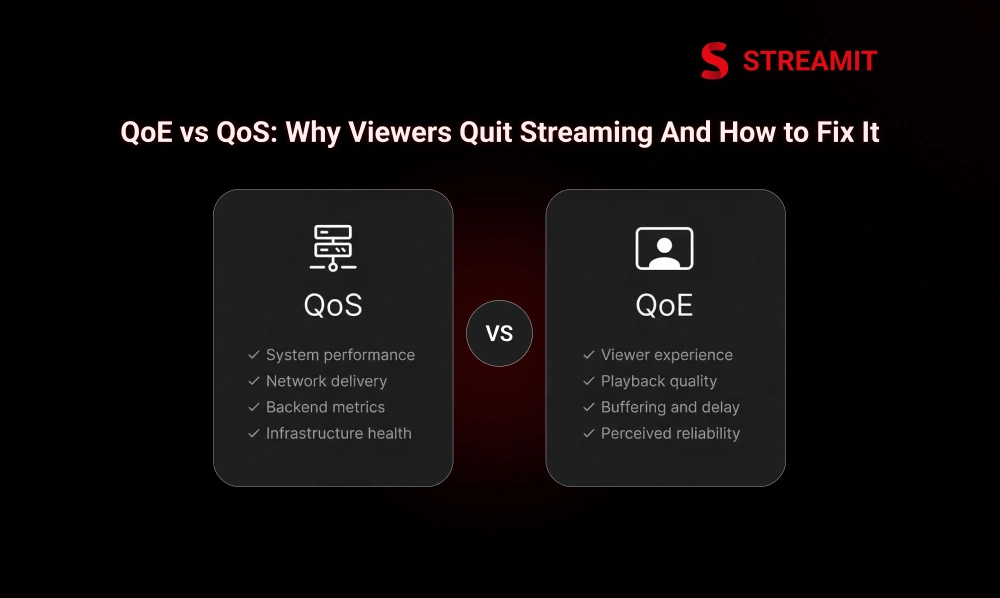
QoS tells you how the system performs. QoE tells you how the viewer experiences it. One is operational. The other is commercial. If OTT teams only monitor infrastructure health, they often miss the real reason users leave: the platform worked, but it did not feel good enough to stay with.
For streaming businesses, this is not a small technical debate. It affects watch time, retention, monetization, churn, and brand trust. A platform that looks stable on backend dashboards can still quietly lose users at the session level. That is the gap that strong OTT businesses learn to close early.
Part 1
QoE vs QoS in OTT Platforms: What They Really Mean
Most teams treat streaming quality like an engineering issue first. That is too narrow. In practice, streaming quality sits between infrastructure, playback logic, app design, and user expectations. If you only measure system delivery, you understand part of the problem. If you also measure viewer pain, you understand the business impact.
QoE and QoS should not compete with each other. They should work together. QoS helps you see where delivery breaks down. QoE shows whether that breakdown actually harms the viewing session. OTT teams that understand both make better product and infrastructure decisions.
What Is QoE in a Streaming App?
QoE, or Quality of Experience, is what the viewer feels while using the platform. It includes startup speed, buffering, playback smoothness, quality shifts, failed sessions, and how dependable the app feels overall.
A viewer never says, “packet loss is high.” They say, “This app keeps buffering,” or they leave without saying anything at all. That is why QoE matters. It translates technical performance into real user experience.
QoE is what the viewer feels during playback
If the video takes too long to start, pauses mid-scene, drops quality too often, or fails during an important moment, QoE is poor. The stream may still be delivered, but the experience has already lost trust.
What Is QoS in Video Delivery?
QoS, or Quality of Service, measures how well the system delivers video. It focuses on transport and network-side health, including latency, packet loss, jitter, throughput, edge availability, and delivery consistency.
QoS is the infrastructure view of quality. It helps teams detect whether the network, CDN, origin, or routing layer is creating instability before the viewer fully feels it.
QoS is how well the system delivers the stream
QoS tells you whether the path is healthy. It helps explain why segments arrive late, why bitrate switching becomes unstable, or why live delivery starts drifting under load.
QoE vs QoS: The Difference OTT Teams Must Understand
QoS measures delivery health. QoE measures viewer impact. That is the real difference. A system can show acceptable network performance and still produce a poor session because startup is slow, the player behaves badly, or the app makes content hard to reach.
That is why OTT platforms need both. QoS helps operators find the technical source. QoE helps product and business teams understand what the viewer actually experienced.
Good QoS can still lead to poor QoE
A stream can travel through a technically healthy pipeline and still feel frustrating. Slow player initialization, weak adaptive bitrate behavior, poor device optimization, or broken app flows can all damage the experience.
QoE also depends on product experience, not only on network quality
Streaming quality is not only about packets and segments. It is also about whether users can find the right content quickly, resume easily, preview confidently, and move through the app without friction.
| Area | QoS | QoE |
|---|---|---|
| Focus | Delivery health | Viewer experience |
| Main concern | Can the system deliver reliably? | Does playback feel smooth and trustworthy? |
| Typical metrics | Latency, jitter, packet loss, throughput | Startup time, buffering, playback failures, and exits |
| Business value | Operational stability | Retention, watch time, monetization |
Part 2
Why Viewers Quit Streaming in the First Place
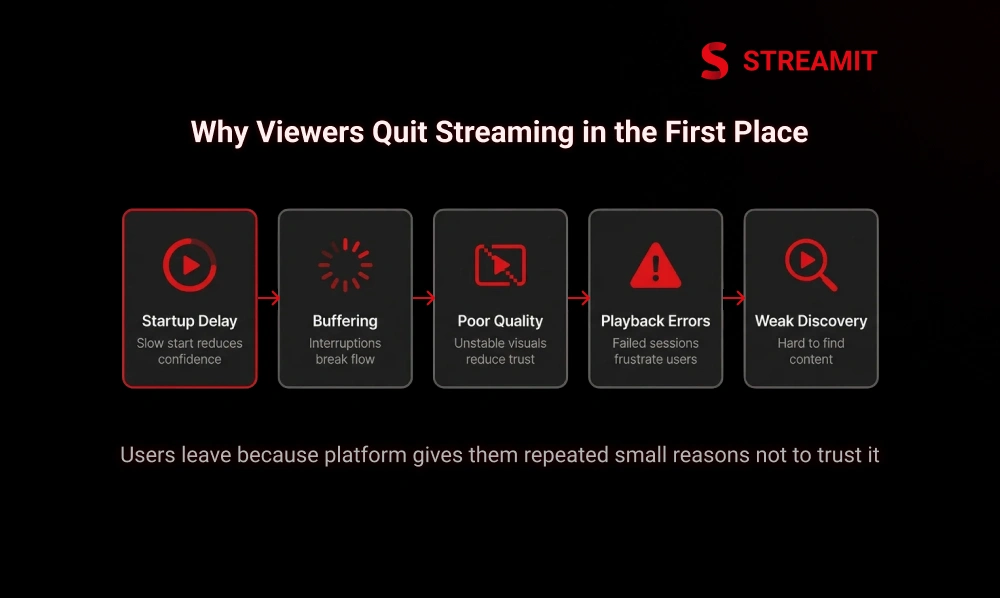
Viewers usually do not leave because of one dramatic failure. They leave because the platform gives them repeated small reasons not to trust it. A slow start, a stall at the wrong time, weak discovery, blurry quality, or broken playback recovery can quietly reduce return visits.
In OTT, frustration compounds faster than teams expect. A poor first impression hurts the current session. A pattern of poor sessions hurts the habit. Once a habit breaks, retention becomes harder and more expensive to recover.
Startup Delay: The First Few Seconds Decide Retention
The first few seconds shape the entire session. If playback feels slow before the content even starts, users begin the experience with doubt instead of momentum.
A fast first frame makes the platform feel ready. A slow first frame makes the platform feel risky.
Buffering and Stalling Break Trust Fast
Buffering is one of the fastest ways to damage perceived quality. Even short stalls feel longer when they interrupt attention, especially during emotional scenes, premium content, or live moments.
Frequent stalling tells viewers the platform is unstable, even if the catalog and pricing are strong.
Live sports and live events are even less forgiving
In sports and live events, tolerance is lower. Viewers expect immediacy. A delay, freeze, or recovery issue during a key moment feels much worse than the same issue in casual VOD playback.
Poor Video Quality Makes the Platform Feel Unreliable
If the video looks soft, unstable, or inconsistent across sessions, viewers often blame the platform, not the network. Quality drops signal unreliability, especially on larger screens where flaws are more visible.
Playback Errors and Failed Sessions Trigger Rage Quits
Few issues damage trust faster than sessions that fail to start or break midway. Error-heavy playback turns a viewing problem into a product problem. The user no longer questions the stream. They question the platform.
Weak Discovery and Personalization Cause Silent Abandonment
Not all churn starts in playback. Some start earlier, when viewers open the app and do not find something relevant fast enough. A platform can stream well and still lose users if discovery feels generic or slow.
Part 3
How Poor QoE Hurts OTT Retention, Revenue, and Brand Trust
Poor QoE does not stay inside engineering. It spreads into revenue. Weak experience reduces watch time, lowers session frequency, hurts renewals, weakens ad delivery, and makes premium content feel less premium.
Brand trust in streaming is operational trust. Users judge quality through consistency. If the platform feels unstable, they assume the business behind it is not fully dependable either.
Poor Experience Reduces Watch Time, Return Visits, and Subscriber Retention
When users hit delays, stalls, or errors too often, they watch less and return less. Over time, low-friction alternatives become more attractive.
Playback Problems Hurt Revenue Across Subscription, AVOD, and Live Streaming Models
Subscriptions suffer when users stop seeing value. AVOD suffers when sessions shorten or ad opportunities disappear. Live models suffer when premium moments fail at the exact time viewers are paying attention.
Bad Streaming Quality Damages Brand Perception Fast
A weak experience makes the platform feel unfinished, even when the business behind it is serious. In streaming, technical instability quickly becomes a brand problem.
Part 4
What to Measure to Find the Real Problem
Most OTT teams do not lack data. They lack the right combination of data. Measuring only backend delivery leaves blind spots. Measuring only session outcomes leaves root causes unclear. Good diagnosis requires both viewer-facing and delivery-facing signals.
The goal is not more dashboards. The goal is faster clarity. You want to know what broke, where it started, how many users felt it, and how badly it affected session quality.
Core QoE Metrics That Show Viewer Pain
QoE metrics reveal what the viewer actually experiences. These are the metrics product, playback, support, and retention teams should watch closely.
Startup time and time to first frame
These show how long it takes for playback to begin after the user presses play.
Buffering count, duration, and buffering rate
These show how often sessions stall and how disruptive those stalls are.
Playback failures and error rate
These reveal how often sessions do not start or break before completion.
Watch time, completion rate, and exit rate
These show whether the overall experience was strong enough to hold attention.
Core QoS Metrics That Show Delivery Health
QoS metrics show whether the network and delivery path are creating pressure on playback quality.
Latency, packet loss, jitter, and throughput
These show network instability and delivery efficiency.
CDN response, edge performance, and availability
These reveal whether regional delivery is fast and dependable.
Origin performance and delivery consistency
These help teams see whether backend bottlenecks are affecting playback.
Why OTT Platforms Need Both QoE and QoS Data
QoS shows where the issue begins. QoE shows how much users feel it. Together, they help teams prioritize fixes that improve both technical stability and business results.
| What to Track | Why It Matters |
|---|---|
| TTFF / startup time | Shapes the first impression |
| Buffering rate | Signals visible session pain |
| Playback error rate | Shows direct failure risk |
| Watch time / exits | Connects quality to behavior |
| Latency / jitter / loss | Reveals delivery instability |
| CDN and origin performance | Shows where infrastructure pressure begins |
Part 5
What Causes Poor QoE Across OTT Streaming Solutions
Most QoE issues are not caused by one layer alone. They usually come from interactions between network variability, packaging choices, bitrate ladders, device constraints, CDN behavior, and app-level decisions.
That is why surface-level fixes often fail. If you only patch the symptom, the problem returns under traffic, on another device, or in another region.
Network Instability and Last-Mile Internet Problems
The last mile is still one of the hardest variables to control. Viewers watch across home Wi-Fi, mobile networks, and inconsistent regional broadband conditions.
Weak Adaptive Streaming and Bitrate Ladder Decisions
Poor ABR logic creates unstable playback. If ladders are too aggressive or packaging is not tuned well, the player may chase quality instead of protecting continuity.
Poor packaging and ABR logic create unstable playback
Smooth playback depends on intelligent switching, not just more renditions.
Inefficient Video Encoding, Transcoding, and Compression
Encoding choices directly affect visual quality, bandwidth use, and playback efficiency. A poor compression strategy can waste bandwidth while still looking worse than expected.
Codec choice affects quality, bandwidth, and device support
Codec decisions should balance efficiency with actual device reach, not trend-driven assumptions.
CDN, Multi-CDN, and Edge Delivery Gaps
Weak regional delivery, cache misses, and origin overdependence can all increase startup time and rebuffering risk.
Cache misses, origin overload, and weak regional coverage hurt playback
Traffic spikes expose weak delivery architecture quickly.
Player, App, and Device Limitations Across Screens
Playback behavior changes across mobile, web, TV, and older smart devices. A platform that works well on one screen can still fail on another.
DRM and Security Layers That Interrupt Playback When Poorly Implemented
Security matters, but poorly implemented DRM and token flows can create startup delays, session failures, and cross-device compatibility issues.
Part 6
How to Fix Streaming Issues Before Viewers Quit
The best OTT teams do not try to fix everything at once. They fix the issues viewers feel most, first. That usually means startup delay, buffering, playback errors, and weak session recovery before anything else.
A strong streaming strategy is not “higher quality at all costs.” It is delivering the best possible experience for the user’s actual network, device, and context.
Fix Startup Delay First
Reduce player load, simplify the first playback path, and improve first-segment delivery. The start of the session deserves disproportionate attention because it sets the tone for everything after it.
Reduce player load and first-screen friction
Reduce player load and keep the path to playback simple so viewers can start watching faster. A quicker start makes the platform feel more reliable and reduces early drop-off.
Improve first-segment delivery and playback start
Improve first-segment delivery by making opening video chunks faster to fetch, cache, and decode so playback can begin without delay. A smoother playback start reduces waiting time, improves first impressions, and helps keep viewers from leaving early.
Reduce Buffering With Smarter Adaptive Streaming
Tune for continuity, not vanity bitrate. A stable stream that adapts intelligently often performs better than one that chases top-end quality too aggressively.
Optimize buffer strategy for smooth playback, not just high bitrate
Optimize buffer strategy by prioritizing playback stability over aggressive bitrate delivery, so the stream stays smooth even when network conditions shift. A well-tuned buffer reduces stalls, protects continuity, and creates a more reliable viewing experience.
Tune ladders and manifests for device and network realities
Tune ladders and manifests to match real device capabilities and network conditions instead of assuming every viewer can handle the highest profile smoothly. This helps the player switch more intelligently, reduce instability, and deliver a more consistent viewing experience.
Improve Video Quality Without Wasting Bandwidth
Rebuild encoding ladders around efficiency, not habit. Match bitrate and resolution to real device classes and viewing conditions.
Rebuild encoding ladders around quality-per-bit efficiency
Rebuild encoding ladders to deliver better quality at lower bitrates without wasting bandwidth. This improves playback efficiency and keeps streaming more stable across devices and networks.
Match resolution and bitrate to screen and device class
Match resolution and bitrate to the viewer’s screen and device class so playback stays efficient without pushing unnecessary quality. This helps reduce buffering, improve stability, and maintain a better viewing experience.
Strengthen Video Delivery With Multi-CDN and Edge Caching
Use traffic routing that adapts by region and performance. Reduce origin dependency so spikes do not become viewer-facing failures.
Route traffic intelligently by region and performance
Route traffic intelligently by region and performance so viewers are served from the fastest and most reliable delivery path available. This helps reduce latency, avoid congestion, and keep playback more stable across locations.
Reduce origin dependency during traffic spikes
Reduce origin dependency during traffic spikes by serving more content from edge caches instead of the origin. This helps prevent overload and keeps playback stable when demand rises.
Lower Latency for Live Streaming and Sports Use Cases
Live use cases need tighter control across ingest, packaging, routing, and playback. Delay compounds across the chain, so it must be managed end-to-end.
Reduce glass-to-glass delay across ingest, packaging, and playback
Reduce glass-to-glass delay by optimizing ingest, packaging, and playback so live video reaches viewers faster. This improves live streaming responsiveness and makes the experience feel more immediate.
Fix Playback Errors With Better Testing, Alerting, and Recovery
Error tracking should be clear, actionable, and device-aware. Recovery paths must be fast enough to save the session, not just log the incident.
Track clear error codes across devices and app versions
Track clear error codes across devices and app versions so teams can identify playback issues faster and fix them with more accuracy. This improves troubleshooting, reduces repeat failures, and supports a more stable viewing experience.
Build fast rollback and fallback paths for broken sessions
Build fast rollback and fallback paths for broken sessions so playback can recover quickly when something fails. This reduces disruption, protects viewer trust, and helps keep the session from ending early.
Improve Discovery, Personalization, and Retention Loops
Streaming quality also includes how quickly viewers reach relevant content. Better discovery reduces idle time, weak starts, and silent abandonment.
Show the right content faster
Show the right content faster by improving discovery so viewers reach relevant videos with less searching and hesitation. This reduces drop-off, increases engagement, and makes the platform feel more intuitive.
Turn engagement signals into smarter retention actions
Turn engagement signals into smarter retention actions by using viewer behavior to guide timely recommendations and re-engagement. This helps increase return visits and reduce churn.
Part 7
A Practical QoE Improvement Plan for OTT Platforms
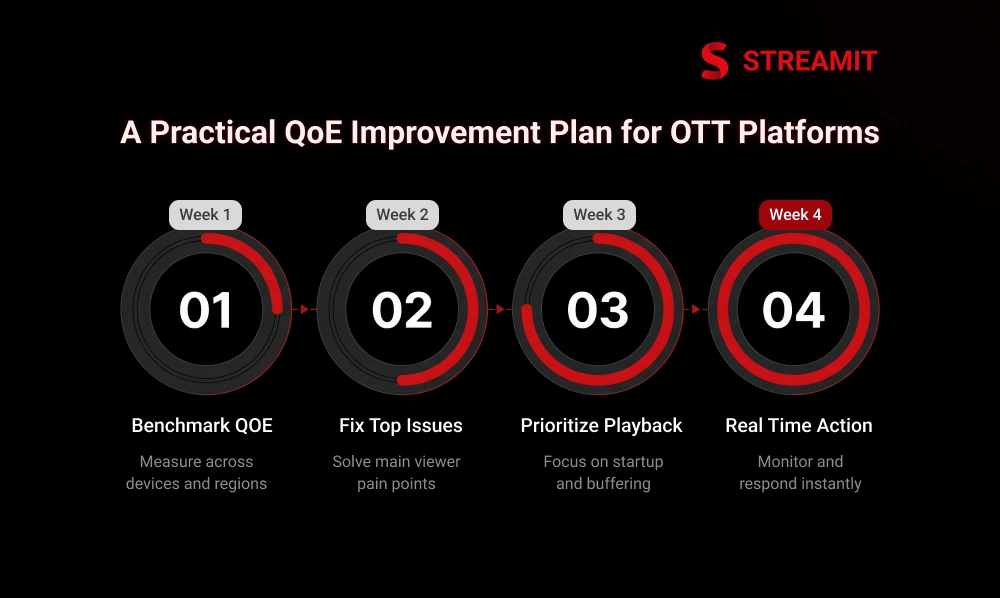
QoE improvement works best when treated like an operating rhythm, not a one-time cleanup. The goal is to build a repeatable system for measuring pain, fixing the largest issues first, and responding faster when quality slips.
Most platforms do not need a massive transformation to improve QoE. They need sharper priorities, clearer metrics, and tighter coordination between playback, app, analytics, and infrastructure teams.
-
W1
Week 1: Benchmark Current QoE Across Devices, Regions, and Content Types
Establish a baseline. Compare startup, buffering, errors, and exits across screens, content formats, and geographies.
-
W2
Week 2: Fix the Top Two Viewer Pain Points First
Do not spread effort across ten issues. Solve the two problems users feel most often and most intensely.
-
W3
Week 3: Prioritize High-Impact Issues Like Startup Delay, Buffering, and Playback Failures
These issues usually hurt performance faster than lower-priority optimizations. Attack them early.
-
W4
Week 4: Turn Monitoring Into Real-Time Action
Move from passive reporting to active response. Monitoring should drive decisions, not just fill dashboards.
Set alerts tied to viewer pain, not just backend graphs
Set alerts tied to viewer pain, not just backend graphs, so teams can react faster to issues that directly affect playback quality. This helps fix real user-facing problems before they turn into larger retention risks.
Create simple response playbooks for repeat incidents
Create simple response playbooks for repeat incidents so teams can act quickly when the same streaming issues return. This improves response time, reduces confusion, and helps protect the viewer’s experience.
Summary
Key Takeaways
QoE and QoS Are Not the Same
QoS measures how well the streaming system delivers video, while QoE reflects how viewers actually experience playback. OTT teams need to track and improve both to understand performance fully.
Experience Breaks Trust Faster Than Teams Expect
Slow startup, buffering, playback failures, and poor video quality are the biggest reasons viewers abandon a stream early and return less often. Frustration compounds session by session.
Good Infrastructure Alone Is Not Enough
A platform can show acceptable delivery metrics and still create poor QoE because of weak playback logic, device issues, or poor product experience. Technical health does not guarantee viewer satisfaction.
Poor QoE Directly Hurts Revenue
When playback feels unreliable, watch time drops, subscriber trust weakens, and monetization models such as SVOD, AVOD, and live streaming all become harder to sustain.
Fix Startup and Buffering First
Startup delay, buffering, and playback errors are the most visible viewer pain points and often deliver the fastest improvement in perceived platform quality. Attack them before anything else.
Treat QoE as a Growth Lever
Strong OTT platforms treat QoE as a repeatable operating rhythm, not a one-time fix. Better streaming quality improves retention, protects brand trust, and helps platforms scale with long-term confidence.
Conclusion
Conclusion
Most streaming businesses do not fail because they lack features. They fail because the experience became unreliable before the business became durable. That is why QoE and QoS should be treated as connected levers, not separate conversations.
For OTT platforms that care about scale, ownership, and long-term retention, the real job is not just delivering video. It is delivering confidence. When the stream starts fast, stays stable, adapts intelligently, and helps viewers find the right content quickly, quality stops being a backend topic and becomes a growth advantage.
FAQs
Frequently Asked Questions
-
What is the real difference between QoE and QoS in video streaming?
QoS measures how well the streaming system performs. QoE measures how the viewer experiences that performance through startup speed, buffering, video quality, and playback smoothness.
-
Why do viewers quit streaming within the first few seconds?
Viewers leave early when playback starts slowly, loading takes too long, or the stream feels unreliable before the content even begins. The first few seconds shape trust quickly.
-
What are the most important QoE metrics to track for OTT platforms?
Key QoE metrics include startup time, buffering rate, playback failures, watch time, completion rate, and exit rate. These show where viewers are facing the most friction.
-
What is a good benchmark for startup time (TTFF) in streaming?
A good TTFF benchmark feels fast and consistent across devices and networks. The goal is not just a low number, but a playback start that feels immediate to the viewer.
-
Is QoE more important than QoS for OTT business success?
QoE is closer to business outcomes because it reflects what users actually feel. But strong QoE depends on solid QoS, so both need to work together.
-
What is the fastest way to improve streaming QoE?
Start by fixing the biggest viewer pain points first, especially startup delay, buffering, and playback failures. These issues hurt trust and retention the fastest.
Read Also
Read Also
1. 10 Streaming Features Every OTT Service Needs
2. Edge Caching for OTT: Faster Streaming, Less Buffering
3. Cloud vs On-Premise Hosting for Your OTT Platform Guide
4. Why Video Streaming App Development Needs Multi-Device Support
5. Lowest Latency Video Streaming: How to Reduce Delay in Live OTT