AI-Powered Smart Thumbnail Personalization for OTT Growth

Most OTT platforms don’t lose viewers because content is weak. They lose them because discovery is. In the first few seconds of browsing, viewers don’t evaluate a title, they react to an image. If the image is misaligned, they scroll. Quietly. Instantly. This is exactly where AI – Powered Smart Thumbnail Personalization for OTT Growth changes the dynamic by aligning visuals with viewer intent at the moment attention is decided.
Recommendation engines can be accurate and still underperform in the real world. Not because the system picked the wrong title, because the platform introduced the right title in the wrong way.
The bottleneck is visual alignment. When thumbnails don’t match viewer intent, engagement drops before the story even has a chance.
When the Right Content Gets the Wrong Image
Recommendation is only half the job. The presentation decides whether the viewer even considers it. Many platforms treat low engagement as an algorithm problem. Often it’s not. The title is correct. The thumbnail simply doesn’t connect.
If the image highlights the wrong angle, wrong emotion, wrong character, wrong energy, the viewer skips without hesitation. Not because they dislike the content. Because the platform framed it poorly.
One Title Multiple Thumbnail Variations
A single title can mean different things to different viewers. A sports documentary can be about achievement, struggle, rivalry, or identity, and each angle attracts a different audience segment.
- The athlete
- The emotional struggle
- The championship moment
- The rivalry
The Three Root Causes of Thumbnail Underperformance
Most thumbnail systems are built for consistency, not performance. The common failure points are predictable:
- Same image shown to every viewer
- Decisions happen in 2–3 seconds
- Platforms learn from clicks, not from skips
Why Static Thumbnails Limit Content Potential?
A small CTR lift compounds into meaningful watch time at scale. Even a 3–5% improvement in thumbnail click-through can translate into millions of additional viewing minutes across a catalog. Static systems cap that upside because they assume one image can represent one title for everyone.
Traditional thumbnails are treated like finished artwork. Uploaded once, distributed forever. That approach is stable, but under-optimized.
The Limitations of a One Size Fits All Image
Audiences aren’t uniform. Thumbnails shouldn’t be either. One thumbnail can attract one segment and repel another. Action-heavy visuals can push away drama-first viewers. Romantic visuals can lose thrill-seekers.
The Scanning Behavior of Modern Users
Viewers don’t evaluate content first. They react to visuals within moments of seeing them. If the image doesn’t align with their intent, they move on before considering the title.
On crowded home screens:
- Images compete for attention
- Movement is fast
- Decisions are subconscious
The Hidden Cost of Underutilized Content
Content investment rarely fails in obvious ways. It loses value quietly when the right titles remain undiscovered.
When thumbnails underperform:
- High-value titles get buried
- Niche content never finds its audience
- Engagement flattens without a clear reason
The Core Idea Behind Smart Thumbnail Personalization
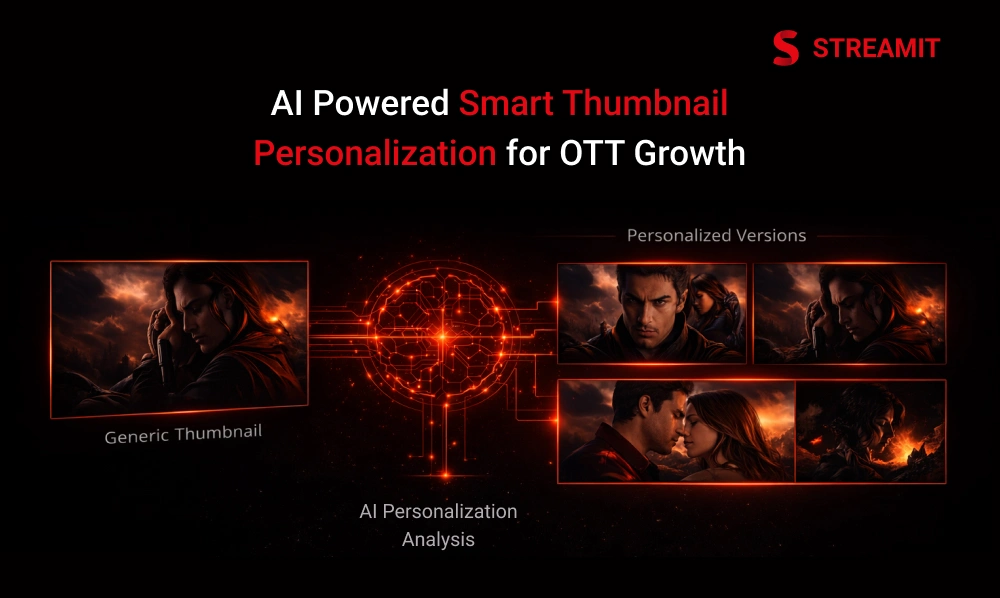
Instead of choosing one thumbnail for everyone, the system chooses the best thumbnail for this viewer. The content doesn’t change. The catalog doesn’t change. Only the entry point changes, so the right titles get a fair chance to be noticed.
AI-Powered Smart Thumbnail Personalization introduces controlled variation that stays:
- Secure
- Governed
- Brand-safe
- Non-disruptive
Same Title & Different Visual Entry Points
You already have multiple approved thumbnails. This system makes them work harder. It selects from your approved set. Creative control stays with your team. No new images are generated.
The Four Controlled Operating Modes
This is not random behavior. It is a structured selection process.
- Global Optimization Mode
- User-Context Mode
- Exploration Mode
- Fallback Mode
What This Solution Does Not Do?
It does not change content, generate images, or interfere with your recommendation engine.
It’s not:
- Real-time image generation
- Aggressive A/B chaos
- Behavioral manipulation
- Creative override
The Thumbnail Selection Process
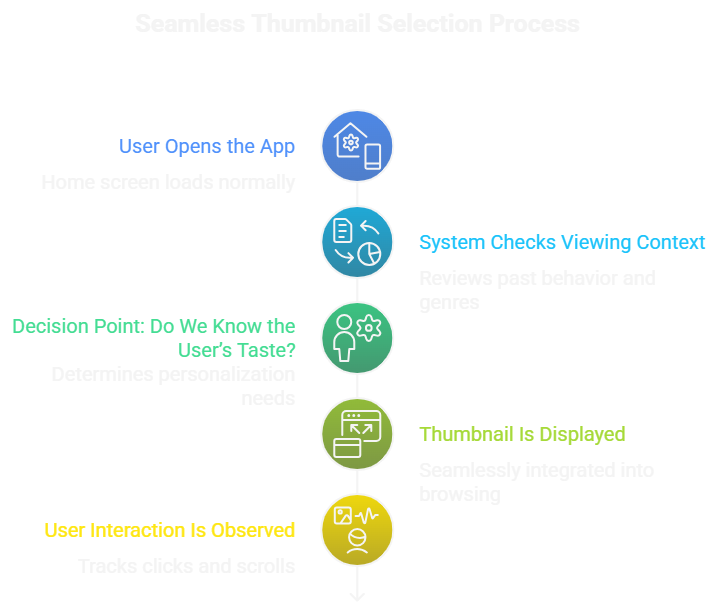
From app open to display, selection happens quietly in the background. No flicker. No disruption. The viewer experience stays stable.
Step 1: User Opens the App
The home screen loads normally. Nothing changes visually at this stage. From the user’s perspective, it is business as usual.
Step 2: System Checks Viewing Context
The system reviews lightweight signals like:
- Past viewing behavior
- Genres frequently watched
- Interaction history
Step 3: Decision Point: Do We Know the User’s Taste?
At this point, the system determines whether enough viewing data exists to personalize the thumbnail selection. If sufficient context is available, it chooses accordingly; if not, it displays a safe default image.
Step 4: Thumbnail Is Displayed
The selected thumbnail is displayed seamlessly as part of the normal browsing experience. To the user, it appears like any standard image, with no visible changes or interruptions.
Step 5: User Interaction Is Observed
Once the thumbnail is shown, the system quietly observes whether the user clicks or scrolls past. These interactions help refine future selections without affecting the current browsing experience.
Two primary signals:
- Click → positive engagement
- Scroll past → neutral observation
No penalty is assigned for non-clicks.
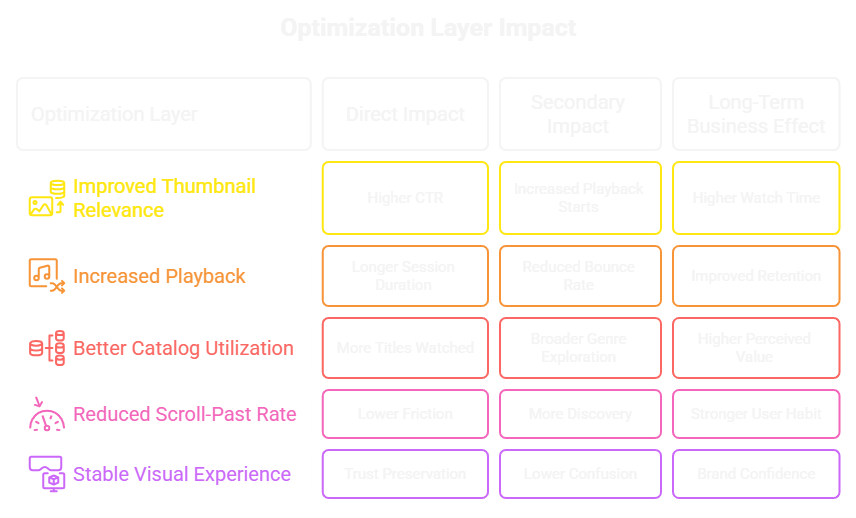
Business Value Flow: From Better Thumbnails to Stronger Engagement
Better thumbnails capture attention faster and increase the likelihood of clicks. More clicks lead to higher playback starts and longer viewing sessions. Over time, this strengthens engagement, improves content utilization, and supports retention growth.
Smarter thumbnail selection increases visibility, which drives more clicks and deeper viewing. That improved engagement strengthens overall platform performance and long-term retention.
Better Thumbnails Lead to More Clicks
When visuals align with user preferences, friction decreases. Reduced friction increases exploration.Users are more likely to engage with titles that visually resonate.
More Clicks Increase Viewing Duration
More clicks lead to more playback starts, which naturally extend session length. As users watch longer, overall engagement and platform stickiness increase.
Better Content Utilization Improves ROI
When more titles are discovered and watched, the value of your existing catalog increases without additional content investment. Higher utilization directly improves return on content spend and overall platform profitability.
Stronger Engagement Strengthens the Platform
Higher engagement builds stronger viewing habits and increases user satisfaction over time. As users watch more and explore deeper, the platform becomes more valuable and harder to replace.
Built for Scale and Stability
The system is designed to handle large audiences without compromising performance or speed. Thumbnail decisions are lightweight and repeatable, ensuring consistency across millions of impressions. Even at scale, the browsing experience remains stable, seamless, and reliable.
The system scales efficiently without affecting speed or stability. It ensures consistent, reliable thumbnail selection across large audiences.
Multiple Approved Thumbnails Per Title
Creative teams upload a set of brand-safe images. Each thumbnail represents a different angle.The system selects among this pool, it does not create new visuals.
Consistency Within a Session
Once selected, a thumbnail remains consistent for that user session. This prevents confusion.No flicker. No swapping mid-scroll.
Controlled Learning Loop
Clicks increase thumbnail weight. Ignored impressions gradually reduce exposure.The system adapts quietly.
Static vs Smart Thumbnail Personalization
Security, DRM and Enterprise Governance
Smart Thumbnail Personalization operates independently from your DRM-protected playback layer, ensuring no compromise to content security. Only approved thumbnails are used, and delivery can follow secure, time-limited access protocols. Full governance controls allow your team to manage, lock, or override assets at any time.
The system enhances discovery without weakening security, compliance, or executive control.
Secure Thumbnail Delivery
Thumbnails are delivered through secure, access-controlled channels to prevent unauthorized usage. This ensures image distribution aligns with your platform’s existing security and compliance standards.
Thumbnails can be served via:
- Time-limited URLs
- Secure CDN layers
- Access-controlled endpoints
Editorial Override and Locking Mechanisms
Your team can lock specific thumbnails, exclude titles, or override selections whenever needed. This ensures full editorial control while the system operates within defined governance rules.
At any time, your team can:
- Lock a thumbnail
- Exclude a title
- Restrict experimentation
- Set regional rules
From Static Artwork to Behavioral Intelligence
Platforms that adapt visuals based on viewing behavior typically see measurable lifts in engagement without altering recommendations. This shift does not change what is offered to users. It changes how that offer is visually framed.
Smart Thumbnail Personalization is not about prediction in the abstract. It is about observing real viewing patterns and responding with better visual alignment. The system learns quietly from interaction signals and refines thumbnail selection over time.
Learning from Patterns, Not Assumptions
The system does not assume who a user is. It observes what they actually do.
If a user frequently watches character-driven dramas, thumbnails emphasizing emotional close-ups may perform better. If another user watches fast-paced thrillers, images highlighting intensity may resonate more.
Engagement Signals That Matter
The system focuses on meaningful user actions such as clicks, playback starts, and repeated interactions. These real engagement signals guide smarter thumbnail selection over time.
Primary signals include:
- Click-to-play
- Time-to-play
- Scroll-past frequency
- Repeat exposure without engagement
Avoiding Over-Optimization
The system avoids aggressive testing that could disrupt the user experience. Optimization happens gradually, ensuring stability, consistency, and long-term trust.
The module ensures:
- No rapid thumbnail swapping
- No disruptive testing waves
- No user confusion
Cold Start Strategy: Handling New Users and New Titles
New users and newly released titles represent the highest uncertainty points in any personalization system. Without historical data, decisions must remain conservative. This is where structured fallback logic becomes critical.
Smart Thumbnail Personalization addresses the cold-start challenge without compromising experience.
Exploration Mode: Learning Without Disruption
Effective systems allocate small, controlled exposure to alternate thumbnails to improve long-term performance. This is not random testing. It is a measured discovery. Exploration mode ensures the system continues improving rather than stagnating.
Controlled Variation
Only a limited percentage of impressions are used for exploration. The majority remain optimized for stability. This avoids large-scale volatility in engagement metrics.
Reversible Learning
If an alternate thumbnail underperforms, its exposure naturally decreases.There is no permanent penalty or lock-in effect.
Protecting High-Value Content
For premium or flagship titles, exploration thresholds can be tightened. Editorial teams retain authority to restrict testing where risk tolerance is low.
Live Streaming Scenario: Real-Time Contextual Adaptation
Live content introduces time sensitivity that differs from VOD personalization. In live scenarios, relevance is tied to the moment. Visuals must reflect current excitement, not historical preference.
Smart Thumbnail Personalization adapts to this dynamic environment.
Generating Candidate Thumbnails from Live Moments
During live events, the system captures key frames and filters them for clarity and brand compliance, creating a pool of candidate thumbnails for display.
During live events:
- Key frames are identified
- Clear, high-quality moments are captured
- Candidate thumbnails are generated
Prioritizing Recency Over Personal History
Prioritize recent events and actions over personal history. Focusing on what’s happening now helps make decisions that reflect the present situation rather than past patterns.
In live events:
- Current momentum matters more than past behavior
- A goal, winning shot, or dramatic moment takes priority
Transitioning Back to VOD Mode
Switching back to Video on Demand (VOD) mode allows viewers to control playback at their own pace. This shift ensures content is accessible anytime, giving users flexibility and convenience.
Once the live event concludes:
- The system switches back to standard thumbnail logic
- Historical engagement regains importance
Why Does This Work at Scale?
Small improvements in click-through rate multiply exponentially across large catalogs and audiences. Even incremental gains compound quickly. The system is designed to scale without adding operational friction.
Scalability is achieved through lightweight decision-making rather than heavy computation.
Pre-Calculated Decisions
Thumbnail selection decisions are often pre-computed. They are not generated in real-time during browsing.
This ensures:
- No latency increase
- No performance bottleneck
- No visible delay
Reusable Behavioral Segments
Users with similar patterns may share thumbnail selection strategies. This allows decision reuse across cohorts.
Instead of individual recalculation, the system applies learned patterns efficiently.
Linear Growth in Impact
If a 4% improvement applies to 100,000 impressions, it scales proportionally at 10 million impressions. Impact grows with audience size.
Performance Impact Mapping
Performance Impact Mapping helps identify how different factors affect overall outcomes. By visualizing these connections, you can pinpoint areas that need improvement and optimize efficiency effectively.
KPI Impact Mapping
Real-World Industry Validation
Major global streaming platforms already deploy personalized artwork strategies at scale. This is not experimental theory. It is operational practice in mature ecosystems. Smart Thumbnail Personalization aligns with established industry standards.
Personalized Artwork in Practice
Personalized Artwork in Practice shows how custom designs can be tailored to individual preferences. Applying this approach enhances engagement by making content feel unique and relevant to each user.
Large OTT platforms display different artwork for the same title depending on:
- Viewer preferences
- Regional context
- Device type
A/B Testing Evolution
Traditional A/B testing measures performance at audience-wide levels. Personalized systems refine that concept to micro-segments.
The shift moves from “best overall image” to “best contextual image.”
Maturity of the Model
These systems have evolved over years. They emphasize:
- Governance
- Stability
- Measurable ROI
Conclusion
Most OTT platforms don’t struggle because of content quality or recommendation accuracy. They struggle because discovery breaks at the visual layer. When the first impression fails, even the most relevant titles remain invisible.
At scale, engagement is rarely limited by what your platform offers. It is limited by how effectively that value is presented in the few seconds where attention is decided.
AI-Powered Smart Thumbnail Personalization is not a redesign of your platform. It is a structural refinement of how content is introduced to each viewer. The catalog remains the same. The interface remains stable. What changes is the alignment between viewer intent and visual presentation.
This shift does not create short-term spikes. It builds long-term efficiency. More titles get discovered, catalog utilization improves, and engagement grows without increasing content spend or operational complexity.
For OTT platforms planning beyond launch metrics and focusing on sustainable growth, improving discovery is not a cosmetic upgrade. It is a strategic lever. Because when the right content is consistently seen at the right moment, performance improves quietly, predictably, and at scale.
Experience how Smart Thumbnail Personalization works and discover a subtle, powerful way to boost engagement without altering your platform.
FAQs
1. What is AI-Powered Smart Thumbnail Personalization?
AI-Powered Smart Thumbnail Personalization selects the most relevant thumbnail for each viewer to improve content visibility and engagement on OTT platforms.
2. How does Smart Thumbnail Personalization improve OTT growth?
By showing thumbnails that match viewer preferences, it increases click-through rates, watch time, and overall platform engagement.
3. Does Smart Thumbnail Personalization affect platform speed or performance?
No. Thumbnail selection happens quickly in the background, ensuring a smooth and uninterrupted user experience.
4. Is Smart Thumbnail Personalization suitable for live streaming and VOD platforms?
Yes. It works for both live streaming and video-on-demand (VOD) platforms, adapting thumbnail selection based on viewing context and user behavior.
5. Is Smart Thumbnail Personalization secure and compliant?
Yes. It works alongside existing DRM and platform security systems without affecting content protection or user privacy.
Read Also
1. Personalization vs. Content Quantity: What Drives Streaming Retention in 2025
2. How to Reduce Subscriber Churn in OTT Platforms: Lessons from Netflix
3. 5 Proven Retention Tactics Every Streaming Platform Can Steal from Netflix
4. Why Most Streaming Platforms Fail at Retention (and How to Fix It Like Netflix)
5. Why Most Streaming Startups Fail in 18 Months (And It’s Not Content)