How Adaptive Streaming Improves Video Performance in OTT


One weak playback session can damage more trust than one weak homepage. In OTT, users rarely notice the infrastructure when it works, but they immediately feel it when the video buffers, drops, or fails to start.
Adaptive streaming solves one of the hardest parts of video delivery: real viewers do not watch from perfect networks, perfect devices, or perfect locations. They watch on phones, TVs, laptops, tablets, mobile data, Wi-Fi, and unstable connections.
Part 1
What Adaptive Streaming Really Does in OTT
Adaptive streaming gives the player choices instead of forcing one fixed video file. The same video is prepared in multiple versions so the platform can serve a suitable stream for each viewer.
This matters because OTT performance is not only about having high-resolution content. It is about delivering the best possible experience under changing real-world conditions.
It Adjusts Video Quality to Match Real Playback Conditions
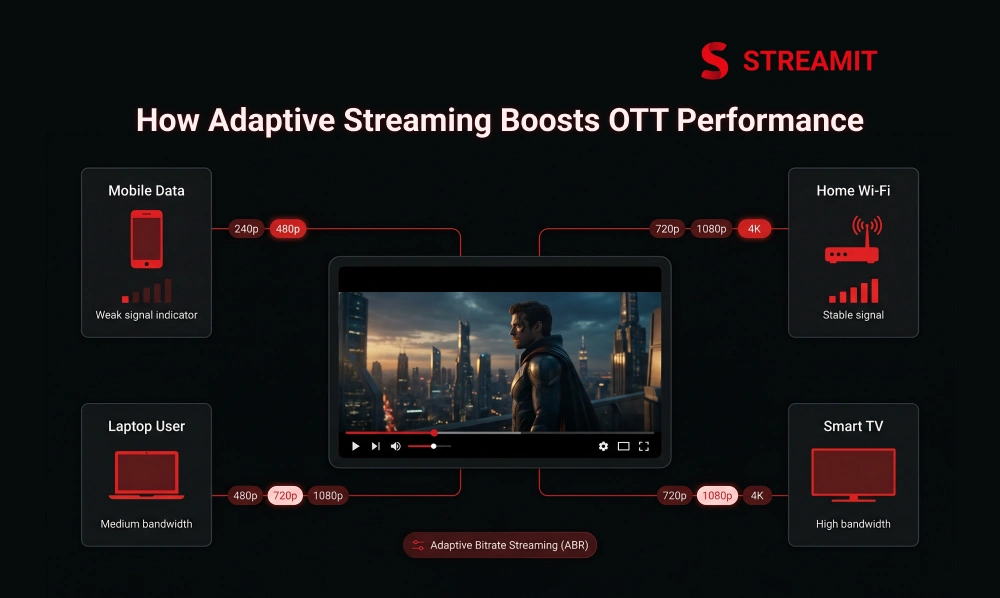
A 4K file is not useful if the viewer’s network can only support 720p smoothly. Adaptive bitrate streaming allows the player to move between different quality levels during playback.
When the connection improves, the player can shift upward. When the connection weakens, it can shift downward before the viewer sees a major interruption.
It Helps OTT Platforms Balance Playback Quality and Playback Stability
The best stream is not always the highest-resolution stream. Sometimes the better business decision is stable playback at slightly lower quality instead of forcing sharp video that keeps buffering.
For OTT teams, this balance directly affects watch time, user engagement, and trust. Viewers forgive small quality adjustments more easily than repeated playback stops.
It Matters More in OTT Because Devices, Screens, and Networks Keep Changing
OTT is no longer watched on one screen in one environment. A viewer may start on mobile data, continue on office Wi-Fi, and finish on a smart TV at home.
Adaptive streaming helps the platform adjust across these shifts. Without it, the same content can feel smooth for one user and broken for another.
Part 2
Why Video Performance Matters in OTT
Playback is not just a technical layer; it is part of the product experience. If the video does not start quickly or play smoothly, the rest of the platform gets judged harshly.
Good design, strong content, and smart pricing cannot fully protect a platform from poor video performance. In OTT, performance is part of the brand.
Poor Playback Hurts Watch Time, Retention, and Platform Trust
One buffering loop can shorten a session before the content gets a fair chance. Viewers often leave because playback feels unreliable, not because the content itself is weak.
For subscription-led platforms, this becomes more serious. Poor playback can reduce repeat usage, weaken retention, and make renewal harder.
Viewer Experience Is Bigger Than Resolution Alone
A sharp video that keeps stopping is still a poor experience. Viewer experience includes startup time, smooth playback, audio sync, quality consistency, and fewer errors.
That is why OTT teams should think in terms of Quality of Experience, not only pixels. Resolution is visible, but reliability is what keeps users watching.
| Playback Area | What Viewers Feel | Business Impact |
|---|---|---|
| Slow startup | “This app feels heavy” | Lower first-session trust |
| Buffering | “This is frustrating” | Shorter watch time |
| Quality drops | “This feels cheap” | Lower brand perception |
| Playback failure | “This does not work” | Higher churn risk |
Part 3
How Adaptive Streaming Works
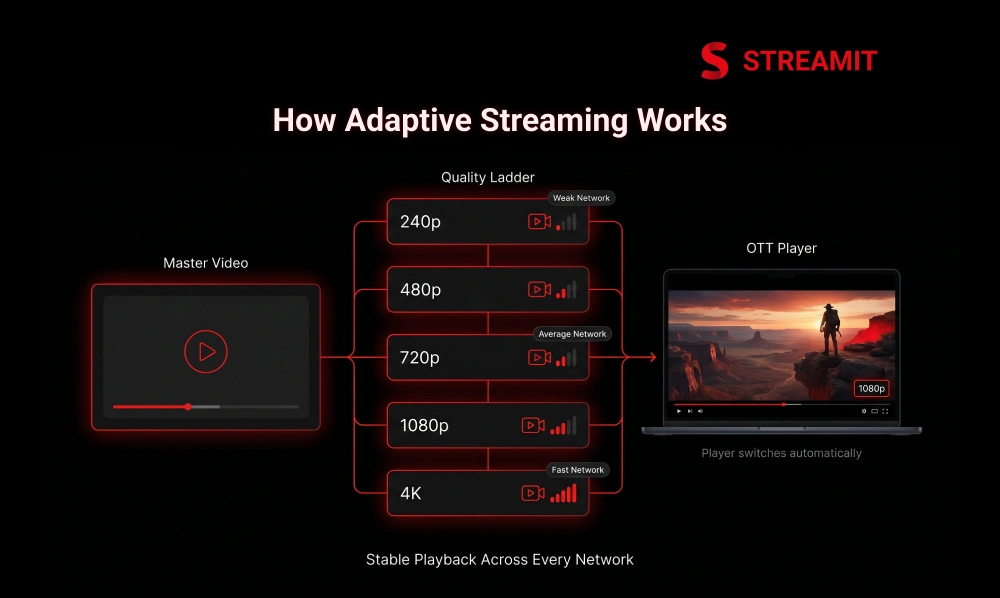
Adaptive streaming works because one master video becomes several playable versions. These versions are prepared at different bitrates and resolutions for different conditions.
The player then reads the available options and selects the most suitable one during playback. This happens quietly in the background.
One Video Is Prepared in Multiple Bitrates and Resolutions
One source video becomes a ladder of quality levels. A high-quality master file is encoded into different versions, such as lower, medium, HD, and higher-resolution streams.
This is where encoding and transcoding matter. If the versions are poorly prepared, adaptive streaming cannot deliver the experience viewers expect.
The Player Switches Between Versions as Playback Conditions Change
The player makes small decisions throughout the viewing session. It watches available bandwidth, buffer health, device capability, and playback behavior.
When conditions change, it requests a different version of the next video segment. The goal is simple: keep playback moving without forcing the viewer to think about it.
Part 4
Why Adaptive Streaming Improves OTT Video Performance
Adaptive streaming improves performance by reducing the gap between ideal delivery and real delivery. It does not assume every viewer has perfect bandwidth.
Instead, it helps the platform respond to each session as it happens. That response is what makes playback feel smoother at scale.
It Reduces Buffering and Improves Start Time
A faster start often matters more than maximum quality in the first few seconds. Many players begin with a safer stream and improve quality once conditions are clearer.
This approach helps reduce waiting time. It also lowers the chance that the viewer leaves before the content starts.
It Handles Network Changes and Device Variation More Smoothly
Mobile viewing is rarely stable from start to finish. Signal changes, Wi-Fi drops, device limits, and background usage can all affect playback.
Adaptive streaming gives the platform room to adjust. Instead of one hard failure, the player can make smaller quality changes and continue.
It Works Differently for Live and VOD Playback
Live streaming has less room for delay than VOD. In live sports, events, or classes, latency and stability become more sensitive.
VOD gives platforms more time to encode, package, test, and optimize. Live workflows need faster decisions and stronger real-time delivery planning.
Part 5
HLS, DASH, and CMAF in Adaptive Streaming
Protocols shape how adaptive streaming is packaged and delivered. HLS, DASH, and CMAF are not the same thing, but they often sit inside the same delivery conversation.
Choosing the right approach depends on device support, player strategy, content type, latency needs, and platform control.
HLS
Widely used for broad OTT device support. A strong practical default, especially where mobile and TV compatibility matter.
DASH
Useful for flexible adaptive delivery. Works well when the device, player, and delivery stack support it properly.
CMAF
Common media packaging format. Helps simplify multi-format workflows and reduce duplicated effort in delivery pipelines.
HLS Is Common in OTT Because of Broad Device Support
HLS is widely used because OTT platforms need reliable playback across many devices. It is especially important where mobile and TV compatibility matter.
For many OTT teams, HLS becomes a practical default. The decision is not emotional; it is about reach and reliability.
DASH Helps When the Ecosystem Supports It Well
DASH can be powerful when the device, player, and delivery stack support it properly. It gives teams flexibility in HTTP-based adaptive streaming workflows.
The key is not choosing DASH because it sounds advanced. The key is choosing it where it fits the platform’s real playback environment.
CMAF Helps Simplify Delivery Across Workflows
CMAF helps reduce workflow complexity when platforms support multiple streaming formats. It can make packaging and delivery more efficient across compatible systems.
For growing OTT teams, this can reduce duplicated effort. Fewer fragmented workflows usually mean cleaner operations and better long-term control.
| Format | Best Use | Strategic Note |
|---|---|---|
| HLS | Broad OTT device support | Strong practical default |
| DASH | Flexible adaptive delivery | Useful when ecosystem supports it |
| CMAF | Common media packaging | Helps simplify multi-format workflows |
Part 6
What Else Has to Work for Adaptive Streaming to Work Well
Adaptive streaming is not magic on top of weak infrastructure. It performs well only when encoding, CDN, player logic, and analytics work together.
This is where many OTT platforms get the wrong lesson. They add adaptive streaming, but ignore the surrounding system that makes it effective.
A Good Bitrate Ladder and Encoding Strategy Matter
The bitrate ladder decides what choices the player actually has. If the ladder is too wide, too narrow, or badly matched to the content, switching becomes less useful.
Different content may need different encoding decisions. A fast sports clip and a slow interview should not always be treated the same way.
CDN, Edge Delivery, and Player Logic Still Shape Playback Quality
The player can only request what the delivery system can serve reliably. CDN performance, edge caching, and origin stability still matter.
Strong player logic also matters. Bad switching decisions can create quality jumps, unnecessary drops, or late reactions to network changes.
Adaptive Streaming Does Not Fix Weak Delivery or Weak UX by Itself
Adaptive streaming reduces playback pressure, but it cannot repair every broken experience. Poor navigation, slow apps, weak search, and bad device support still hurt retention.
OTT teams should treat adaptive streaming as part of the performance system. It is not a replacement for product discipline.
Part 7
The Quality Trade-Off OTT Teams Often Get Wrong
Many teams confuse lower buffering with better experience. Reducing bitrate too aggressively may keep playback alive, but it can make the platform feel cheap.
The better goal is not simply “less buffering.” The better goal is stable playback with quality that still protects the brand.
Lowering Bitrate Too Hard Can Reduce Buffering but Hurt Trust
A stream that never buffers but looks poor can still damage perception. Viewers may not know the word bitrate, but they understand poor quality immediately.
This is especially important for premium OTT products. If users are paying, the visual standard must match the promise.
Chasing High Resolution Too Aggressively Can Increase Buffering
High resolution becomes a liability when the platform forces it too early. A player that climbs too fast can create stalls on unstable networks.
Smart OTT teams avoid ego-based resolution decisions. They optimize for real playback, not just spec-sheet quality.
The Best Result Is Stable Playback With Smart Quality Switching
The strongest OTT experience feels invisible. The viewer should not keep noticing quality changes or waiting for video to recover.
Good adaptive streaming protects the session. It gives the user enough quality to enjoy the content and enough stability to continue watching.
Part 8
What to Measure When You Optimize Adaptive Streaming
You cannot optimize what you only feel through complaints. OTT teams need playback analytics that show what users actually experience.
The right metrics help teams find where quality breaks. They also show whether improvements are helping retention, not just infrastructure reports.
Startup Time, Rebuffer Rate, and Playback Failure Rate
These three metrics give OTT teams the first clear view of playback performance. Startup time shows how quickly viewing begins, while rebuffer rate shows interruptions during playback.
Playback failure rate is even more serious. If users cannot start or resume video, the product loses trust quickly.
Watch Time, Session Length, and Drop-Off Points
Playback metrics need business context. A lower buffering rate is useful, but the deeper question is whether users watch longer.
Session length and drop-off points help connect technical improvements with user behavior. That is where performance becomes growth infrastructure.
Device-Level and Region-Level Performance Gaps
Average performance can hide serious problems. A platform may look healthy overall while certain devices, browsers, cities, or regions struggle.
Device-level and region-level reporting helps teams fix the right problems first. This is especially important for multi-device OTT growth.
| Metric | What It Shows | Why It Matters |
|---|---|---|
| Startup time | Speed to first frame | Impacts first impression |
| Rebuffer rate | Playback interruption | Impacts watch time |
| Failure rate | Broken sessions | Impacts trust |
| Session length | Viewing depth | Impacts retention |
| Device gap | Platform inconsistency | Impacts scale |
Part 9
Where Adaptive Streaming Matters Most Across OTT Use Cases
Adaptive streaming matters wherever viewing conditions are unpredictable. That includes entertainment, sports, education, fitness, creator platforms, and live events.
The use case changes the priority. Some platforms need long-session stability, while others need low-latency delivery or strong mobile performance.
Entertainment Platforms With Long-Session Viewing
Movies and series need playback that can hold attention for long sessions. Even small interruptions feel larger when viewers are deeply engaged.
For entertainment OTT platforms, adaptive streaming supports smoother viewing across different devices and household network conditions.
Live Sports and Event Platforms
Live sports have very little patience for buffering. If the video fails during an important moment, the damage is immediate.
Adaptive streaming helps live platforms manage network changes, traffic spikes, and device differences. But it must be paired with strong live delivery planning.
Learning, Fitness, and Creator Platforms With Mixed Network Conditions
Learning and fitness content often depends on continuity. A buffering workout or interrupted lesson breaks rhythm and reduces perceived value.
Creator platforms also face mixed audiences and mixed devices. Adaptive streaming helps keep content accessible without forcing one quality level for everyone.
Part 10
What a Good OTT Platform Must Support for Adaptive Streaming to Work Well
A good OTT platform does not treat adaptive streaming as one isolated feature. It supports the full delivery chain around it.
That includes encoding, packaging, CDN delivery, player behavior, analytics, device testing, and long-term infrastructure control.
Strong Encoding, Packaging, and Multi-Bitrate Delivery
The playback experience starts before the viewer presses play. Encoding and packaging decide how well the content can adapt later.
Multi-bitrate delivery gives the player real options. Without that, adaptive streaming becomes limited from the beginning.
CDN, Multi-CDN, and Edge Delivery for Stable Playback
The closer the video is delivered to the viewer, the smoother the experience can become. CDN and edge delivery reduce stress on the origin system.
For larger OTT platforms, multi-CDN planning can also improve resilience. It gives teams more control when traffic rises, or regions behave differently.
Playback Analytics to See Where Quality or Buffering Breaks Down
Analytics should show where the experience fails, not just how much traffic arrived. OTT teams need visibility into buffering, failures, devices, and regions.
This helps teams fix root causes instead of guessing. Without playback analytics, scaling becomes reactive.
Device-Aware Playback Across Web, Mobile, and TV
The same stream may not behave the same way on every screen. TVs, browsers, mobile apps, and connected devices all have different constraints.
A strong OTT platform respects these differences. Device-aware playback helps maintain quality without forcing one rigid delivery model.
Part 11
Why Streamit Fits OTT Teams Focused on Better Video Performance
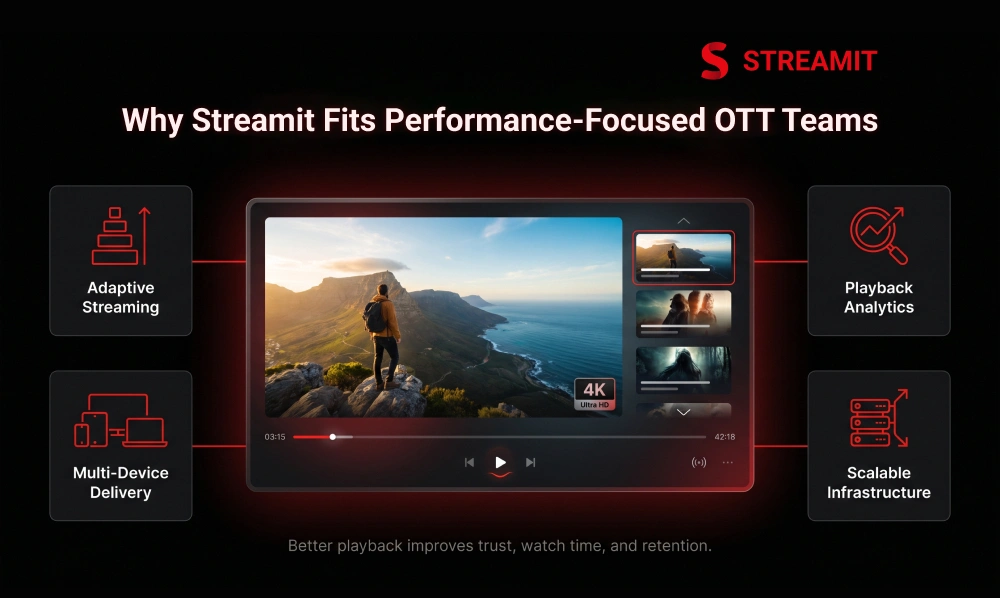
Streamit is built for teams that care about scale after launch, not just launch day. That distinction matters for serious OTT businesses.
The goal is not to create a basic streaming interface. The goal is to build a controlled platform that can support playback, monetization, analytics, and growth.
It Supports Adaptive Streaming, Better Playback, and Multi-Device Delivery
Streamit gives OTT teams a stronger base for adaptive delivery across web, mobile, and TV. This helps platforms serve different users without rebuilding the core experience.
For founders and media teams, that means less dependence on short-term fixes. The product can be planned around real usage from the start.
It Supports Better Analytics, Retention, and Viewing Experience
Better playback decisions need better visibility. Streamit supports the kind of platform thinking where analytics and experience are connected.
That matters because retention is not only about content recommendations. It is also about whether users enjoy watching without friction.
It Gives OTT Teams a Stronger Base for Playback and Scale
Most OTT platforms do not break because of one missing feature. They break because the foundation was not designed for traffic, devices, monetization, and performance together.
Streamit helps teams build with long-term control in mind. That is the difference between launching a streaming app and building a streaming business.
Summary
Key Takeaways
Manage playback quality, not just resolution
Adaptive streaming helps the player adjust video quality based on the viewer’s network, device, and real-time playback conditions – not just a fixed quality level.
Smooth playback beats forced high resolution
A stable 720p stream often delivers a better viewer experience than a 4K stream that keeps stopping. Buffer-free playback protects trust and watch time.
A strong bitrate ladder is the foundation
OTT teams need multiple video versions prepared properly so the player can switch quality levels without breaking the session for the viewer.
CDN and player logic still shape the final result
Adaptive streaming works best when segments are delivered quickly from the right location and the player knows when to switch quality without disrupting playback.
Live and VOD need different streaming decisions
VOD allows more preparation and optimization time, while live streaming requires faster delivery, lower delay, and stronger real-time handling under pressure.
Playback analytics are non-negotiable for growth
Metrics like startup time, rebuffer rate, failure rate, session length, and device-level gaps are essential to find where performance is breaking and where to fix it first.
Conclusion
Conclusion
In OTT, video performance is retention infrastructure. Users may come for the content, but they stay when the experience feels smooth, reliable, and worth returning to.
Adaptive streaming helps platforms deliver that experience across changing networks, devices, and viewing habits. For OTT teams thinking beyond launch, it is not optional polish. It is one of the foundations of scalable video delivery.
FAQs
Frequently Asked Questions
-
Why does buffering still happen even with adaptive streaming?
Buffering can still happen when the CDN, network, encoding ladder, player logic, or origin delivery is weak. Adaptive streaming reduces the risk, but it cannot fix every delivery issue alone.
-
Can adaptive streaming lower video quality too much?
Yes, if the bitrate ladder or switching logic is poorly planned. The goal is not just to avoid buffering, but to preserve quality while keeping playback stable.
-
What matters more in ABR: bitrate ladder or CDN setup?
Both matter because they solve different problems. The bitrate ladder gives the player quality choices, while the CDN helps deliver those choices reliably.
-
Does HLS handle adaptive streaming better than DASH?
It depends on the device ecosystem and platform strategy. HLS is widely used for broad support, while DASH can work well where the player and device environment support it properly.
-
What metrics show adaptive streaming is really working?
Startup time, rebuffer rate, playback failure rate, average bitrate, watch time, and device-level performance gaps are strong signals. These show both technical health and user impact.
-
Can aggressive compression reduce buffering but hurt retention?
Yes, because users still judge visual quality even when playback is smooth. Over-compression can make premium content feel low-value and reduce trust.
Read Also
Read Also
1. How to Reduce Buffering in OTT Without Hurting Video Quality
2. HLS vs DASH: What It Means for Streaming Buffering & Retention
3. 11 Ways to Improve Streaming Performance & Reduce Buffering
4. QoE vs QoS: Why Viewers Quit Streaming And How to Fix It
5. How Adaptive Streaming Works- ABR, Transcoding & Video Quality