HLS vs DASH: What It Means for Streaming Buffering & Retention


In OTT, buffering is not just a technical issue. It is a retention issue. Viewers may not understand streaming protocols, but they immediately notice slow startup, poor quality switching, and playback interruptions.
This is where HLS and DASH matter. Both are adaptive streaming protocols used to deliver video smoothly across different devices, networks, and screen sizes. But they work differently, and those differences can affect performance, latency, device support, and long-term viewer experience.
For OTT businesses, the goal is simple: start video quickly, maintain stable playback, reduce buffering, and retain viewers longer.
Foundations
What Are HLS and DASH in Video Streaming?
HLS and DASH are video streaming protocols that help deliver video over the internet in smaller chunks instead of one large file. This makes playback more flexible and stable, especially when the viewer’s internet speed changes.
HLS stands for HTTP Live Streaming. It was developed by Apple and is widely used across mobile, website, smart TV, and OTT apps. DASH means Dynamic Adaptive Streaming over HTTP, a protocol used to deliver video streams that adjust quality based on the viewer’s internet speed. It is an open standard used for adaptive video delivery across many modern devices and browsers.
Why Streaming Protocols Matter for OTT Platforms
Streaming protocols decide how video is packaged, delivered, and played on user devices. They directly affect startup time, buffering, video quality, and live latency.
For OTT platforms, this is not just backend logic. A weak video delivery setup can increase drop-offs, reduce watch time, and hurt subscription retention.
How Streaming Protocols Affect Buffering and Viewer Experience
Buffering happens when the video player cannot download the next segment fast enough. This can happen due to slow networks, poor CDN delivery, high bitrate selection, or badly optimized segments.
HLS and DASH reduce this risk through adaptive bitrate streaming. If bandwidth drops, the player can switch to a lower quality instead of stopping playback completely.
Protocol Deep Dive
How HLS Streaming Works
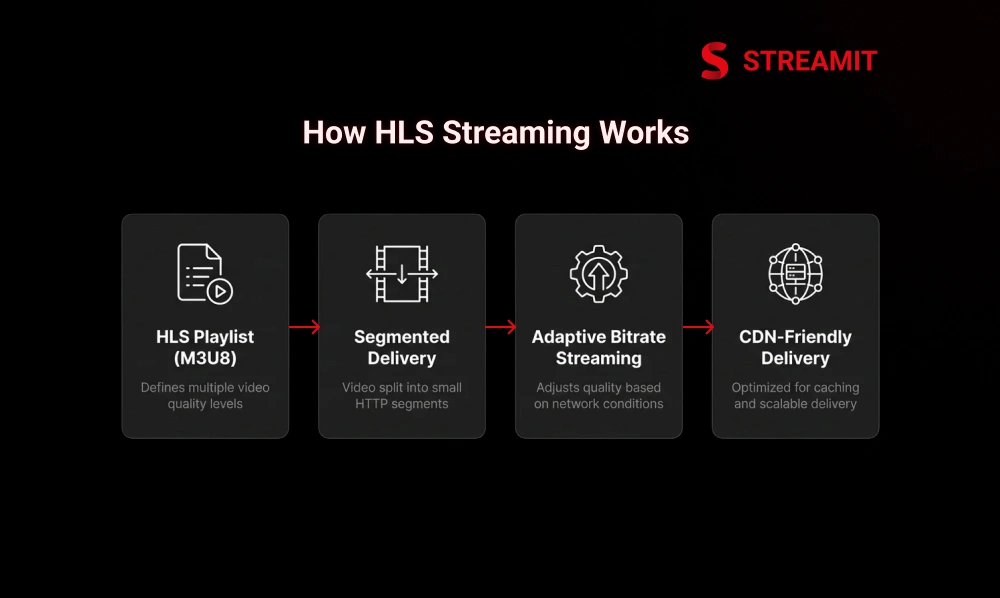
HLS works by splitting video into small segments and creating playlist files that tell the player where each segment is stored. The player reads the playlist and downloads segments one by one.
This makes HLS reliable and easy to distribute through CDNs. It is widely used because it works well across Apple devices and is supported by many OTT video players.
HLS Segmentation and Playlist Structure
HLS uses playlist files, usually called M3U8 files. The main playlist includes different quality versions of the video. Each version has its own segment playlist.
These segments are delivered over HTTP, which makes them cache-friendly and scalable. Segment size plays an important role. Larger segments can improve delivery efficiency, while smaller segments can reduce latency.
Adaptive Bitrate Streaming in HLS
HLS supports adaptive bitrate streaming. This means the player can move between different video qualities based on internet speed and device performance.
For example, if the viewer’s network slows down, the player may switch from 1080p to 720p to avoid buffering. This helps maintain playback continuity.
Pros and Limitations of HLS
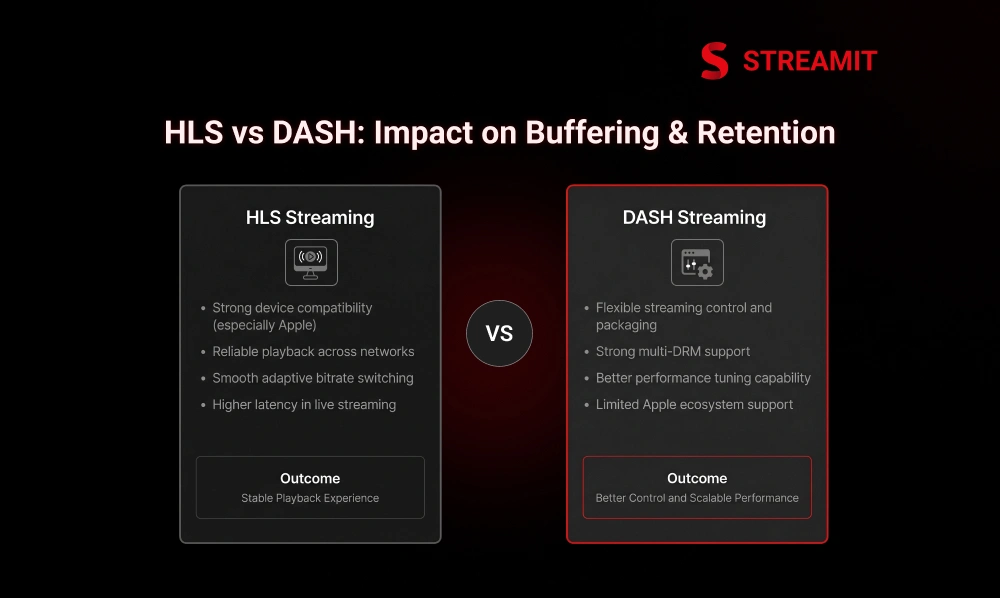
HLS is strong in compatibility. It works especially well across Apple devices and is commonly used for both VOD and live streaming.
The main limitation is latency. Traditional HLS can have more delay in live streaming compared to low-latency workflows. This matters for sports, live events, auctions, and interactive streaming.
Protocol Deep Dive
How DASH Streaming Works
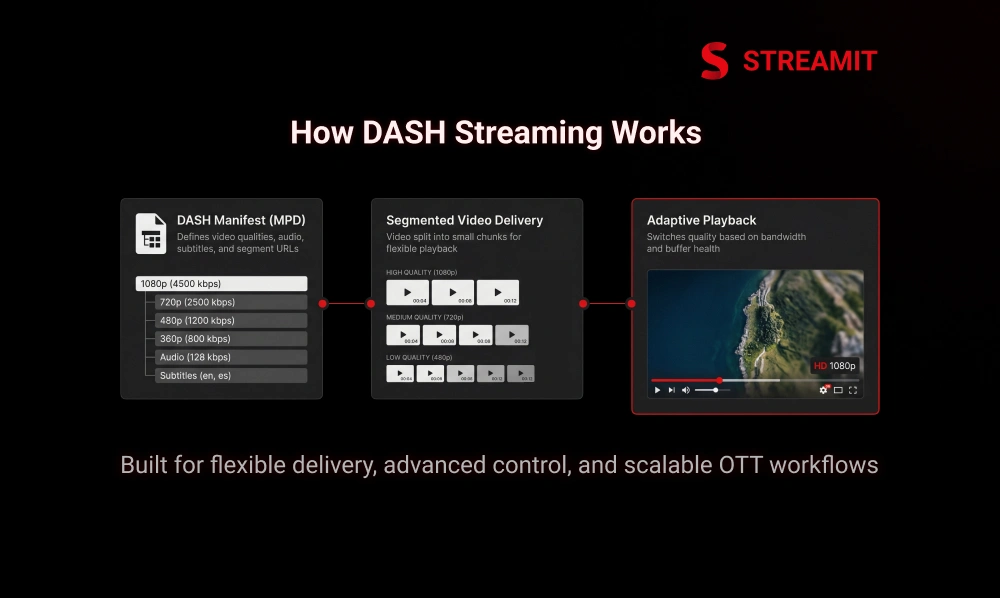
DASH also splits the video into small segments and allows the player to switch between quality levels. Instead of M3U8 playlists, DASH uses an MPD file, also called a manifest.
DASH gives streaming teams more flexibility in packaging, playback control, and multi-DRM workflows. It is commonly used in modern OTT systems that need scalable and flexible video delivery.
DASH Manifest and Segment Structure
The DASH manifest tells the player which video qualities, audio tracks, subtitles, and segment URLs are available. The player uses this information to decide what to play.
This structure gives DASH strong control over playback behavior. It is especially useful for platforms that need advanced device support, subtitle handling, and DRM combinations.
Adaptive Bitrate Streaming in DASH
Like HLS, DASH also supports adaptive bitrate streaming, allowing video quality to adjust based on the viewer’s network conditions. The player checks bandwidth and buffer health before choosing the right video quality.
A well-configured DASH workflow can deliver smooth playback, but it still depends on proper encoding, CDN performance, and player logic.
Pros and Limitations of DASH
DASH is flexible, open, and strong for advanced OTT workflows. It works well with modern browsers, Android devices, and multi-DRM systems.
Its limitation is Apple ecosystem support. DASH is not always the safest choice for Apple-heavy audiences unless paired with HLS.
Side-by-Side Analysis
HLS vs DASH Technical Comparison
HLS and DASH are both used for adaptive streaming, but they differ in structure, compatibility, DRM support, and latency behavior.
| Factor | HLS | DASH |
|---|---|---|
| Full Name | HTTP Live Streaming | Dynamic Adaptive Streaming over HTTP |
| Manifest Type | M3U8 playlist | MPD manifest |
| Strongest Support | Apple devices and broad player support | Browser, Android, and flexible workflows |
| Common Use | VOD, live streaming, OTT apps | VOD, live streaming, advanced OTT delivery |
| DRM Pairing | FairPlay | Widevine, PlayReady |
| Latency | Higher in a traditional setup | Flexible with low-latency workflows |
| Best Fit | Broad compatibility | Flexible multi-device delivery |
Format and Container Support
HLS traditionally used MPEG-TS segments, but modern HLS can also use fragmented MP4. DASH commonly works with fragmented MP4 and CMAF-based workflows.
CMAF helps platforms reduce duplication by using a common media format for both HLS and DASH. This can improve workflow efficiency.
Browser and Device Compatibility
HLS is usually safer for Apple devices, including iPhone, iPad, Safari, and Apple TV. It is also widely supported by modern OTT players.
DASH performs well across many browsers, Android devices, and smart TV environments. But for full device reach, many OTT platforms use both.
Adaptive Bitrate and Playback Handling
Both HLS and DASH support adaptive bitrate playback. The real difference comes from player behavior, encoding quality, and how well the bitrate ladder is designed.
A good adaptive setup should avoid aggressive quality jumps. Smooth playback is more important than forcing the highest resolution.
Latency and Live Streaming Performance
Traditional HLS can have higher live latency because of segment-based delivery. DASH can support low-latency setups depending on the player and packaging workflow.
For normal VOD, latency is not a major concern. For live sports and events, low-latency streaming needs careful planning.
Performance
HLS vs DASH for Buffering Performance
Neither HLS nor DASH automatically removes buffering. Buffering depends on the full streaming workflow, not only the protocol.
Encoding, segment duration, CDN quality, player logic, bitrate ladder, and network conditions all affect playback stability.
What Causes Buffering in Video Streaming
Buffering usually happens when the player runs out of downloaded video data. This can be caused by slow internet, overloaded servers, weak CDN routing, or poor bitrate selection.
It can also happen when the platform pushes high-quality video too early, before confirming the user’s network can handle it.
How HLS Handles Buffering
HLS handles buffering by allowing the player to switch to lower-quality segments when bandwidth drops. This helps prevent playback interruption.
To improve HLS buffering performance, teams should optimize segment length, CDN caching, and bitrate ladder structure.
How DASH Handles Buffering
DASH handles buffering through its MPD manifest and adaptive segment selection. The player chooses the best quality based on available bandwidth and buffer health.
DASH can perform very well, but only when the player, CDN, and encoding pipeline are properly tuned.
CDN and Segment Strategy Impact on Buffering
CDN performance has a major impact on buffering. If video segments are served from a far or overloaded server, playback can slow down.
Edge caching, multi-CDN routing, and optimized segment size help reduce buffering and improve playback consistency.
Retention Impact
HLS vs DASH Impact on Viewer Retention
Viewer retention depends heavily on playback quality. If the video starts quickly and plays smoothly, viewers are more likely to continue watching.
If the stream buffers, drops quality often, or crashes during playback, viewers may leave even if the content is good.
Buffering and Drop-Off Rate
Buffering creates frustration. Most viewers do not wait long before leaving, especially on mobile or smart TV apps.
For OTT platforms, reducing buffering is one of the simplest ways to protect watch time and reduce churn.
Startup Time and First Frame Delay
Startup time is the delay between clicking play and seeing the first frame. A slow start creates a weak first impression.
Both HLS and DASH can be optimized for faster startup through better manifest loading, CDN response, and initial bitrate selection.
Playback Stability During Long Sessions
Long viewing sessions reveal the real strength of a streaming platform. A short clip may play fine, but a full movie, series binge, or live match tests the entire system.
Stable playback across long sessions improves trust and increases repeat viewing.
Quality Switching and User Experience
Quality switching should feel natural. If the player keeps jumping between sharp and blurry video, the experience feels unstable.
A good adaptive streaming setup switches quality smoothly without distracting the viewer.
Live Streaming
Low Latency Streaming Comparison: LL-HLS vs LL-DASH
Low latency streaming reduces the delay between the live event and what the viewer sees on screen. This is important for sports, news, auctions, and live interactive content.
LL-HLS and LL-DASH are low-latency versions of HLS and DASH. They use smaller chunks or partial segments to deliver video faster.
How LL-HLS Works
LL-HLS uses partial segments to make parts of the video available before the full segment is complete. This helps reduce delay during live playback.
It is useful when an OTT platform needs low latency while still supporting Apple devices.
How LL-DASH Works
LL-DASH often uses chunked CMAF delivery. This allows smaller parts of the stream to reach the player faster.
It can work well in controlled playback environments where the player, CDN, and devices support low-latency DASH workflows.
Which Is Better for Live Sports and Events
For live sports, the best option depends on device support and end-to-end architecture. The protocol alone does not decide latency.
A strong live streaming setup needs optimized encoding, CDN delivery, player support, and monitoring. LL-HLS and LL-DASH can both be useful depending on the audience.
Security
DRM and Security Differences Between HLS and DASH
DRM protects premium video content from unauthorized access and piracy. It is important for subscription platforms, paid events, and licensed content.
HLS and DASH both support DRM, but they are often paired with different DRM systems based on device ecosystem.
DRM Support in HLS
HLS is commonly used with FairPlay DRM, especially for Apple devices. It can also use encryption to protect video segments.
For platforms with a large Apple audience, HLS and FairPlay support are usually important.
DRM Support in DASH
DASH is commonly used with Widevine and PlayReady. This makes it useful for Android, Chrome, Windows, and many smart TV environments.
For global OTT platforms, DASH often plays an important role in multi-DRM delivery.
Security Considerations for OTT Platforms
DRM alone is not enough. OTT platforms should also use signed URLs, token-based access, geo-restrictions, session control, and anti-piracy monitoring.
Security should be planned early because it affects content rights, monetization, and platform trust.
Decision Guide
Which Is Better for Your OTT Platform: HLS or DASH?
There is no single winner between HLS and DASH. The right choice depends on your audience, devices, content type, live streaming needs, and DRM requirements.
For many serious OTT platforms, the best approach is to use both. HLS improves Apple compatibility, while DASH adds flexibility across other environments.
Best for Video on Demand Platforms
For VOD platforms, buffering control and device compatibility matter more than low latency. Viewers want fast startup, smooth seeking, and stable quality.
HLS is often a strong starting point for VOD. DASH becomes useful when the platform needs broader device coverage and advanced DRM support.
Best for Live Streaming Platforms
For live streaming, latency becomes more important. Sports, events, and real-time content need faster delivery and stable playback.
Live platforms should evaluate LL-HLS, LL-DASH, CDN readiness, and player support before choosing the final setup.
Best for Global Multi-Device OTT Platforms
Global OTT platforms need to support different devices, browsers, and network conditions. Relying on one protocol can limit reach.
Using both HLS and DASH gives better coverage and stronger fallback options.
Strategy
Why Many OTT Platforms Use Both HLS and DASH Together
Many OTT platforms use both HLS and DASH because one protocol cannot always cover every device perfectly.
This approach gives the platform more control. HLS can serve Apple-heavy environments, while DASH can support Android, browsers, and other playback ecosystems.
Multi-Protocol Delivery for Maximum Device Reach
Multi-protocol delivery helps OTT platforms reach more viewers without forcing one format everywhere.
It also reduces playback failure risk. If one protocol is not supported on a device, the player can use another compatible option.
Auto Protocol Switching in Modern Video Players
Modern OTT players can detect the user’s device, browser, and playback environment. Based on that, they can choose HLS or DASH automatically.
The viewer does not need to know what is happening behind the scenes. They only care that the video plays smoothly.
Best Practices
Best Practices to Reduce Buffering and Improve Streaming Retention
Reducing buffering requires a full workflow approach. The protocol is only one part of the system.
OTT teams should optimize encoding, CDN delivery, player logic, segment strategy, and QoE monitoring together.
Optimize Segment Size and Bitrate Ladder
Segment size affects latency, buffering, and CDN efficiency. Shorter segments can improve responsiveness, while longer segments may reduce delivery overhead.
The bitrate ladder should include realistic quality levels. This helps the player switch smoothly without large jumps in video quality.
Improve CDN and Edge Delivery Strategy
A strong CDN setup helps deliver video segments faster to viewers. Edge caching keeps content closer to the user and reduces loading delays.
For growing OTT platforms, multi-CDN and smart routing can improve reliability during traffic spikes.
Monitor QoE and Playback Metrics
QoE metrics show how viewers actually experience playback. Important metrics include startup time, rebuffering ratio, error rate, bitrate changes, and playback failures.
Without monitoring, teams only discover issues after users complain. With monitoring, problems can be fixed before they affect retention at scale.
Summary
Key Takeaways
Protocols Shape the Viewer Experience
HLS and DASH are not just technical choices – they directly affect buffering, startup time, playback quality, live latency, and overall OTT viewer retention.
HLS Leads on Apple Compatibility
HLS works especially well across iPhone, iPad, Safari, and Apple TV. It is the reliable starting point for VOD and broad OTT playback support.
DASH Offers Flexibility at Scale
DASH is ideal for browser-based playback, Android environments, smart TVs, multi-DRM delivery, and advanced adaptive streaming setups across many device types.
Buffering Is a Full-Stack Problem
CDN performance, segment size, bitrate ladder, encoding quality, player logic, and network conditions all determine buffering – not the protocol alone.
Use Both for Global Reach
Multi-protocol delivery with HLS and DASH improves device reach, fallback support, DRM flexibility, and playback reliability for global OTT audiences.
Smooth Playback Drives Retention
Fast startup, fewer rebuffering events, smoother quality switching, and consistent long-session performance help keep users watching longer and reduce churn.
Conclusion
Conclusion
HLS vs DASH is not just a protocol comparison. It is a decision that affects buffering, playback quality, live latency, security, device support, and viewer retention.
For smaller or VOD-first platforms, HLS may be enough to start. For global OTT platforms, multi-device platforms, or businesses with long-term growth plans, using both HLS and DASH gives more control.
The goal is not to pick the most popular protocol. The goal is to build a streaming experience that starts fast, plays smoothly, protects content, and keeps viewers coming back.
FAQs
Frequently Asked Questions
-
How are HLS and DASH different in simple terms?
HLS uses playlist files to guide video playback and works especially well on Apple devices. DASH uses manifest files and gives more flexibility across browsers, Android devices, smart TVs, and DRM setups.
-
Which option helps reduce video buffering better?
Both HLS and DASH can support smooth playback when the setup is built properly. Buffering depends more on CDN quality, segment size, encoding, bitrate planning, and player performance.
-
Should I choose HLS or DASH for live streaming?
For regular live streaming, HLS is often easier to support across more devices. For low-latency live events, LL-HLS or LL-DASH may be better depending on your audience, devices, and platform setup.
-
Is it possible to use HLS and DASH on the same streaming platform?
Yes. Many streaming platforms use both so the video player can pick the best format based on the viewer’s device, browser, and network condition.
-
Does HLS or DASH cost less to run?
The cost usually depends more on CDN usage, bandwidth, storage, encoding, and traffic volume than the protocol itself. HLS can be simpler at the start, while DASH can offer more flexibility as the platform grows.
-
How do these protocols affect how long users keep watching?
HLS and DASH affect how quickly a video starts, how often it buffers, how smoothly quality changes, and how stable playback feels. A smoother viewing experience usually helps users watch longer.