Why Video Streaming App Development Needs Multi-Device Support


Most founders treat multi-device support as a phase-two feature. In streaming, that is usually a strategic mistake.
According to Nielsen, streaming already accounts for 43.8% of total TV time in the U.S., while consumers split an average of six hours a day across media and entertainment. That means your product is no longer competing only on content. It is competing on continuity: how easily a user can move from phone to TV, from commute to couch, and from casual browsing to intentional watching.
A modern streaming product is not one app. It is one service expressed across multiple contexts. Mobile is fast, personal, and fragmented. TV is lean-back and high-intent. The web is flexible, searchable, and often shared. If the experience breaks between those environments, the business absorbs that friction as lower watch time, weaker retention, and less monetization headroom.
That is why serious video streaming app development cannot be planned as a single-screen build anymore. The question is not whether people watch on multiple devices. The question is whether your streaming platform is designed to keep the session, identity, and value intact when they do.
The Way People Watch Video Has Changed Across Devices
According to Nielsen, 43.8% of TV time already going to streaming is the clearest signal that device behavior has shifted from linear to situational. People do not choose a device in the abstract. They choose the screen that fits the moment: phone when they are moving, laptop when they are browsing, TV when they are settled.
Viewers No Longer Watch on Just One Screen
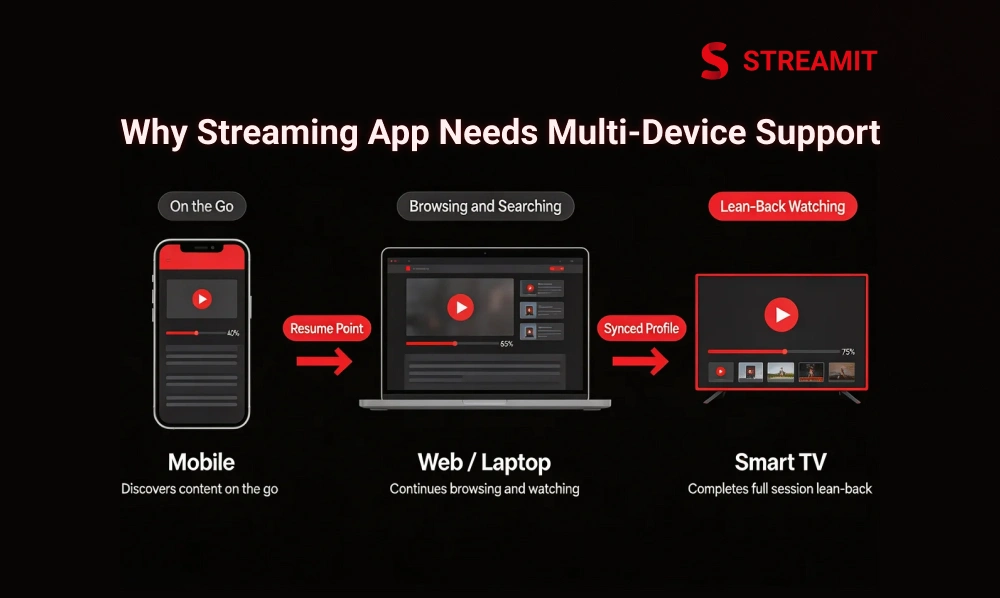
Multi-device streaming is now normal behavior, not premium behavior. A viewer may discover a title on mobile, compare web options, and complete the session on TV. When a platform supports that movement well, the experience feels obvious. When it does not, the user feels the break immediately.
Users Start Watching on Mobile and Continue on TV or Laptop
One user journey can span three screens before the first full session is complete. That is why cross-device playback matters. Resume points, watch history, and synced profiles are not convenience extras. They are the mechanics that prevent drop-off when the user changes context.
A user who has to search again, log in again, or restart from the beginning is not facing a small UX issue. They are being asked to do extra work to keep consuming your product. Most will not describe that as friction. They will simply leave.
Different Devices Fit Different Viewing Moments
Mobile supports short, reactive viewing. TV supports longer sessions and household viewing. Tablets often sit between those use cases, while the web remains important for browsing, account management, and workplace or desktop consumption.
The product implication is simple: the same service must behave differently without feeling inconsistent. That is the real job of cross-platform streaming app design.
Why Single-Device Thinking No Longer Works for Streaming Apps
Single-device logic made more sense when platforms were early, catalogs were smaller, and streaming habits were less distributed. That world is gone. Now the expectation is continuity.
Limited Device Support Creates Friction for Users
When a platform works only on mobile, or only on web, or only partially on TV, the problem is not just reduced reach. It is a broken user flow. If the viewer cannot move naturally between screens, your platform becomes harder to fit into daily life.
That is especially risky for OTT products because entertainment time is contested. Users are comparing your experience against the smoothest products they already use, not against your roadmap.
Friction Leads to Lower Engagement and Higher Drop-Off
Mux notes that startup times above two seconds correlate with meaningful abandonment, and rebuffering over 3% indicates serious delivery problems. In other words, even small playback or continuity issues can directly reduce engagement.
For streaming businesses, this matters more than it does for many other apps. If the product interrupts consumption, it interrupts revenue. That is why multi-device support is tied not just to UX quality, but to retention economics.
What Multi-Device Support Really Means in Video Streaming App Development
Multi-device support in video streaming app development means more than making the app available on different screens. It means creating a connected experience where users get the same content, account access, progress, and usability across mobile, TV, web, and other devices.
Multi-Device Support Is More Than Just Opening on Different Screens
True multi-device support means one platform can deliver the right experience across mobile, TV, tablet, and web without losing identity, playback continuity, content access, or brand coherence. Streamit’s own platform positioning reflects this directly: enterprise OTT infrastructure built for web, mobile, and smart TVs with centralized control and long-term ownership.
Same Account, Same Content, and Same Progress Across Devices
A serious streaming product should preserve the same user identity everywhere. That includes login state, subscriptions, purchased content, parental rules, watchlists, playback position, and history.
This is where many weak builds fail. They launch separate app surfaces that look related but do not share enough backend intelligence. The result is fragmented sessions and inconsistent customer trust.
Same Brand Experience With Device-Specific UI Adjustments
Consistency does not mean cloning the same layout everywhere. It means users should recognize the same service while each device gets a UI built for its own input model and viewing distance.
On mobile, dense touch interactions can work. On TV, they often fail. On the web, discoverability and keyboard flow matter more. Same brand, different interface logic.
Devices a Modern Streaming App Should Support
A modern streaming app should support the devices people actually use in daily life, including mobile, smart TVs, web, and tablets. In video streaming app development, broader device support improves accessibility, session continuity, and long-term user retention.
Mobile Apps for iOS and Android
Mobile remains essential because it is the fastest path to discovery, trial, push engagement, and personal viewing. It also tends to expose performance issues first because network conditions are less stable and device capabilities vary more widely.
Smart TVs and TV Platforms
TV apps cannot be treated like stretched mobile apps; Android TV explicitly recommends “10-foot” layouts and navigation that work with a directional pad and select button. Roku’s own design guidance also centers navigation around the four-way d-pad and clear focus movement.
That means smart TV app development is its own product discipline. Android TV, Apple TV, Roku, and Fire TV each introduce platform behavior, certification realities, and focus-navigation expectations that influence design and QA.
Web, Tablets, and Other Connected Devices
Web still matters because it reduces install friction, supports flexible search and onboarding, and often becomes the operational center for account flows. Tablets matter because they sit between lean-back and touch-first use cases. Connected devices like Chromecast and Fire TV extend reach further, especially for households that shift between personal and shared viewing.
Device Support at a Glance
| Device / Platform | Primary viewing context | UX priority | Business value |
| iOS / Android mobile | Personal, on-the-go, short-to-medium sessions | Fast startup, touch controls, resilient playback | Discovery, engagement, notifications, habit formation |
| Smart TVs / Android TV / Apple TV / Roku / Fire TV | Lean-back, long-form, household viewing | 10-foot UI, remote focus, large visuals, smooth playback | Longer watch time, higher perceived premium value |
| Web | Search, browsing, account actions, flexible access | Fast navigation, keyboard support, catalog discovery | Lower entry friction, strong onboarding, broader reach |
| Tablets | Mixed personal and lean-back use | Flexible layout, touch comfort, and readable browsing | Good bridge device for longer sessions and families |
| Casting / connected devices | Move content from personal to shared screen | Seamless handoff, stable session continuity | Extends usage moments without rebuilding the product |
Why Multi-Device Support Matters for User Experience, Retention, and Revenue
Most founders ask whether adding more devices will increase reach. That is the narrow view. The stronger question is what happens to trust, session length, and monetization when device support is missing.
Better User Experience Across Every Screen
A strong streaming experience is judged less by how beautiful it looks than by how little resistance it creates.
Smooth Playback Builds Trust
Cloudinary defines adaptive bitrate streaming as dynamic quality adjustment based on bandwidth and CPU capacity, so video can start faster and buffer less on the current device and network. That is not just a delivery technique. It is the base layer of trust across mixed devices and unstable conditions.
If playback feels unstable on lower-end phones, entry-level TVs, or weaker networks, the viewer does not blame codec ladders or player configuration. They blame the platform.
Easy Device Switching Keeps Users Engaged
The best multi-device streaming products reduce session loss during context changes. A user can discover on one screen and continue on another without feeling the transition.
That continuity raises engagement because it fits real life. It does not force the user to finish content in the same environment where they started.
Better Retention and Longer Watch Time
When users can switch devices without losing progress, preferences, or playback quality, they are far more likely to stay engaged with the platform. In streaming, a smoother cross-device experience often leads to longer watch sessions, stronger retention, and lower churn over time.
Resume Watching and Personalized Experience to Keep Users Active
Streamit highlights synced watch history, progress sync, and resume-watching behavior as core multi-screen features for entertainment OTT platforms. That is the right framing. Resume watching is not cosmetic. It preserves momentum.
The same applies to personalized rows, remembered preferences, language settings, and profile continuity. The more state survives across devices, the less effort the user spends rebuilding their relationship with the product.
More Reach and More Monetization Opportunities
Supporting more devices gives your platform more chances to be used across different viewing moments and user preferences. That wider reach can increase watch sessions, expand audience access, and create stronger opportunities for subscriptions, ads, and other monetization models.
More Supported Devices Mean More Viewing Sessions
A platform that works across mobile, TV, web, and connected devices creates more legitimate opportunities to watch. That increases the number of entry points into content and makes the service more resilient to changing habits.
For subscription businesses, that supports stickiness. For ad-supported businesses, it increases inventory. For transactional models, it gives users more buying moments.
Cross-Device Data Helps Recommendations and Monetization
Cross-device analytics provide a fuller picture of intent. What users browse on the web, sample on mobile, and complete on TV tells a richer story than single-screen data ever can.
That improves recommendations, content packaging, upsell logic, ad relevance, and plan design. Streamit’s platform positioning around analytics, retention systems, and monetization architecture points in that same direction.
Key UX Elements of a Multi-Device Streaming App
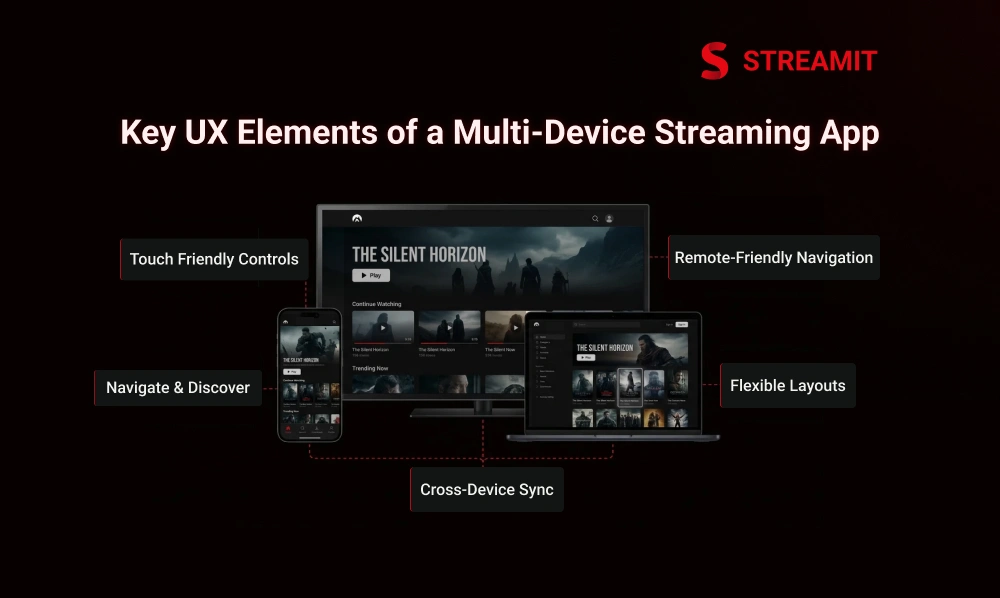
A strong multi-device streaming app is not built by repeating the same interface on every screen. It is built by creating a consistent experience that adapts to how users browse, search, and watch across mobile, TV, web, and tablet.
UI Should Adapt to Each Device Type
A streaming interface should feel consistent across platforms, but it should not behave the same on every screen. Mobile, TV, web, and tablet each have different viewing conditions and input methods, so the UI must adapt to deliver a smoother and more natural user experience.
Mobile Needs Touch-Friendly Controls
On mobile, controls must be easy to reach, overlays must be lightweight, and session recovery has to be fast. The user is often on variable networks, handling interruptions, and operating one-handed.
TV Apps Need Remote-Friendly Navigation
Android TV and Roku both center navigation around d-pad movement and clear focus behavior, which means hidden states and ambiguous focus quickly become exit triggers. TV design must optimize for fewer clicks, visible selection, and predictable movement.
Web and Tablet Need Flexible Layouts
Web and tablet experiences should support broader browsing, larger content grids, and flexible search behavior. They also need logical keyboard flow and visible focus for accessibility; WebAIM recommends that all content be accessible by keyboard alone and warns against removing visible focus indicators.
Navigation, Search, and Content Discovery Must Stay Simple
Discovery has to remain easy even when screen size, interaction pattern, and viewing distance change. Categories, rows, search, watchlist access, and profile entry points should stay recognizable across surfaces.
This is where many products overcomplicate things. They add device-specific logic but lose structural consistency. Users should not need to relearn the service on each platform.
Watch History, Preferences, and Profiles Should Sync Across Devices
Profiles, watchlists, parental controls, language preferences, subtitle settings, and continue-watching rows should travel with the user. Without that, “multi-device” becomes little more than “multi-login”.
Technical Foundations for Multi-Device Video Streaming App Development
Strong multi-device streaming depends on more than front-end design. It requires a shared backend, reliable content delivery, playback optimization, cross-device sync, and secure access so the experience stays consistent across mobile, TV, web, and other connected platforms.
A Shared Backend Is the Base of Multi-Device Support
The front end changes by device, but identity, billing, metadata, and access logic should be centrally managed. Streamit repeatedly frames this as enterprise OTT architecture: centralized CMS, user control, monetization, and delivery foundations built for scale.
Single User Identity Across Devices
Cross-device login means one user model across all apps and surfaces. Entitlements, profiles, session limits, content access, and subscription rules need to be resolved consistently, whether the user is on Android, Roku, or a browser.
Shared Content, Billing, and Metadata Across Platforms
A unified content model prevents operational fragmentation. Titles, thumbnails, descriptions, rights windows, packages, pricing, and billing state should be managed once and rendered appropriately everywhere.
When this layer is weak, teams end up maintaining platform-specific fixes for issues that should have been solved centrally.
Adaptive Bitrate Streaming and Device-Specific Playback Optimization
Adaptive bitrate streaming helps video adjust to different network conditions and device capabilities, so playback stays smoother across screens. Device-specific playback optimization ensures the app delivers the right quality, format, and performance for each platform instead of using one setup for all.
Video Quality Should Adjust to Device and Network Conditions
Cloudinary’s ABR guidance is useful here: bitrate selection should react not only to bandwidth, but also to CPU capacity and current device constraints. That is why a stream that works on fiber-connected TV may still struggle on mid-range mobile hardware if optimization is poor.
Encoding, Resolution, and Codec Planning Matter
Encoding ladders, segment sizing, subtitle handling, resolution targets, and codec support all influence how broadly your product performs. A platform planned only around flagship devices often breaks on the long tail, where real growth happens.
APIs, CDN, and Delivery Infrastructure Help Multi-Platform Scaling
APIs connect apps to user state, content services, payments, analytics, and recommendations. CDNs reduce latency and improve delivery consistency. Monitoring helps teams catch quality regressions before users report them.
Streamit’s infrastructure positioning emphasizes multi-region delivery, monitoring, scaling, security, and support for real traffic spikes. That is exactly the kind of foundation multi-device growth needs.
DRM, Authentication, and Data Protection Must Work Across Devices
Secure content access has to work everywhere the content does. For premium OTT, that usually means authentication, entitlement control, encrypted delivery, and multi-DRM support aligned with platform requirements.
Streamit explicitly highlights Widevine, FairPlay, and PlayReady support in its security stack, alongside secure authentication and anti-piracy controls.
Common Challenges in Multi-Device Streaming App Development
Multi-device streaming app development brings more reach, but it also adds more complexity across design, performance, testing, and maintenance. As device support expands, teams must handle different screen sizes, operating systems, input methods, and playback conditions without breaking the user experience.
Device Fragmentation and OS Differences
Different screen sizes, memory limits, chipset performance, store policies, remote behaviors, and OS update cycles create fragmentation quickly.
Different Screen Sizes, Hardware Levels, and Platform Rules
A playback path that is stable on a premium iPhone may fail on an entry-level Android TV box. A polished mobile pattern may feel broken on Roku. A web player that works with mouse input may be frustrating with keyboard-only navigation.
Playback Performance Can Vary Across Devices
Mux recommends keeping rebuffering under 1% and flags 1%+ playback failure as infrastructure trouble worth investigating. That threshold becomes harder to maintain as device support expands.
Input Methods Change the User Experience
The way users interact with a streaming app changes from one device to another, whether it is touch on mobile, remote control on TV, or keyboard and mouse on the web. Each input method needs its own interaction pattern, or the experience quickly starts to feel awkward and less intuitive.
Mobile, TV, and Web Need Different Interaction Patterns
Android TV and Apple tvOS both rely on focus-based movement rather than direct touch. Apple’s tvOS documentation is explicit: focus determines the active target of remote input, and the focus engine controls how that movement behaves.
Testing and Maintenance Get Harder as Device Support Grows
Each new platform adds QA combinations across authentication, playback, billing, localization, search, and content rights. That complexity is manageable, but only if testing is systematic.
Common Failure Points by Layer
| Layer | Typical issue | What users feel | Business impact |
| UX | Reused layouts across devices | Confusing navigation, harder discovery | Lower engagement |
| Playback | Weak ABR or poor codec/device planning | Buffering, startup delay, failed playback | Higher churn, shorter sessions |
| Identity | Weak cross-device sync | Lost progress, login friction, profile mismatch | Lower retention |
| Billing | Inconsistent entitlement handling | “I paid, but can’t watch here” moments | Support cost, refund risk |
| QA | Limited real-device coverage | Bugs only appear after launch | Reputation damage, slower growth |
Best Practices for Building a Strong Multi-Device Streaming App
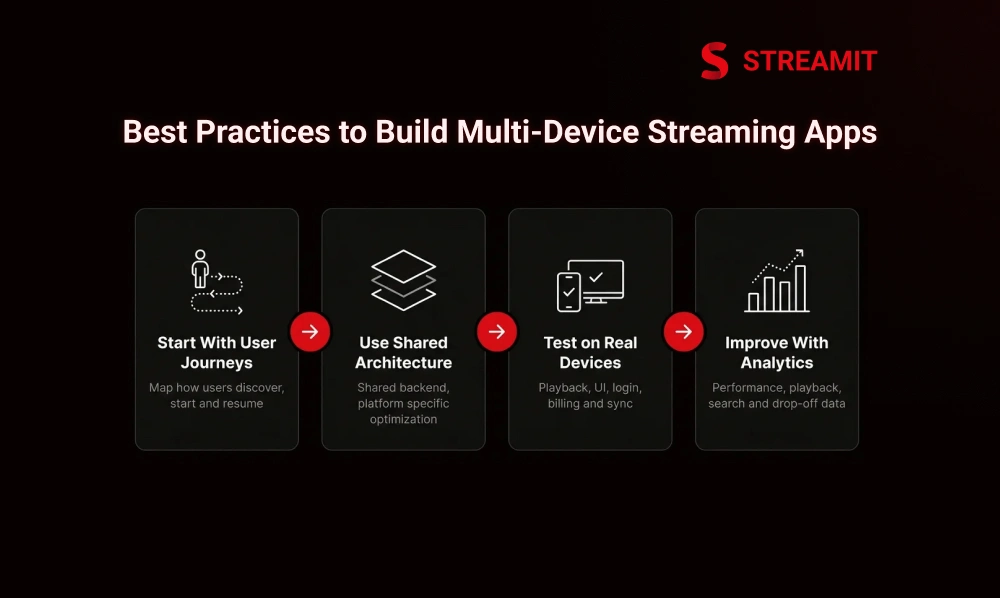
A strong multi-device streaming app starts with clear user journeys, a shared backend, and platform-specific optimization where it truly matters. The best results come from balancing consistency across devices with the flexibility to improve playback, navigation, and usability for each screen type.
Start With User Journeys, Not Just Screen Sizes
Map how users discover, start, pause, resume, subscribe, cast, search, and pay across different environments. Device decisions become clearer when tied to real use cases.
Use Shared Architecture With Platform-Specific Optimization
A shared backend and reusable service layer reduce waste. Platform-specific interaction, playback, and navigation logic preserve quality.
Reuse What Can Be Shared
User management, catalog services, entitlement logic, analytics, recommendation inputs, and much of the content infrastructure should be shared wherever possible.
Optimize What Must Be Device-Specific
TV navigation, player behavior, app packaging, remote interactions, app-store requirements, and certain playback optimizations must be tailored to the platform.
Test Playback, UI, Login, Billing, and Sync on Real Devices
Emulators are useful, but they do not replace real-device testing. Especially for smart TVs and lower-end Android hardware, actual device behavior reveals the issues that matter.
Improve Continuously With Analytics and User Feedback
Performance dashboards, playback analytics, search behavior, drop-off points, and support tickets should feed directly into iteration. Streamit’s emphasis on analytics, monitoring, and retention systems aligns with this operating model well.
How to Plan Multi-Device Video Streaming App Development Step by Step
Planning a multi-device streaming app requires more than choosing platforms to launch on. It involves defining target devices, content type, backend structure, playback strategy, and user experience early so the product can scale smoothly across mobile, TV, web, and other connected screens.
Step 1: Choose Your Target Devices and User Use Cases
Decide which devices matter first based on audience behavior and content type. Sports, long-form entertainment, education, and enterprise video often need different priority orders.
Step 2: Decide Whether You Need VOD, Live Streaming, or Both
Live introduces concurrency, latency, and operational complexity. VOD emphasizes catalog depth, discovery, and progression logic. Hybrid products need an architecture that can support both without becoming fragmented.
Step 3: Plan Backend, Content Delivery, Security, and Sync
Define identity, catalog, billing, DRM, CDN, analytics, and sync requirements early. Retroactively fixing these foundations is where timelines and budgets get damaged.
Step 4: Design the Experience for Mobile, TV, and Web
Treat each platform as part of one system, but design for its real usage conditions. TV should feel calm and clear. Mobile should feel fast and forgiving. The Web should feel flexible and discoverable.
Step 5: Build, Test, Launch, and Improve
Launch should not be the point where quality is discovered. It should be the point where real usage validates a system already tested for continuity.
How to Choose a Video Streaming App Development Partner
The right OTT development partner should understand more than app delivery. They should be able to plan for scalability, playback quality, cross-device performance, testing, and long-term platform growth across mobile, TV, and web.
Check Their Experience Across Mobile, TV, and Web Platforms
If a team only shows mobile work, they are not yet demonstrating full multi-device support capability. TV and web experience matter because the interaction models are materially different.
Ask About Architecture, Playback, Testing, and Scale
You want practical answers on shared backend design, playback optimization, CDN strategy, QA coverage, entitlement management, and post-launch monitoring.
Choose a Team That Can Support Long-Term Device Expansion
Streamit’s own positioning is clear here: it is built for founders who care about scale, ownership, monetization, and long-term control rather than a cheap one-screen launch. That is the right lens for serious OTT buying.
Key Takeaways
- Multi-Device Support Is Now Essential: This blog explained why video streaming app development can no longer rely on single-screen thinking. Viewers now expect to move smoothly across mobile, TV, web, and tablets without losing access, progress, or quality.
- Changing Viewing Behavior: Modern streaming audiences do not watch on one device alone. They often discover content on mobile, continue on laptops, and finish on smart TVs, making multi-device streaming a core part of the user experience.
- Better User Experience and Retention: A strong multi-device setup improves convenience, reduces friction, and helps users stay engaged longer. Features like synced watch history, resume watching, and consistent playback directly support retention and lower drop-off.
- More Revenue Opportunities: Supporting multiple devices increases viewing sessions and expands audience reach. It also strengthens monetization opportunities through subscriptions, ads, and transactional models by making content accessible in more viewing moments.
- UX Must Be Device-Specific: A streaming app should not use the same interface everywhere. Mobile needs touch-friendly controls, TV needs remote-friendly navigation, and web or tablets need flexible layouts for easier browsing and discovery.
- Strong Technical Foundation Matters: Multi-device support depends on more than front-end design. A shared backend, adaptive bitrate streaming, centralized identity management, CDN support, and secure access are all necessary to keep the experience stable across platforms.
- Development Challenges Grow With Device Support: As more devices are added, teams must handle fragmentation, different screen sizes, operating systems, input methods, and playback performance issues. Testing and maintenance also become more demanding over time.
- Best Practices Improve Long-Term Results: The blog highlighted the importance of starting with user journeys, using shared architecture with device-specific optimization, testing on real devices, and improving continuously through analytics and user feedback.
- Planning Should Be Strategic: Successful cross-platform streaming app development starts with clear decisions around target devices, content type, backend structure, content delivery, security, and user experience. A structured roadmap makes long-term scaling easier and more stable.
- Choosing the Right Development Partner Is Critical: The right streaming app development company should understand architecture, playback, testing, scale, and long-term platform growth. Multi-device success depends on choosing a partner that can build for performance, ownership, and future expansion.
Conclusion
Most OTT platforms do not struggle because they lack one more feature. They struggle because the product was never designed for the way people actually watch.
Multi-device behavior is now normal behavior. Users move across screens without thinking about it. The platform has to keep up. That means video streaming platform development should be planned around continuity, infrastructure, and device-specific quality from the start.
For founders, the strategic takeaway is simple: do not ask whether you need multi-device support. Ask whether your current product logic can survive without it. In most cases, it cannot.
FAQs
Why is multi-device support important for video streaming apps?
Because viewers watch across mobile, TV, web, and other devices, multi-device support makes streaming smoother and more convenient. It helps reduce friction, improve retention, and increase monetization opportunities.
How does watch history sync work across different devices?
It works through a shared backend that stores watch history, playback progress, and user preferences in one place. This lets viewers continue watching on another device without starting over.
What are the biggest challenges in multi-device video streaming app development?
The biggest issues are device fragmentation, different input methods, playback inconsistency, entitlement mismatches, and the testing burden that grows with every new platform. TV, mobile, and web all behave differently, so design and QA have to reflect that from the start.
How do smart TV apps differ from mobile streaming apps?
Smart TV apps are designed for remote-based navigation and distance viewing, while mobile apps are built for touch controls and on-the-go use. Each platform needs a different UI and interaction style to work smoothly.
How much does multi-device video streaming app development cost?
The cost depends on device coverage, live or VOD features, DRM, billing, backend complexity, and testing needs. A serious multi-device OTT build often starts around $25K-$75K+, with higher costs for live streaming and broader platform support.
Is native or cross-platform better for video streaming app development?
There is no one-size-fits-all answer. Native is better for deeper performance and device-specific control, while cross-platform can reduce development effort, so many strong streaming apps use a mix of both.
Read Also
1. Why Mobile Optimisation Matters for OTT Platforms Today
2. Streaming Issues: 7 Reasons Why Your OTT App Is Failing
3. 7 Best OTT Security Solutions for Streaming Platforms
4. Streamit vs Muvi: 7 Features You Can’t Ignore in 2026
5. 7 Reasons Why OTT Platforms Will Fail in 2026 Without Retention