What Is DRM? A Practical Guide to Digital Rights Management


DRM stands for Digital Rights Management. It helps protect digital content by controlling who can access it, how they can use it, and where it can be played.
For OTT platforms, DRM is important because videos, live streams, subscriptions, rentals, and premium content are directly tied to revenue. It helps reduce piracy, prevent unauthorized sharing, and keep content access secure.
This guide explains what DRM is, how it works, and why it matters for modern streaming platforms.
Part 1
What Is DRM (Digital Rights Management)?
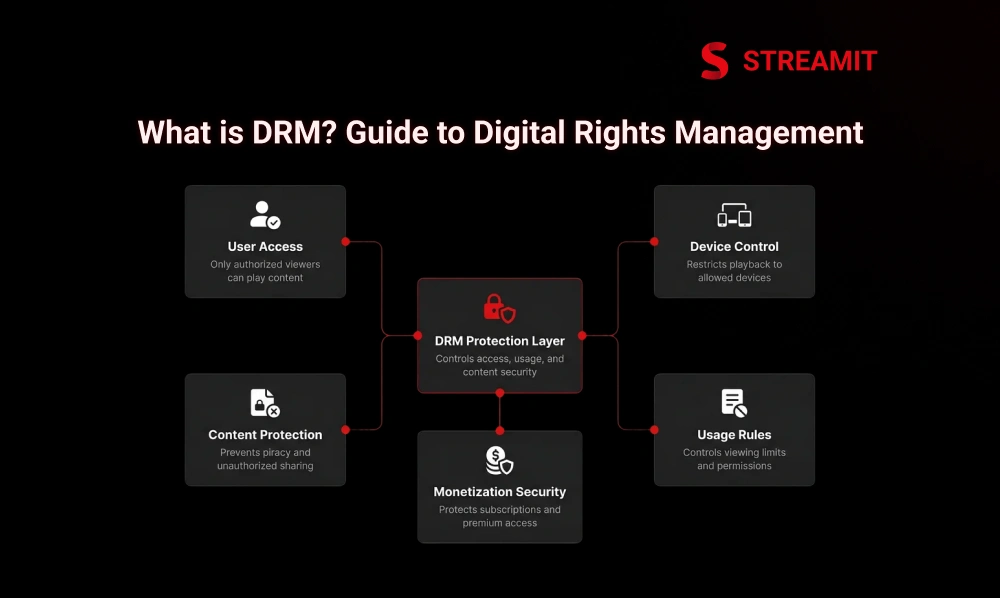
DRM is not just a security feature. It is a control layer for how digital content is accessed, used, shared, and monetized. DRM’s full form is Digital Rights Management, and it refers to technologies and rules used to manage access to copyrighted or premium digital content.
In simple words, DRM helps make sure the right user gets access to the right content under the right conditions. For OTT platforms, this can mean protecting a paid movie, a live sports stream, a subscription-only course, or exclusive creator content from unauthorized access.
What DRM Means and Why It Exists
The purpose of DRM is not to punish users. It exists because digital content is easy to copy, download, record, and distribute without permission. Once premium content leaks, the damage is rarely limited to one file. It can affect revenue, licensing trust, and future content deals.
DRM, explained simply, means this: the content is protected before delivery, and the viewer must prove they are allowed to watch it. That permission is checked through authentication, licensing, device rules, and playback controls.
Why Digital Rights Management Matters Today
The more valuable your digital content becomes, the more exposed your business becomes. Digital piracy, content theft, password sharing, screen recording, and unauthorized redistribution are real risks for serious streaming businesses.
For a small video website, DRM may feel optional. For a growing OTT platform with subscriptions, rentals, premium VOD, or licensed content, DRM becomes part of the business model. It protects revenue, ownership, and long-term platform credibility.
Part 2
What Types of Content Can DRM Protect?
DRM is used wherever digital access has business value. It can protect videos, live streams, eBooks, PDFs, documents, software, apps, music, games, and training content.
The common pattern is simple: if users pay for access, or if the content has licensing restrictions, DRM can help control who can open it, how long they can use it, and where they can consume it.
| Content Type | Common DRM Use Case |
|---|---|
| Video and OTT content | Protect paid streaming, VOD, live events, rentals |
| eBooks and PDFs | Limit copying, printing, sharing, and downloads |
| Software and apps | Control license activation and usage |
| Online courses | Protect premium training videos and documents |
| Enterprise documents | Restrict access to confidential files |
DRM for Video and Streaming Content
Video DRM is one of the most important layers for OTT platforms because video is expensive to produce, license, and distribute. Streaming DRM protects content during delivery and playback so only authorized users can watch it.
For OTT DRM, the goal is not only to stop downloads. It also helps enforce rules like subscription access, rental windows, device limits, regional restrictions, and premium content tiers.
DRM for Documents, eBooks, and PDFs
Document DRM is useful when access needs to be controlled beyond the first download. eBook DRM, PDF DRM, and document DRM can restrict copying, printing, forwarding, and offline access.
This matters for publishers, education platforms, research firms, legal teams, and businesses that sell premium knowledge assets. The file may reach the user, but the usage rights remain controlled.
DRM for Software and Applications
Software DRM protects paid applications from unauthorized installation, license sharing, and modification. It is commonly used for desktop software, mobile apps, games, SaaS tools, and enterprise applications.
App DRM protection usually checks whether the user has a valid license, subscription, or activation key. It can also limit use by device, account, region, or license period.
Part 3
How DRM Works
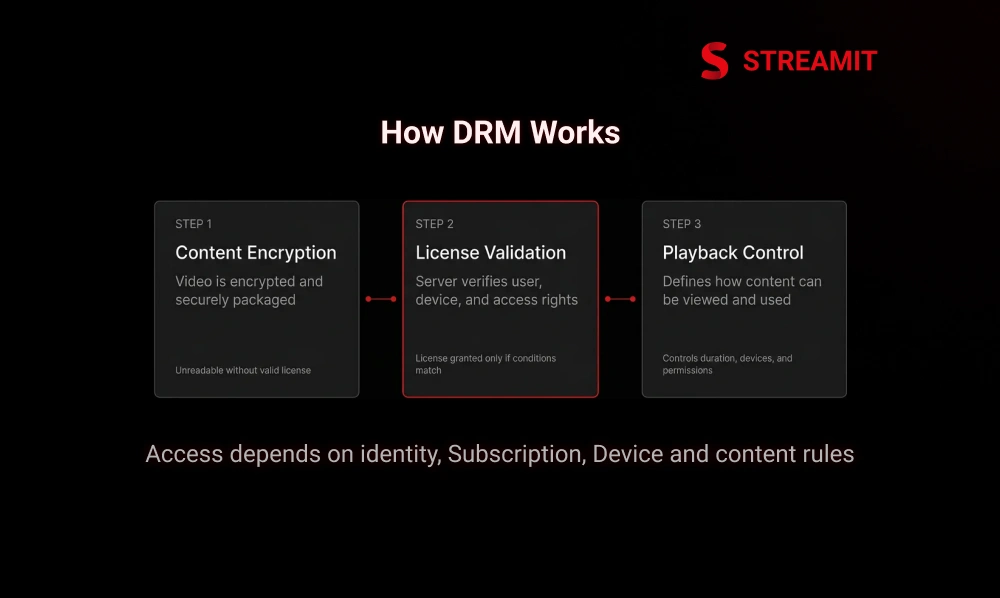
A strong DRM workflow has three core layers: encryption, license validation, and playback control. Encryption protects the file, while DRM decides who receives the key and what they are allowed to do with the content.
For the viewer, playback looks simple. They click play. Behind that click, the platform checks identity, content rights, device compatibility, license rules, and security conditions before allowing playback.
Content Encryption and Secure Packaging
DRM starts before the user ever presses play. The content is encrypted and securely packaged so it cannot be opened like a normal video file or document.
In video workflows, encrypted content is usually prepared for streaming formats and delivered through secure OTT infrastructure. The file may travel across networks, but without a valid license, it remains unreadable.
License Servers and Authentication
The license server is where access becomes a business rule, not just a technical process. When a user requests playback, the player contacts the DRM license server to ask for permission.
The license server checks whether the user, device, subscription, region, and content rights are valid. If everything matches, it sends a license response that allows playback under specific conditions.
Playback Rules and Access Control
DRM access control decides what the user can do after access is granted. It can control playback duration, offline viewing, number of devices, expiry time, output protection, and screen restrictions.
For OTT platforms, these rules are important because monetization models differ. A monthly subscriber, a rental user, and a pay-per-view buyer should not receive the same access rights.
Part 4
Main Types of DRM Technologies
Different devices support different DRM systems. That is why serious OTT planning cannot treat DRM as a single checkbox. Web browsers, Android devices, Apple devices, Windows systems, and smart TVs often require different DRM support.
For streaming businesses, this is where multi-DRM becomes important. The user should not care which DRM system is working in the background. They only care that the video plays securely and smoothly.
Widevine DRM
Commonly used across Android devices, Chrome browsers, and many connected TV environments. Critical for platforms targeting mobile, web, and Android-based viewing.
FairPlay DRM
Used for Apple environments – iPhone, iPad, Apple TV, and Safari. Essential when a meaningful portion of your audience uses Apple devices.
PlayReady DRM
Commonly used across Windows, Microsoft environments, and many connected TV devices. Especially relevant for smart TVs, set-top boxes, and large-screen streaming.
Multi-DRM
Supporting more than one DRM system through a unified workflow. Protects content across mobile, web, and TV without breaking playback as users switch devices.
Widevine DRM
Widevine DRM is commonly used across Android devices, Chrome browsers, and many connected TV environments. It is a major part of video DRM workflows for platforms that need broad device support.
For OTT businesses, Widevine is often included when the platform targets mobile users, web playback, smart TVs, and Android-based viewing environments.
FairPlay DRM
FairPlay DRM is used for Apple environments. It is important when a platform needs secure playback across iPhone, iPad, Apple TV, and Safari-based viewing experiences.
If your audience includes a meaningful number of Apple users, FairPlay support becomes difficult to ignore. Without it, secure playback coverage can become incomplete.
PlayReady DRM
PlayReady DRM is commonly used across Windows, Microsoft environments, and many connected TV devices. It is especially relevant when the platform needs broader TV and living-room device compatibility.
For OTT operators, PlayReady often becomes part of the DRM stack when distribution includes smart TVs, set-top boxes, and large-screen streaming experiences.
Multi-DRM Solutions
Multi-DRM means supporting more than one DRM system through a unified workflow. Instead of building separate protection logic for each ecosystem, the platform uses a coordinated DRM strategy.
This matters because OTT viewers do not stay on one device. They may start on mobile, continue on web, and finish on TV. Multi-DRM helps protect content across that journey without breaking playback.
Part 5
DRM vs Encryption vs Watermarking
DRM, encryption, and watermarking are connected, but they do different jobs. Encryption protects the content file. DRM manages rights and access. Watermarking helps trace leaks back to a source.
A mature content protection strategy may use all three. The mistake is thinking one method solves every risk. In reality, each method protects a different layer of the streaming business.
| Method | What It Does | Best Use |
|---|---|---|
| Encryption | Scrambles the content so it cannot be opened directly | Protecting files during delivery |
| DRM | Controls access, licenses, and playback rules | Paid OTT, subscriptions, rentals |
| Watermarking | Identifies the source of leaked content | Anti-piracy investigation |
DRM vs Basic Encryption
Encryption protects the content, but DRM controls the business rules around that content. A file can be encrypted, but someone still needs to decide who gets the key, when they get it, and what they can do after access is granted.
That is the difference. Basic encryption is protection. DRM is protection plus permission logic.
DRM vs Watermarking
Watermarking does not usually stop playback. It helps identify where a leak came from. Forensic watermarking can embed invisible information into the content, making it easier to trace piracy sources.
DRM is preventive. Watermarking is investigative. For high-value content, using both can make sense.
When to Use Each Protection Method
Use encryption when you need secure delivery. Use DRM when access rules matter. Use watermarking when leak tracing matters. The right choice depends on your content value and business model.
For free marketing videos, DRM may be too much. For paid live events, premium films, licensed libraries, or subscription content, DRM becomes much more relevant.
Part 6
Benefits and Limitations of DRM
DRM protects business value, but it must be implemented carefully. A poorly integrated DRM setup can create playback issues, device errors, or user frustration.
For OTT platforms, the goal is balance. Content should be protected without making honest users feel punished.
Key Benefits of Using DRM
The biggest DRM benefit is revenue protection. It helps prevent unauthorized access, reduces content leakage, and gives content owners more confidence in monetization.
-
Revenue Protection
Prevents unauthorized access and reduces content leakage, giving content owners more confidence in monetization strategy.
-
Structured Business Models
DRM supports subscriptions, rentals, pay-per-view, private screenings, and premium memberships – turning content access into a controlled commercial system.
-
Licensing Confidence
Content owners, production houses, broadcasters, and sports operators gain assurance that premium content is not exposed casually to unauthorized viewers.
-
Access Rule Enforcement
Granular control over playback duration, offline access, device limits, expiry time, and output protection settings across different user tiers.
Common DRM Challenges and Limitations
DRM is powerful, but it is not invisible to engineering teams. Compatibility, device support, browser differences, license errors, offline playback, and smart TV testing can all add complexity.
The viewer should not experience that complexity. That is why DRM should be planned as part of the platform architecture, not added at the last moment.
DRM Cost and Implementation Complexity
DRM cost depends on scale, provider, device coverage, and workflow complexity. A small VOD library has different needs than a multi-device OTT platform with live events and premium licensing.
Implementation cost also includes player integration, packaging, license server setup, testing, monitoring, and support. The cheaper approach is not always the safer one if the platform is expected to grow.
Part 7
DRM for OTT and Streaming Platforms
OTT platforms need DRM because streaming is not just content delivery. It is controlled digital distribution. When users pay for access, the platform must protect both the content and the monetization model.
For Streamit-style OTT builds, DRM fits into the larger architecture alongside authentication, payments, CDN delivery, analytics, device support, and platform security. Streamit‘s positioning focuses on streaming businesses built for real traffic, monetization, and long-term ownership.
Why OTT Platforms Need DRM
OTT content protection is not only about piracy. It is also about licensing confidence. Content owners, production houses, educators, broadcasters, and sports operators need assurance that premium content is not exposed casually.
Secure video streaming becomes more important as the platform grows. More users, more devices, and more monetization models create more access points to protect.
DRM for Live Streaming and VOD
Live streaming DRM and VOD DRM solve slightly different problems. VOD needs long-term library protection. Live streaming needs real-time access control during events, matches, launches, or broadcasts.
For paid live events, DRM is especially useful because the revenue window is short. A leak during the event can hurt the value immediately.
Why Multi-DRM Is Critical for Device Compatibility
A single DRM system cannot reliably cover every major viewing environment. OTT platforms usually need secure playback across mobile, web, smart TV, browsers, and connected devices.
Multi-DRM helps avoid the common problem where content works securely on one device but fails on another. For viewers, compatibility feels like quality. For operators, it is an infrastructure discipline.
Part 8
When Do You Actually Need DRM?
You need DRM when the content has direct revenue, licensing, or exclusivity attached to it. Not every platform needs DRM on day one, but serious streaming businesses should evaluate it early.
The decision should be based on risk, not trend. If content leakage would hurt your revenue, partnerships, or credibility, DRM should be part of the roadmap.
Businesses That Should Use DRM
Media companies, OTT platforms, sports streaming businesses, e-learning platforms, premium creators, and content owners should strongly consider DRM. These businesses often depend on paid access and controlled distribution.
DRM for content owners becomes even more important when content is licensed from third parties. Without the right protection, future licensing conversations can become harder.
When DRM May Not Be Necessary
DRM may not be necessary for free public videos, brand awareness content, basic tutorials, or low-risk marketing assets. If the goal is maximum reach, heavy access control can be counterproductive.
For early-stage platforms, DRM can also be introduced in phases. Start with the content that carries the highest commercial risk instead of protecting everything equally.
Part 9
How to Choose the Right DRM Solution
Choosing a DRM solution is less about buying a tool and more about designing the right access strategy. The right solution should match your content type, monetization model, devices, geography, and long-term growth plan.
A platform built for $25K to $75K seriousness should not select DRM only by price. It should evaluate reliability, compatibility, integration effort, support, and future scale.
Single DRM vs Multi-DRM
Single DRM may work for a limited audience and a controlled device environment. For example, an internal platform or limited app ecosystem may not need full multi-DRM from day one.
Multi-DRM is better when the platform targets wide consumer access. If users watch across Android, iOS, web, smart TV, and connected devices, multi-DRM is usually the safer long-term choice.
Cloud DRM vs On-Premise DRM
Cloud DRM is usually faster to deploy and easier to maintain. It can reduce infrastructure burden and help teams launch secure streaming workflows more efficiently.
On-premise DRM gives more control but adds operational responsibility. It may suit enterprises with strict compliance, internal infrastructure teams, or highly specific security requirements.
Key Features to Look for in a DRM Provider
A strong DRM provider should support major DRM systems, secure license delivery, device compatibility, analytics, offline playback rules, and reliable support. For OTT, player compatibility is especially important.
Also check scalability, documentation, uptime history, integration options, and support for your streaming formats. DRM should protect the platform without slowing down development or damaging user experience.
Part 10
How DRM Supports Content Monetization
DRM helps turn content into controlled revenue. Without access control, monetization models become easier to abuse through sharing, downloading, and unauthorized viewing.
For OTT businesses, DRM connects directly to pricing strategy. It allows different access rights for subscriptions, rentals, PPV, memberships, bundles, and exclusive releases.
DRM for Subscription and Membership Platforms
Subscription DRM helps ensure that only active members can access premium content. This is important for SVOD platforms, learning libraries, fitness video memberships, and private content communities.
It can also support rules like device limits, account-based access, offline expiry, and renewal-based playback. These controls help protect recurring revenue.
DRM for Pay-Per-View and Rentals
PPV DRM is useful when access is tied to a specific event, title, or time window. A user may pay to watch one match, one movie, or one live session.
Video rental DRM works in a similar way. Access may expire after 24, 48, or 72 hours, depending on the business rules. DRM helps enforce that window.
DRM for Premium and Exclusive Content Access
Exclusive content only stays premium if access is controlled. Early releases, private screenings, paid masterclasses, member-only shows, and licensed videos need stronger protection.
DRM makes premium access more structured. It gives the platform owner more confidence to launch higher-value content without depending only on trust.
Summary
Key Takeaways
DRM Is a Business Control Layer
DRM directly controls who can access your digital content, where they can play it, and how long they can use it – not just a technical security feature.
Directly Tied to Revenue Protection
For OTT platforms, DRM secures subscriptions, rentals, pay-per-view content, live streams, and premium video libraries from unauthorized access.
Goes Beyond Basic Encryption
Encryption protects the content file; DRM adds license validation, user authentication, playback permissions, and granular access rules on top.
Multi-DRM Covers All Devices
Widevine, FairPlay, and PlayReady solve different device needs. OTT platforms often require multi-DRM to deliver secure playback across Android, Apple, web, and smart TVs.
Plan DRM Early in Development
Adding DRM later in the platform lifecycle creates playback issues, compatibility gaps, higher costs, and avoidable integration complexity.
Not Necessary for Every Platform from Day One
DRM becomes important when your content is paid, licensed, or exclusive. Start by protecting the content with the highest commercial risk.
Conclusion
Conclusion
DRM is not about making streaming harder. It is about making premium streaming sustainable. When content becomes a revenue asset, access control becomes part of the business foundation.
For OTT founders, the real question is not “Do we need DRM because others use it?” The better question is: “What content, revenue, and licensing risks are we willing to leave exposed?”
A serious streaming platform needs more than a clean interface. It needs secure delivery, controlled access, device compatibility, monetization logic, and infrastructure that can grow without forcing a rebuild. DRM is one part of that larger platform discipline.
FAQs
Frequently Asked Questions
-
What is DRM, and how does digital rights management work?
DRM stands for Digital Rights Management. It protects digital content by encrypting it and allowing access only after the user, device, and usage rights are verified.
-
Why is DRM important for OTT and streaming platforms?
DRM helps OTT platforms protect paid videos, live streams, rentals, and premium content from piracy. It also supports secure monetization and controlled content access.
-
What is the difference between DRM, encryption, and watermarking?
Encryption protects the content file, DRM controls who can access and play it, and watermarking helps trace leaked content. All three can work together for stronger content protection.
-
What is the difference between Widevine, FairPlay, and PlayReady DRM?
Widevine is commonly used for Android and Chrome, FairPlay is used for Apple devices, and PlayReady is used across Microsoft and many TV environments. OTT platforms often use multi-DRM to support all major devices.
-
When do you actually need DRM for your streaming platform or app?
You need DRM when your content is paid, licensed, exclusive, or tied to subscription, rental, or pay-per-view revenue. It is less necessary for free public videos or low-risk marketing content.
-
How much does DRM implementation cost for OTT platforms?
DRM cost depends on device coverage, provider, traffic scale, and whether you need single DRM or multi-DRM. The total cost also includes integration, testing, player setup, and ongoing support.