Lowest Latency Video Streaming: 7 Proven Ways to Reduce Delay


A five-second delay feels small until it breaks the business model. In live sports, it creates spoilers. In auctions, it changes outcomes. In live commerce, it kills urgency. On interactive platforms, the product feels slower than the competition, even when the interface looks polished. Research from Dolby OptiView notes that traditional broadcast still carries roughly a 5-7 second lag. At the same time, many modern streaming teams now treat single-digit seconds, and in some cases sub-second delivery, as the real benchmark.
Most streaming teams blame the internet first. That is usually the wrong diagnosis. Delay builds across the entire chain: capture, encoding, transport, packaging, buffering, decoding, and playback. Dolby defines glass-to-glass latency as the full delay from capture to on-screen rendering, which is the metric that actually matters to users.
That distinction matters because the fix is rarely one thing. You do not solve low latency by buying a faster CDN alone, changing a player alone, or lowering bitrate alone. You solve it by designing the full delivery path to make fewer slow decisions.
This guide breaks down what lowest latency video streaming actually means, why it matters, where delay comes from, and the seven most practical ways to reduce it without wrecking stability, reach, or quality.
What Is Lowest Latency Video Streaming?
Lowest latency video streaming means delivering live video with the shortest possible delay between the actual event and the viewer’s screen. In simple words, it helps a livestream feel closer to real time.
This matters because too much delay can make a live stream feel disconnected. In sports, webinars, auctions, and live commerce, even a few extra seconds can affect the viewer experience.
Lowest latency video streaming reduces that delay by improving the full delivery process, including capture, encoding, delivery, buffering, and playback.
Lowest Latency Video Streaming: Meaning in Simple Words
Lowest latency video streaming means delivering live video with as little delay as possible between what happens in real life and what the viewer sees on screen. In simple terms, it makes a livestream feel closer to real time.
This matters because even a small delay can affect how a live stream feels. In sports, auctions, webinars, and interactive events, lower latency helps viewers stay in sync with the moment instead of watching it several seconds later.
What does “latency” mean in video streaming?
In streaming, latency is not a vague technical issue. It is a measurable delay. Dolby breaks it down into several metrics: encoding latency, network latency, playback latency, and total glass-to-glass latency.
A simple way to think about it:
- The camera captures the event
- The encoder compresses it
- Server packages and distributes it
- Player buffers it
- The viewer finally sees it
Each step adds time. The audience only experiences the total.
Low latency vs normal live streaming delay
Standard live streaming can tolerate several seconds of delay, especially when the audience is mostly passive. Dolby describes low latency as several seconds and ultra-low latency as less than one second, depending on the use case.
That is why a webinar can survive with a few seconds of delay, while a live auction cannot.
Low Latency vs Ultra-Low Latency vs Real-Time Streaming
These terms often get used loosely, but they should not be.
- Low latency usually means a delay of a few seconds.
- Ultra-low latency usually means sub-second delivery.
- Real-time streaming is the practical goal of feeling immediate enough for two-way interaction.
Dolby notes that WebRTC is commonly used where latency needs to stay under half a second, while LL-HLS and LL-DASH generally land in the 3-7 second range and scale well over CDNs.
When a few seconds of delay is acceptable
A few seconds is often fine when the stream is mainly one-way:
- keynote broadcasts
- public webinars
- product launches
- live events where chat is secondary
In these cases, scale and compatibility often matter more than shaving off every last second.
When sub-second latency is needed
Sub-second delivery matters when timing changes the experience or the outcome:
- video calls
- live auctions
- sports betting
- remote operations
- interactive live selling
- real-time collaboration
This is where “good enough” delay stops being good enough.
How Video Travels From Camera to Viewer Screen?
A live video stream passes through several stages before it reaches the viewer. It starts with the camera capturing the video, then moves to encoding, where the raw footage is compressed into a format that can be streamed online.
After that, the video is delivered through servers or a CDN, buffered by the video player, and then played on the viewer’s device. Each step adds a small amount of time, which is why streaming delay builds across the full chain, not just from internet speed alone.
Capture, encode, deliver, buffer, play
The live delivery chain looks simple on a slide and complicated in production:
| Stage | What Happens | How Delay Gets Added |
| Capture | A camera or device captures audio and video | Sensor and hardware processing time |
| Encode | Raw input is compressed into a streamable format | Codec settings, GOP size, transcoding time |
| Package & Deliver | Stream is prepared for transport and sent through the origin/CDN | Segment creation, chunking, routing, and region distance |
| Buffer | Player stores a small amount before playback | Startup buffer and stability settings |
| Play | Device decodes and renders the stream | Device performance and playback sync |
Dolby explicitly notes that latency is introduced at multiple points across the workflow, including CDN choice, encoder configuration, protocols, and network conditions.
Why Low Latency Matters in Live Streaming?
Low latency matters in live streaming because it helps viewers stay closer to the real moment. When the delay is low, the stream feels more natural and more immediate.
It also improves live interaction. In webinars, live commerce, sports, and Q&A sessions, lower delay helps chats, reactions, and responses happen with better timing.
When latency is too high, the experience feels disconnected. Viewers may lose interest, miss the flow of the event, or feel the platform is less reliable.
Better Viewer Experience and Real-Time Engagement
Low latency improves the viewer experience by making live video feel more natural and immediate. When the stream stays closer to real time, viewers can follow the event without feeling delayed or disconnected.
It also supports better real-time engagement. Live chat, audience reactions, Q&A sessions, and interactive moments work more smoothly when responses happen with minimal delay.
Better live chat, Q&A, and audience response
When chat lags behind the stream, hosts respond to questions too late, moderators feel out of sync, and the audience stops interacting naturally. Dolby points out that high latency disrupts live Q&As, gaming, and auctions because it breaks real-time flow.
Fewer awkward pauses in interactive streams
You see this in live classes, online coaching, and live shopping all the time. The host asks a question. The audience reacts late. The host fills the silence that should not exist. The stream becomes mechanically live, not functionally live.
Why Delay Hurts Sports, Events, and Live Selling?
Delay hurts sports, events, and live selling because timing plays a major role in the viewer experience. In these formats, even a few extra seconds can make the stream feel out of sync and less engaging.
In sports, delayed streams can lead to spoilers. In live events and live selling, late reactions, missed cues, and slow audience response can reduce trust and make the experience feel less natural.
Spoilers from social media and second screens
For sports, delay has become more visible because audiences now watch with multiple screens open. Dolby cites sports as a major low-latency use case and notes an average sports latency of around 9 seconds in one recent survey, with the market pushing toward 5 seconds to better match broadcast expectations.
That gap matters. A fan hearing a cheer from another room before the goal appears on their stream does not blame “streaming architecture.” They blame your platform.
Late reactions can hurt trust and retention
Live selling has a similar issue. If the streamer says an item is sold out and viewers are still seeing the pitch seconds later, urgency turns into confusion. Delay makes the platform feel unreliable, even when the video quality looks fine.
Business Impact of High Latency
High latency can affect more than just the viewing experience. It can reduce audience engagement, weaken trust, and make the platform feel less reliable during live streaming.
It can also lead to buffering, delayed interactions, and lower viewer retention. When the stream feels slow or out of sync, users are more likely to leave and less likely to return.
Buffering, sync problems, and poor stream quality
High latency often shows up alongside other visible defects:
- buffering under load
- audio-video sync drift
- slow startup
- dropped playback quality
- broken interaction timing
Cloudinary’s guide frames latency reduction as an end-to-end optimization problem involving protocol choice, smaller segments, chunked transfer, CDN proximity, ABR, reduced server-side processing, and edge delivery.
In other words, delay is often the symptom of a stream that is making too many expensive decisions before playback begins.
Where Video Streaming Delay Comes From?
Video streaming delay comes from multiple stages in the delivery process, not from internet speed alone. The delay starts when the camera captures the video and continues through encoding, processing, delivery, buffering, and playback.
Each step adds a small amount of time before the stream reaches the viewer. That is why live video can feel delayed even when the internet connection seems fine.
To reduce latency, it is important to understand the full streaming chain. A faster and more stable stream depends on improving every stage, not just one part of the process.
Delay at the Capture and Encoding Stage
Delay often begins at the capture and encoding stage, where the camera records the video, and the encoder processes it into a streamable format. This step takes time because the raw video must be compressed before it can be delivered online.
If the hardware is slow or the encoder settings are too heavy, an extra delay is added early in the workflow. That is why efficient capture devices and optimized encoding settings are important for lower latency streaming.
Camera input and hardware processing time
The first delay starts before the stream even leaves the source. Cameras, switchers, capture cards, and encoders all take time to process input. Dolby includes encoding latency as one of the core latency categories inside the full live chain.
Encoder settings that add extra delay
Aggressive encoding settings can quietly add avoidable delay. Higher complexity, inefficient GOP structure, unnecessary processing steps, and heavy transcoding all slow the path from source to screen. Dolby specifically recommends optimizing encoder settings and selecting the right codec and bitrate to reduce processing and delivery time.
Delay During Packaging, CDN Delivery, and Playback
More delay is added when the video is packaged into stream segments, delivered through the CDN, and prepared for playback on the viewer’s device. If segment sizes are too large or delivery takes longer, the stream falls further behind live.
The video player also adds a delay through buffering before playback starts. This helps keep the stream stable, but if the buffer is too high, it increases the overall latency.
Segment size, chunking, and playlist updates
For HTTP-based streaming, latency often grows because the system waits too long to package and publish segments. Harmonic notes that LL-HLS reduces delay through shorter segment durations and preloading hints, while Cloudinary recommends smaller segment sizes and chunked transfer encoding so parts of a segment can be sent before the whole segment is complete.
That is one of the clearest ways to understand modern low-latency delivery: stop waiting for whole units of video when partial delivery can start sooner.
Player buffer and startup delay
Playback latency is often self-inflicted. A conservative player buffer can improve stability, but it also pushes the stream further behind reality. Dolby lists playback latency as the result of buffering and viewer device capability.
Delay Caused by Network and Devices
Network and device issues can also increase streaming delay. Weak internet, packet loss, jitter, background apps, and limited hardware performance can all slow down how quickly the video reaches and plays on the viewer’s screen.
Even if the stream setup is strong, unstable networks or older devices can still add extra lag. That is why low latency depends on both a well-optimized delivery chain and a stable viewing environment.
Weak internet, packet loss, and jitter
Network quality still matters, but not in the simplistic way most teams think. Packet loss, jitter, and route distance can all increase delay or force the player into safer, slower behavior. SRT has become popular in unreliable network conditions because it can recover from packet loss while maintaining secure, low-latency transport.
Background apps, old hardware, and local traffic
On the viewer side, device limitations and local network competition add more friction. Older hardware decodes less efficiently. Busy local networks create bandwidth contention. Weak Wi-Fi adds instability. Virgin Media notes that moving from Wi-Fi to wired Ethernet is one of the simplest ways to improve latency because it reduces interference and provides a more stable direct connection.
The key point is simple: delay adds up across the full chain. It is rarely caused by internet speed alone. The stream becomes slow because too many small delays accumulate before the viewer ever sees the first frame.
When do businesses need the lowest latency video streaming?
Businesses need the lowest latency video streaming when timing directly affects the viewer experience. In live sports, webinars, auctions, live commerce, and interactive events, even a small delay can make the stream feel less natural and less effective.
It becomes even more important when real-time reactions, decisions, or audience participation are involved. Lower latency helps keep the stream aligned with the live moment and supports smoother communication.
For businesses, this means better engagement, stronger trust, and a more reliable live experience. When the use case depends on speed and interaction, low latency becomes a practical requirement, not just a technical upgrade.
Live Sports Streaming
Live sports streaming needs low latency because fans want to watch the action as it happens. Even a few seconds of delay can make the experience feel out of sync, especially when viewers see updates from other screens or social media first.
Lower latency helps keep the stream closer to the live moment. This improves the viewing experience, reduces spoilers, and makes sports content feel more immediate and engaging.
Why do sports fans hate delayed streams?
Sports is where latency becomes visible fastest. The audience knows exactly when something happened, and even a few extra seconds can create spoilers through social feeds, group chats, or nearby broadcasts. Dolby highlights live sports as a priority use case for low latency.
Why do betting and live data need faster delivery?
Where live data, odds, or microbetting are involved, the tolerance gets even tighter. Dolby notes that these use cases often target around 1-2 seconds, while some horse racing scenarios push to roughly 500 milliseconds.
Webinars, Online Classes, and Live Q&A
Webinars, online classes, and live Q&A sessions work better with low latency because they depend on smooth interaction between the speaker and the audience. When the delay is low, questions, answers, and responses feel more natural.
If the stream is too delayed, conversations can feel slow and disconnected. Lower latency helps improve engagement and makes the session feel more live and interactive.
Why delay breaks natural conversation?
Not every webinar needs ultra-low latency, but any session that depends on back-and-forth participation benefits from reducing delay. A few seconds of lag can turn a live class into a one-way lecture.
Live Commerce, Auctions, and Bidding
Live commerce, auctions, and bidding need low latency because timing directly affects user actions. When viewers are watching products, placing bids, or responding to offers, even a short delay can create confusion and reduce trust.
Lower latency keeps the stream closer to the live moment, making interactions feel faster and more accurate. This helps improve urgency, viewer confidence, and the overall buying or bidding experience.
Why does every second matter in live selling?
Live commerce depends on synchronized urgency. If the host, chat, stock count, and viewer action are not aligned, the event feels messy instead of exciting. Dolby specifically points to auctions and live shopping as scenarios where lower latency improves interaction quality.
Video Chat, Telemedicine, and Remote Operations
Video chat, telemedicine, and remote operations need low latency because they rely on real-time communication and quick decision-making. When the delay is low, conversations feel smoother, and actions can happen with better timing.
If latency is too high, it can interrupt communication and reduce accuracy during important moments. Lower latency helps make these use cases more reliable, responsive, and effective.
Why do high-stakes use cases need near-real-time video?
This is where latency stops being about convenience and starts affecting decisions. Remote monitoring, telemedicine, operations support, and command workflows need near-immediate feedback loops. WebRTC is often used here because it is designed for highly interactive real-time delivery.
Best Streaming Protocols for Low Latency Video Streaming
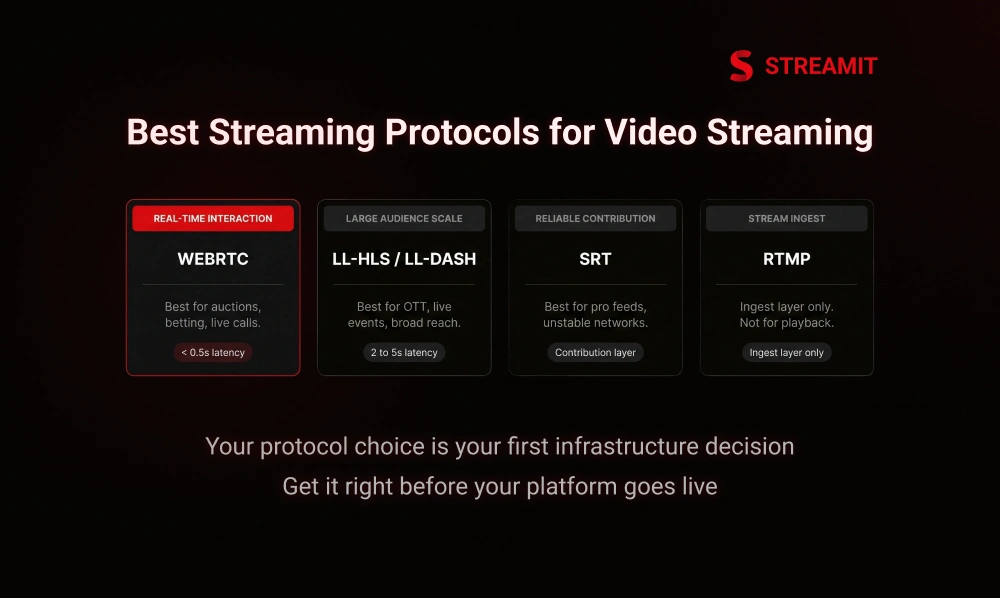
The best streaming protocol for low-latency video streaming depends on the use case, audience size, and level of interaction. Different protocols are designed for different delivery needs, so choosing the right one is important for reducing delay.
For highly interactive streaming, WebRTC is often the best choice because it supports near real-time delivery. For larger audiences, LL-HLS and LL-DASH offer a better balance of lower latency, wider reach, and stable playback.
Other protocols like SRT and RTMP also play an important role in live streaming workflows. SRT is useful for reliable contribution feeds, while RTMP is still commonly used for stream ingest.
WebRTC for Sub-Second and Interactive Streaming
WebRTC is the practical default for real-time interaction. Dolby notes it is used in scenarios that need under half a second of latency, and Red5 describes it as consistently capable of sub-second delivery because it was built for live communication use cases like conferencing.
Best for calls, auctions, betting, and live interaction
Ideal for use cases that require real-time communication and fast audience responses. It helps keep interactions smooth and closely aligned with the live moment.
Main limit: scaling to very large audiences
WebRTC is excellent for immediacy, but large-scale distribution requires careful architecture. It is not the easiest path when you need a broad CDN-style reach at very high concurrency.
LL-HLS and LL-DASH for Scale and Wider Reach
LL-HLS and LL-DASH are strong options for low-latency streaming when you need to reach a larger audience. They are designed to reduce delay while still supporting stable playback across multiple devices and networks.
These protocols offer a better balance of scale, quality, and wider compatibility. That makes them a practical choice for live events, OTT platforms, and other large audience streaming use cases.
Best for large audience live streaming
Use these when scale, device compatibility, and operational familiarity matter.
Better balance of reach, quality, and delay
For many broadcasters and OTT businesses, this is the most practical middle ground: not real-time, but fast enough for most live experiences at scale.
SRT for Reliable Contribution and Delivery
SRT is a reliable streaming protocol used for sending high-quality video over unstable networks with lower delay. It helps maintain smoother delivery by reducing the impact of packet loss, jitter, and network issues.
It is mainly used in professional streaming workflows for contribution feeds and remote production. SRT is a strong choice when stream reliability and stable transport matter more than direct viewer playback.
Best for unstable networks and pro streaming workflows
SRT is especially useful for contribution feeds, remote production, and ingest paths where network conditions are not clean.
RTMP and Why It Still Matters at Ingest?
RTMP is no longer the preferred playback format, but it still matters in production workflows. Harmonic notes that RTMP remains widely used for stream ingestion even though Flash-era playback is long gone.
Why is RTMP often used for input, not final playback?
It still works well as an ingest layer. It is just not the best answer for final viewer playback on modern platforms.
Protocol Comparison Table
| Protocol | Typical Strength | Best Use Case | Main Trade-Off |
| WebRTC | Sub-second delivery | Calls, auctions, betting, and interactive streaming | Harder to scale broadly |
| LL-HLS / LL-DASH | CDN scale + ABR + wider compatibility | OTT, sports, large live events | Usually not sub-second |
| SRT | Reliable low-latency transport on unstable networks | Contribution feeds, remote production, pro workflows | Usually part of the workflow, not a full playback strategy |
| RTMP | Reliable ingest from encoders and studios | Stream input to media servers/platforms | Outdated for modern playback delivery |
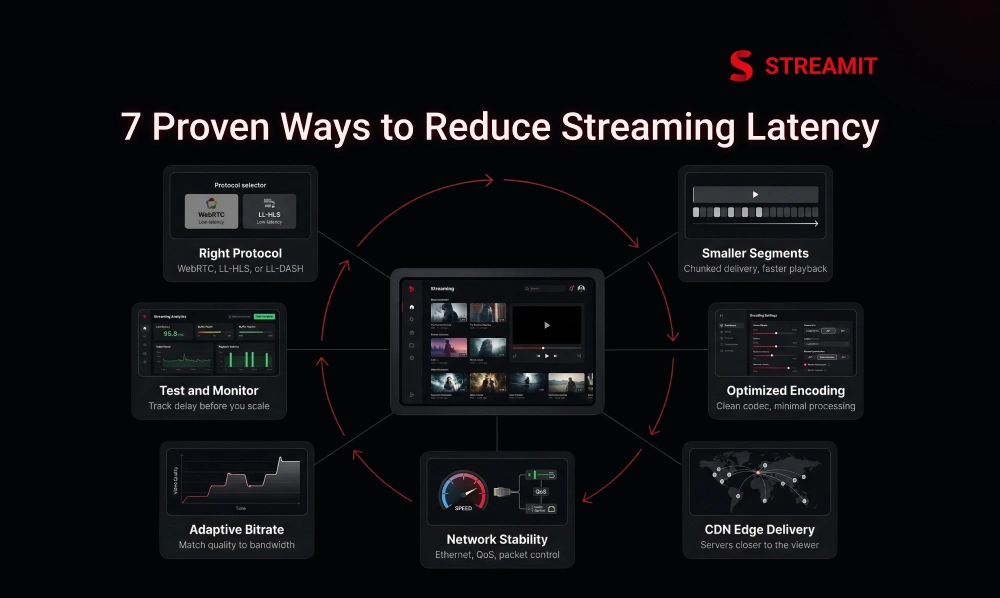
7 Proven Ways to Reduce Video Streaming Delay
Reducing video streaming delay starts with improving the full delivery workflow, not just one part of it. The most effective ways include choosing the right streaming protocol, reducing segment size, optimizing encoding, and using a low-latency CDN.
It also helps to improve network stability, use adaptive bitrate streaming, and keep player buffer settings low but stable. These changes work together to make live video feel faster and more responsive.
Testing and monitoring are also important before going live. When each stage is optimized properly, the stream can deliver lower latency with better stability and viewer experience.
1. Choose the Right Streaming Protocol for Your Use Case
Choosing the right streaming protocol is one of the most important steps in reducing video delay. Different protocols are built for different needs, so the best choice depends on whether your priority is real-time interaction, large audience delivery, or reliable contribution.
For example, WebRTC works well for interactive streaming, while LL-HLS and LL-DASH are better for larger audiences. When the protocol matches the use case, it becomes easier to deliver lower latency with better performance.
Use WebRTC for real-time interaction
WebRTC is ideal for real-time interaction because it delivers video with very low delay. It is commonly used for video calls, live chat, auctions, and other interactive streaming use cases where timing matters.
Use LL-HLS or LL-DASH for scale
If the priority is large audience delivery with manageable latency, use HTTP-based low-latency delivery over CDN infrastructure.
2. Reduce Segment Size and Use Chunked Delivery
Reducing the segment size helps lower streaming delay because the video can be delivered and played faster. Instead of waiting for large segments to finish, smaller segments allow the stream to move closer to real time.
Chunked delivery improves this further by sending parts of the video as they become available. This helps the player start playback sooner and reduces overall latency.
Why are shorter segments lower in delay?
Shorter segments lower the delay because the player does not have to wait as long for each video part to be created and delivered. This helps the stream reach the viewer faster.
How do partial chunks help playback start faster?
Chunked transfer sends usable video data sooner instead of waiting for the full segment to complete.
3. Optimize Encoding, Compression, and Transcoding
Optimizing encoding, compression, and transcoding helps reduce delay by making video processing faster and more efficient. When the stream uses clean settings and avoids unnecessary processing, it can move through the workflow with less latency.
Using the right codec, bitrate, and resolution also helps balance speed and quality. A well-optimized encoding setup keeps the stream stable while reducing extra delay before playback.
Use efficient codecs and clean encoding settings
Tune bitrate, resolution, and keyframe interval for the actual audience and use case.
Cut extra processing steps in the workflow
Reduce unnecessary server-side transformations and multi-stage transcoding. Cloudinary specifically calls out minimizing server-side processing time.
4. Use a Low Latency CDN and Edge Delivery
A low-latency CDN helps reduce delay by delivering the stream from servers that are closer to the viewer. This shortens the distance the video has to travel and improves playback speed.
Edge delivery supports this by caching content near the audience for faster access. Together, they help make live streaming more responsive and stable across different locations.
Deliver streams closer to the viewer
Delivering streams from servers closer to the viewer reduces travel distance and helps lower streaming latency.
Pick CDN regions close to your audience
Selecting CDN regions near your target audience helps reduce delivery time and keeps the live stream closer to real time.
5. Improve Network Stability and Local Setup
Network stability plays a key role in reducing streaming delay. A stable and consistent internet connection helps the stream move smoothly from the source to the viewer without interruptions.
Using a wired connection, managing bandwidth, and reducing network congestion can improve stream performance. A well-prepared local setup helps maintain lower latency and more reliable live streaming.
Use Ethernet instead of weak Wi-Fi
This is one of the simplest upgrades and one of the most ignored. Wired connections reduce interference and improve consistency.
Reduce packet loss, congestion, and competing traffic
QoS, clean routing, and bandwidth prioritization help keep real-time traffic from fighting everything else on the network. Vodlix recommends prioritizing video traffic and reducing packet loss or jitter.
6. Use Adaptive Bitrate and Smarter Buffer Settings
Adaptive bitrate streaming helps maintain smoother playback by adjusting video quality based on the viewer’s internet speed. This prevents interruptions and keeps the stream stable during changing network conditions.
Smarter buffer settings also help reduce delay. Keeping the buffer low but stable allows the stream to stay closer to the live moment while still maintaining smooth playback.
Match quality to viewer bandwidth in real time
ABR prevents the player from chasing a bitrate that the network cannot sustain. Dolby, Cloudinary, and Vodlix all emphasize adaptive bitrate as part of stable low-latency delivery.
Keep the player buffer low but stable
Low latency does not mean zero buffering. It means using the smallest safe buffer for the audience, devices, and network conditions you actually have.
7. Test, Measure, and Monitor Before You Scale
Testing and monitoring help identify latency issues before the stream reaches a larger audience. By measuring performance early, teams can detect delays, buffering, or stability problems and fix them in advance.
Tracking metrics such as startup time, buffering, and overall stream delay helps maintain a stable live experience. Regular testing ensures the platform performs smoothly when traffic increases.
Run pre-live tests on devices and networks
Test the stream on different devices and network conditions before going live to identify and fix potential latency issues early.
Track startup time, rebuffering, and glass-to-glass delay
Monitoring these metrics helps identify performance issues and ensures the stream stays stable with minimal delay.
Best Technical Settings to Lower Streaming Latency
The right technical settings play an important role in reducing streaming delay. Encoder configuration, player settings, and delivery parameters all influence how quickly a live stream reaches the viewer.
Adjusting bitrate, resolution, keyframe intervals, segment duration, and buffer size can help keep the stream closer to real time. When these settings are optimized correctly, they improve both latency and playback stability.
Encoder Settings That Help Reduce Delay
Encoder settings have a direct impact on streaming latency because they control how quickly video is processed before delivery. Efficient settings help compress and prepare the video faster without adding unnecessary delay.
Adjusting bitrate, resolution, and keyframe intervals can help balance video quality and speed. When encoding is optimized, the stream moves through the workflow more quickly and stays closer to real time.
Bitrate, resolution, and keyframe interval
Lower latency starts with realistic encoding choices. Excessive bitrate creates more data than the network can move quickly. Livestream-Shop describes this as the “bitrate trap,” where more data can mean more delay rather than better outcomes.
Balance quality, speed, and stability
The best stream is not the prettiest one in a lab. It is the one that survives real-world variability without falling behind.
Player Settings That Affect Latency
Player settings also influence how much delay a viewer experiences during live streaming. Factors like startup buffer size and playback synchronization determine how quickly the stream begins and how closely it stays aligned with the live moment.
Optimizing these settings helps the player start faster while still maintaining stable playback. When configured properly, the video player can reduce unnecessary delay and improve the overall streaming experience.
Startup buffer size
Startup buffer size determines how much video the player loads before playback begins, and keeping it smaller can help reduce streaming delay.
Rebuffer strategy and playback sync
Some players recover from network fluctuation by drifting further behind live. That may protect continuity, but it also harms interaction.
Delivery Settings That Matter Most
Delivery settings play a key role in how quickly a live stream reaches the viewer. Factors like segment duration, chunk delivery, server location, and CDN configuration can directly influence streaming latency.
Optimizing these settings helps the video travel faster through the delivery network and reduces unnecessary delay. When delivery is properly configured, the stream stays closer to the live moment while maintaining stable playback.
Segment duration and chunk duration
These are among the most direct levers in HTTP-based low-latency delivery. Shorter durations help start playback faster.
Server region and edge caching
The closer the delivery path is to the viewer, the more forgiving the stream becomes under load.
How to Measure and Test Streaming Latency?
Measuring streaming latency helps determine how much delay exists between the live event and what the viewer sees on screen. This is often measured as glass-to-glass latency, which tracks the time from camera capture to final playback.
Testing latency helps identify where delays occur in the streaming workflow. By analyzing metrics such as startup time, buffering, and playback performance, teams can understand how the stream behaves under real conditions.
Regular testing across different devices, networks, and locations helps ensure the stream performs consistently. Monitoring these factors makes it easier to reduce delay and improve the overall live streaming experience.
What Glass-to-Glass Latency Means?
Glass-to-glass latency refers to the total delay between the moment a video is captured by the camera and the moment it appears on the viewer’s screen. It measures the full end-to-end delay in the streaming process.
This metric includes every stage of the workflow, such as encoding, delivery, buffering, and playback. Tracking glass-to-glass latency helps understand how close the stream is to real-time.
Camera-to-screen delay vs startup delay
Startup delay measures how long the stream takes to begin. Glass-to-glass measures how far behind reality the stream remains after it starts. They are related, but they are not the same.
Key Metrics to Track
Tracking the right metrics helps identify where streaming delay is occurring. Metrics such as startup time, buffering rate, bitrate changes, and dropped frames provide insights into stream performance.
Monitoring these indicators helps maintain stable playback and lower latency. When these metrics are regularly analyzed, teams can quickly detect issues and improve the overall live streaming experience.
Startup time, buffering, bitrate switches, dropped frames
Vodlix recommends monitoring playback start time and buffering-related performance indicators, while Dolby emphasizes testing across conditions to catch bottlenecks before going live.
QoE and QoS for low-latency streaming
QoS tells you how the system behaves. QoE tells you how the viewer experiences that behavior. High-performing platforms track both.
How to Test Before Going Live?
Testing before going live helps identify potential latency or performance issues early. Running pre-live checks ensures the stream works smoothly across different devices, browsers, and network conditions.
It is also important to test real-world viewing scenarios to understand how the stream performs for the audience. This helps detect delays, buffering issues, or playback problems before the actual broadcast begins.
Test on different devices, browsers, and networks
Testing across multiple devices, browsers, and network conditions helps ensure the stream performs consistently for all viewers.
Compare latency with real-world viewer conditions
Compare latency across different locations and network conditions to understand how the stream performs for actual viewers.
Common Mistakes That Increase Streaming Delay
Streaming delay often increases due to small mistakes in configuration, delivery setup, or network preparation. These issues may seem minor, but together they can significantly affect live streaming performance.
Common problems include using the wrong streaming protocol, large segment sizes, unstable internet connections, poor CDN placement, and overloaded encoding systems. These factors can add unnecessary delay and reduce stream reliability.
Avoiding these mistakes and optimizing each stage of the streaming workflow helps maintain lower latency and a smoother viewing experience.
Using the Wrong Protocol for the Job
Using the wrong streaming protocol can increase delay and reduce stream performance. Each protocol is designed for specific use cases, so choosing the wrong one can create unnecessary latency.
For example, protocols built for large-scale delivery may not work well for real-time interaction. Selecting the right protocol helps maintain lower latency and a smoother live streaming experience.
Keeping Segments Too Large
Keeping video segments too large can increase streaming delay because the player must wait longer before the next segment becomes available. This pushes the stream further behind the live moment.
Using smaller segments allows the video to be delivered and played faster. This helps reduce latency and keeps the stream closer to real time.
Depending on Weak Wi-Fi During Live Events
Depending on weak or unstable Wi-Fi during live events can increase streaming delay and affect overall stream stability. Network interruptions, signal interference, or limited bandwidth can slow down video delivery.
Using a stable wired connection and ensuring sufficient bandwidth helps maintain smoother streaming and reduces the risk of added latency.
Ignoring CDN Location and Edge Delivery
Ignoring CDN location and edge delivery can increase streaming delay because the video may travel longer distances before reaching the viewer. This can slow down delivery and push the stream further behind the live moment.
Using CDN regions closer to the audience and enabling edge delivery helps reduce travel time, improving stream speed and lowering overall latency.
Overloading the Encoder or Device
Overloading the encoder or streaming device can increase delay because the system struggles to process video efficiently. When the hardware is under heavy load, encoding and processing take longer.
Using optimized settings and reliable hardware helps maintain smoother processing and reduces the chances of added streaming latency.
Not Monitoring Metrics During Live Playback
Not monitoring performance metrics during live playback can allow latency issues to go unnoticed. Without tracking key indicators like buffering, startup time, and stream delay, it becomes harder to detect problems in real time.
Continuous monitoring helps identify issues quickly and maintain a smoother streaming experience. It allows teams to respond faster and keep the stream closer to the live moment.
How to Choose the Right Low Latency Video Streaming Solution?
Choosing the right low-latency video streaming solution depends on your use case, audience size, and performance requirements. The platform should support modern streaming protocols, reliable delivery, and stable playback across multiple devices.
It should also provide features like global CDN support, adaptive bitrate streaming, analytics, and monitoring tools. These capabilities help maintain lower latency while ensuring consistent stream quality.
A well-chosen streaming solution allows businesses to deliver faster, more reliable live video while scaling smoothly as audience demand grows.
Features to Look For in a Low Latency Streaming Platform
A good low-latency streaming platform should support modern protocols such as WebRTC, LL-HLS, and LL-DASH to deliver video with minimal delay. These protocols help maintain faster and more stable live streaming.
It should also include features like a global CDN, adaptive bitrate streaming, and performance monitoring tools. These capabilities help ensure smooth playback, lower latency, and reliable streaming across different devices and networks.
Protocol support: WebRTC, LL-HLS, LL-DASH, SRT
A strong low-latency streaming platform should support protocols like WebRTC, LL-HLS, LL-DASH, and SRT, since each protocol is designed for different streaming needs, from real-time interaction to scalable live delivery.
Global CDN, edge delivery, and multi-device playback
A reliable streaming platform should provide a global CDN and edge delivery to deliver content faster, while ensuring smooth playback across different devices and networks.
ABR, analytics, and stream monitoring tools
Adaptive bitrate (ABR), analytics, and monitoring tools help maintain smooth playback by adjusting video quality and tracking stream performance in real time.
Build vs Buy for Low Latency Streaming
When planning a low-latency streaming solution, businesses often decide whether to build a custom OTT platform or use an existing streaming service. The choice usually depends on technical resources, time to market, and long-term goals.
Building a custom platform provides greater control over infrastructure and performance, while ready-made platforms help launch faster with proven streaming capabilities. Selecting the right approach depends on how much customization, scalability, and operational control the business requires.
When custom development makes sense
Custom development makes sense when latency is tied directly to your advantage: sports, premium live experiences, real-time engagement, or differentiated OTT workflows.
When a ready platform is the better option
If speed to market matters more than proprietary delivery logic, a proven platform can reduce execution risk.
Questions to Ask Before You Choose a Vendor
Choosing the right streaming vendor requires evaluating how well the platform handles performance, scalability, and reliability. Businesses should look beyond basic features and understand how the solution performs under real-world conditions.
Important questions include what latency the platform can deliver at scale, how it manages CDN delivery and failover, and what analytics or monitoring tools are available to track stream performance. These insights help ensure the platform can support long-term streaming needs.
What latency can you deliver at scale?
Ask vendors what latency levels they can maintain when the audience grows. A reliable platform should deliver low latency consistently, even during high traffic.
How do you handle CDN, failover, and analytics?
Most latency promises sound good in demos. What matters is how the system behaves under messy conditions.
Lowest Latency Video Streaming for OTT, Sports, and Interactive Platforms
Lowest latency video streaming is becoming essential for platforms that rely on real-time engagement and live content delivery. OTT services, sports broadcasters, and interactive platforms need faster streaming to keep viewers closer to the live moment.
Lower latency improves audience engagement, reduces delays during live interactions, and helps deliver a smoother viewing experience. For industries where timing matters, reducing streaming delay helps maintain viewer trust and platform reliability.
By using optimized streaming protocols, CDN delivery, and efficient encoding settings, businesses can support faster live video experiences across multiple devices and locations.
Low Latency for OTT and Broadcaster Workflows
For OTT, the question is not whether low latency matters. The question is where it matters most: live events, sports, premium premieres, audience interaction, or operational control.
Low Latency for Sports and Live Events
Low latency is important for OTT platforms and broadcasters because it helps deliver live content closer to real time. This improves viewer experience during live events, premieres, and interactive broadcasts.
For broadcasters, lower delay also helps keep multiple distribution channels synchronized. This ensures viewers across different devices and platforms receive the stream with minimal lag.
Low Latency for Education, Fitness, and Live Classes
Low latency is important for education, fitness sessions, and live classes because these formats rely on real-time interaction between instructors and participants. When the delay is low, instructions, feedback, and responses feel more natural.
This helps maintain better engagement and allows participants to follow the session more effectively. A faster stream keeps communication smooth and improves the overall learning or training experience.
Low Latency for Commerce, Auctions, and Real-Time Engagement
Low latency is important for commerce, auctions, and real-time engagement because user actions depend on precise timing. When the stream is closer to real time, viewers can respond quickly to offers, bids, or announcements.
This improves interaction, reduces confusion during fast-paced moments, and helps create a more reliable and engaging live experience.
Key Takeaways
- Understanding Lowest Latency Streaming: This blog explained what lowest latency video streaming means and why it is important for modern live video platforms. Lower latency helps reduce the delay between the live event and viewer playback, making the streaming experience feel closer to real time.
- Why Low Latency Matters: The blog highlighted how lower latency improves viewer experience and real-time engagement. It helps live chats, Q&A sessions, and audience reactions happen with better timing during sports, webinars, and interactive events.
- Where Streaming Delay Comes From: Streaming delay does not come from one source alone. It builds across the workflow, including capture, encoding, packaging, CDN delivery, buffering, and playback.
- Streaming Protocols for Low Latency: Protocols such as WebRTC, LL-HLS, LL-DASH, and SRT play different roles in low-latency streaming. Each protocol supports different use cases, from real-time interaction to large-scale live streaming.
- Ways to Reduce Streaming Delay: The blog explained seven practical ways to reduce video streaming delay, including choosing the right protocol, reducing segment size, optimizing encoding, using a low-latency CDN, improving network stability, applying adaptive bitrate streaming, and testing streams before scaling.
- Technical Settings That Improve Latency: Key factors such as encoder settings, player buffer size, segment duration, and delivery configuration play a major role in reducing streaming delay and improving performance.
- Measuring Streaming Performance: Monitoring metrics such as glass-to-glass latency, startup time, buffering rate, and dropped frames helps teams understand and improve stream performance.
- Common Mistakes That Increase Delay: Issues such as using the wrong protocol, large segment sizes, weak Wi-Fi, poor CDN placement, and overloaded encoders can increase streaming delay and reduce stream reliability.
- Choosing the Right Streaming Solution: Businesses should select streaming platforms that support modern protocols, global CDN delivery, adaptive bitrate streaming, analytics, and monitoring tools to maintain low latency.
- Use Cases Driving Low Latency Demand: Industries such as OTT streaming, sports broadcasting, education, fitness, and live commerce benefit greatly from low-latency streaming because real-time engagement and faster delivery improve the overall viewing experience.
Conclusion
The platforms that win on live experience are rarely the ones chasing the lowest number in isolation. They are the ones making the smartest trade-offs across the full delivery chain.
If your platform is built for interaction, you need architecture that prioritizes immediacy. If it is built for scale, you need delivery that balances reach, compatibility, and acceptable delay. If it is built for long-term growth, you need a system that can keep latency low without becoming fragile when traffic spikes.
That is the real conversation around lowest latency video streaming. Not how to look fast in a product pitch, but how to stay fast when the audience gets large, the networks get messy, and the stream still needs to feel live.
FAQs
1. What is considered low latency in video streaming?
Low latency usually means a delay of a few seconds, while ultra-low latency usually refers to sub-second delivery. The right target depends on how interactive the stream needs to be.
2. What is the difference between low latency and ultra-low latency?
Low latency is often acceptable for large-scale live broadcasts, while ultra-low latency is needed when viewers must react in near real time, such as in calls, auctions, or betting.
3. How can I reduce the delay in live streaming?
Start with the full chain: choose the right protocol, reduce segment size, use chunked delivery, optimize encoding, improve CDN proximity, stabilize the network, tune ABR and player buffer settings, and test thoroughly before going live.
4. Is WebRTC better than HLS for low-latency streaming?
For sub-second interaction, usually yes. For large-scale compatibility and CDN-based delivery, LL-HLS is often the better fit. It is less about “better” and more about use-case alignment.
5. What features should a low-latency streaming platform have?
Look for protocol flexibility, global CDN support, edge delivery, adaptive bitrate streaming, analytics, monitoring, and the ability to support both stability and scale under live traffic.
Read Also
1. Top OTT Solution Providers for Modern Streaming Platforms
2. Subscriber Retention for OTT Platforms: 15 Proven Tactics to Reduce Churn
3. Why Streaming Startups Fail Within 18 Months?